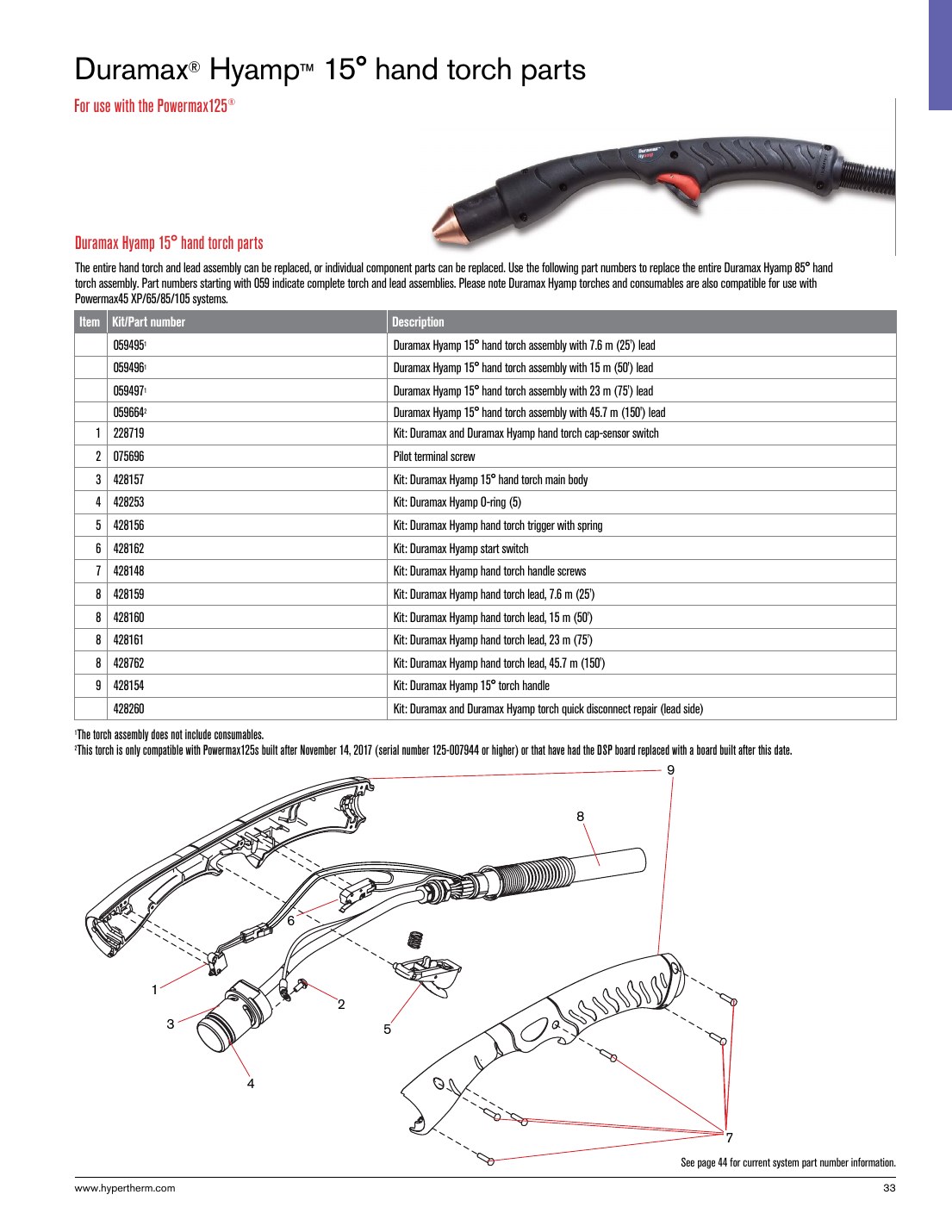
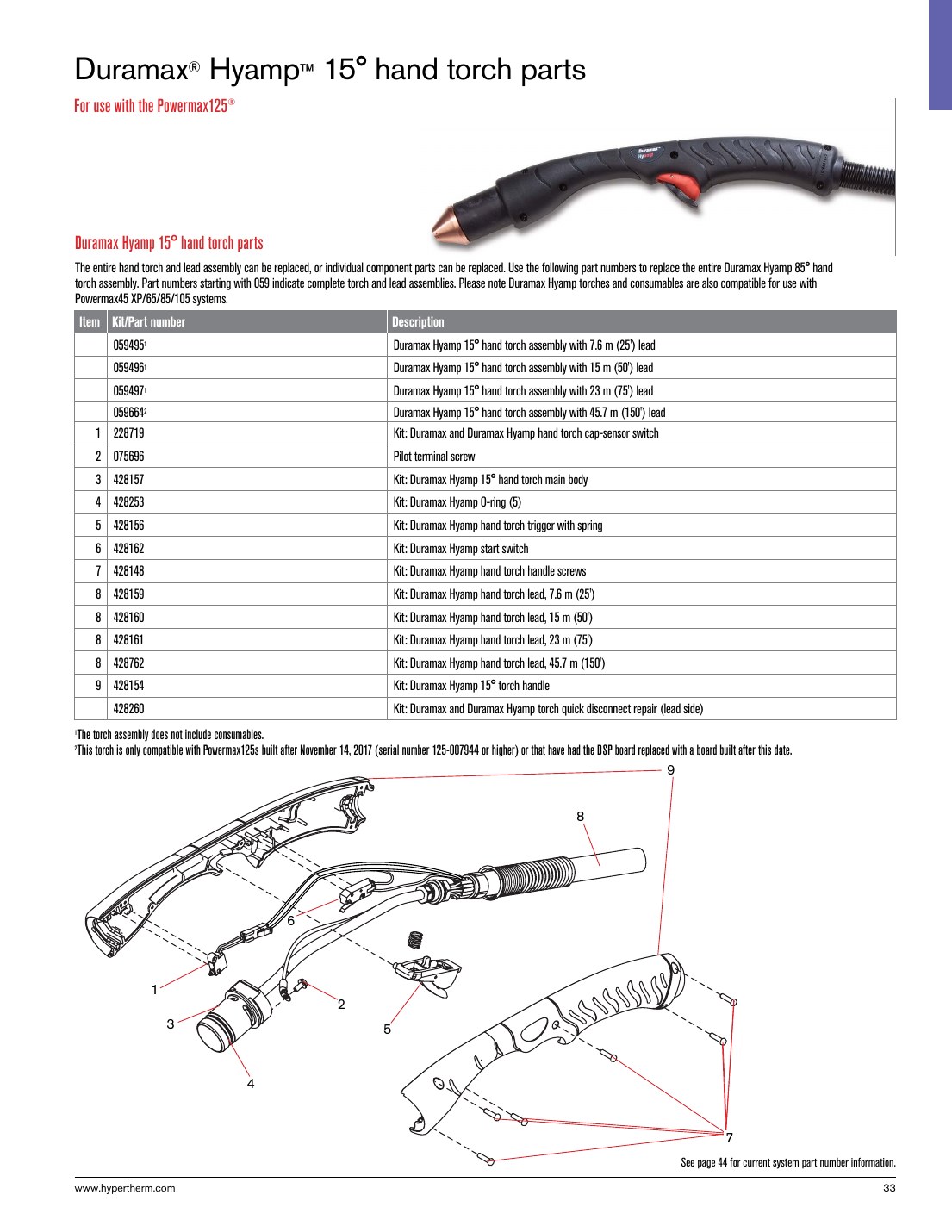
Hypertherm Duramax Hyamp 15 degree hand torch parts can look straightforward until the replacement order reaches the bench. The torch name, the machine platform, the cut mode, and the consumable stack all have to line up before a part is considered a safe fit. This guide is built for that check-and-verify process. It is not a substitute for manufacturer documentation, and any uncertain detail should be treated as Unknown (Verify) until confirmed against the machine, torch body, or approved support records.
Key Takeaways
- Start with the exact torch family and hand torch angle before comparing parts.
- Do not assume a consumable fits because it looks similar. Verify torch series, retaining hardware, and cut mode.
- Use the WSP lookup page as the catalog starting point, then confirm the physical torch and machine context before ordering.
- If a part number, accessory, or cut chart detail is not confirmed, label it Unknown (Verify).
- For process questions, separate consumable selection from procedure approval. They are not the same check.
What this torch breakdown is meant to solve
A parts breakdown is useful when a maintenance buyer or welding support team needs to replace worn torch components without interrupting production. The problem is usually not the part itself. The problem is identifying whether the torch on the floor matches the part family shown in the lookup. For a Hypertherm Duramax Hyamp 15 degree hand torch, that means checking the torch name, the torch angle, the machine family, and the installed consumables before any order is released.
Compatibility checks before ordering
Use the following sequence when a replacement is needed:
- Check the torch label. Confirm the torch family name and the 15 degree hand torch designation on the body, handle, or service label. If the label is missing or unreadable, note Unknown (Verify).
- Inspect the machine context. Identify the connected plasma system and the interface at the torch lead. Do not infer compatibility from brand alone.
- Verify the consumable stack. Remove the nozzle, electrode, swirl ring, retaining cap, shield, and any spacer or extended hardware currently installed. Match the installed stack against the catalog reference, not against memory.
- Check wear pattern and damage. Look for heat checking, melted threads, carbon tracking, ovalized openings, cracked shields, or seized retaining parts. Worn parts can hide an otherwise correct part number.
- Confirm cut mode. Drag, standoff, mechanized, or hand-held use can change the required consumable set. If the current mode is not documented, mark it Unknown (Verify).
- Cross-check the order against the physical torch. Before release, compare the replacement part number to the installed part family and any approved internal notes.
Troubleshooting and support checks
When a torch starts cutting poorly, support teams often replace the wrong item first. Use a fault-to-check approach.
Poor arc start
- Check: Electrode wear, nozzle damage, and retaining hardware condition.
- Inspect: Lead connection, connector seating, and any signs of contamination in the torch end.
- Verify: That the consumable stack matches the torch family and cut mode. If not confirmed, the issue may be a mismatched stack rather than a failed torch.
Ragged cut or excessive dross
- Check: Nozzle orifice condition and shield condition.
- Inspect: Air quality, torch alignment, and visible arc instability.
- Verify: That the selected consumables are appropriate for the installed torch configuration. If the torch configuration is uncertain, record Unknown (Verify).
Consumable life is shorter than expected
- Check: Heat damage, double arcing evidence, and loose retaining parts.
- Inspect: Air filtration, leaks, and contamination in the lead or torch end.
- Verify: Operator setup and machine settings against the approved process. Do not treat a parts lookup as a process approval.
WSP lookup section
Use the Weld Support Parts lookup page as the starting point for this torch family:
Hypertherm Duramax Hyamp 15 Degree Hand Torch Parts Breakdown on WSP
The lookup page is useful for item identification and catalog navigation, but the final order still depends on the torch on hand. Compare the torch angle, torch family, and the installed consumables before ordering. If a part number is not clearly matched to the torch in service, leave it as Unknown (Verify) and escalate to the support team or manufacturer review.
How to use this breakdown on the floor
For maintenance buyers, this workflow reduces wrong-part orders:
- Pull the failed part and keep it with the service ticket.
- Photograph the torch label, consumable stack, and connector end.
- Match the observed stack to the WSP lookup page.
- Check whether the torch is hand-held 15 degree or a different variant.
- Require a second review when the torch family, consumable stack, or cut mode is not confirmed.
For support teams, this also creates a cleaner handoff. The technician reports the observed condition. The buyer confirms the lookup. The supervisor approves the replacement only after the torch identity is verified.
Safety notes
- De-energize and lock out equipment before touching torch parts.
- Allow hot parts to cool before inspection or removal.
- Wear eye protection and gloves when handling used consumables.
- Do not test-fit parts into a live torch to guess compatibility.
- If the torch or machine condition is uncertain, stop and verify before use.
FAQ
Can I order by torch name alone?
No. Torch name is the starting point, not the final check. Verify the torch family, the 15 degree hand torch configuration, and the installed consumable stack before ordering.
What if the installed parts do not match the lookup page exactly?
Treat that as a mismatch until confirmed. A previous repair, field modification, or incorrect retrofit can change the installed configuration. Mark uncertain details Unknown (Verify) and confirm before release.
Should I use the lookup page as a process guide?
No. Use it as a parts identification and selection starting point. Procedure approval, current settings, and cut method must still be confirmed against the machine and the approved process.
What if the torch label is missing?
Do not guess. Inspect the torch body, lead, connector, and existing consumables, then escalate if the torch family cannot be confirmed. Unknown (Verify) is the correct status until identity is established.
Sources Checked
- WSP lookup: Hypertherm Duramax Hyamp 15 Degree Hand Torch Parts Breakdown
- Plasma Consumable Compatibility: How to Verify Torch Parts Before Ordering
- Plasma Drag Shield Compatibility Guide: Torch Family, Amperage, Nozzle, Retaining Cap, and Cut Mode Checks
Note: Catalog summaries are not a substitute for manufacturer review. For any uncertain fit, damaged torch, or safety-critical replacement, verify against the actual torch and approved documentation before ordering.
Disclosure: As an Amazon Associate, Weld Support Parts may earn from qualifying purchases.
Leave a Reply