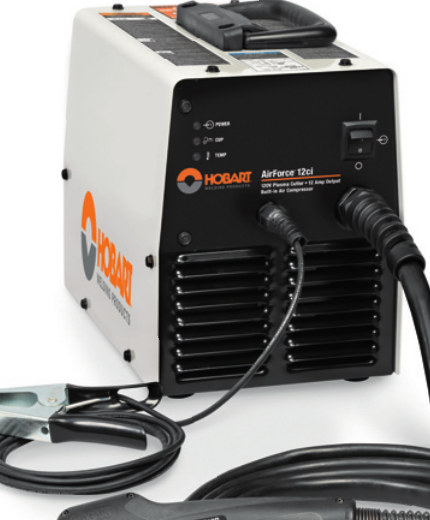
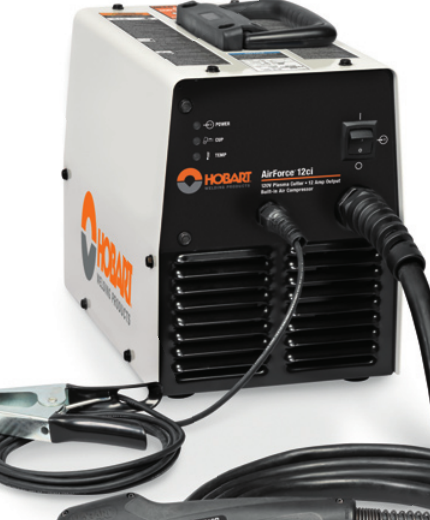
The Hobart AirForce 12ci is a compact plasma cutter support case where the buying risk is usually not the cutter itself, but the parts that keep it running: torch fitment, consumables, protective gear, and whether the replacement item matches the machine’s input and torch family. This guide is built to help welders, fabricators, and maintenance buyers verify the basics before ordering.
Key Takeaways
- Use the Hobart AirForce 12ci support page as the first parts reference before you buy.
- Verify torch model, consumable type, and input power before ordering any replacement item.
- Do not assume a plasma torch, consumable kit, or cover fits because it looks similar.
- Check wear items first: nozzle, electrode, shield, swirl ring, retaining parts, air supply, and cable condition.
- Safety glasses and a protective cover are support items, not optional extras.
Start with the WSP lookup page
The primary support page for this unit is here: Hobart AirForce 12ci Plasma Cutter Support. The page indicates stock 500564 and lists 120 V specs, XT12R replacement torch, consumable kits, safety glasses, and a protective cover. Treat those listings as the starting point for verification, not as a substitute for checking your exact machine and torch tag.
Check before you order
- Inspect the machine label: confirm the model is Hobart AirForce 12ci, not a similar unit.
- Verify input power: the support page shows 120 V specs. Confirm your unit nameplate and outlet setup match.
- Inspect the torch tag: confirm whether the unit uses the XT12R replacement torch listed on the support page.
- Check consumable wear: look for recessed electrode, enlarged nozzle orifice, heat damage, cracks, or unstable arc start.
- Verify cable and lead condition: cuts, melted sections, or loose strain reliefs can mimic consumable failure.
Troubleshooting and support checks
If the cutter is not performing well, the fastest path is a basic inspection sequence. Start simple and document what you find.
1) No start or weak start
- Check: power source status, plug condition, and supply voltage at the receptacle.
- Inspect: trigger switch, torch lead, and any visible torch damage.
- Verify: the consumables are installed correctly and are not worn beyond serviceable condition.
2) Arc starts but cut quality is poor
- Check: air pressure and air quality at the cutter.
- Inspect: nozzle, electrode, shield, and retaining parts for spatter buildup or heat distortion.
- Verify: the work clamp is clean and attached to bare metal.
3) Arc drops out during cutting
- Check: thermal condition of the machine and duty cycle usage pattern.
- Inspect: torch lead for intermittent breaks or damaged insulation.
- Verify: the air supply is steady and dry. Moisture can cause unstable operation and consumable damage.
4) Consumables wear too quickly
- Check: cutting technique, standoff distance, and travel speed.
- Inspect: whether the nozzle is being run beyond normal wear indicators.
- Verify: you are using the correct consumable kit for the torch family. If uncertain, use Unknown (Verify) until the exact kit is matched.
Parts lookup buying checks for this model
For the Hobart AirForce 12ci, the most useful parts categories are torch replacement, consumable kits, and protective items. The support page points to an XT12R replacement torch, but buyers should verify the torch family, connector style, and lead length against the existing machine before ordering. Unknown (Verify) should be used for any detail that is not confirmed by the machine label or the support page.
Replacement torch check
- Inspect: the old torch for model markings, connector type, and damage location.
- Verify: the new torch is listed for the same support page and matches the original torch family.
- Confirm: no modification is required for fitment unless the manufacturer states otherwise.
Consumable kit check
- Inspect: all wear components removed from the torch.
- Compare: thread shape, size, and seating surfaces.
- Verify: the kit is intended for the same torch model, not just a similar plasma system.
Protective gear and cover
- Check: whether the shop already stocks plasma-rated eye protection.
- Inspect: the machine’s storage location for dust, slag, and moisture exposure.
- Verify: a protective cover will not trap heat when the machine is warm after use.
Use the internal guides as support references
If the cutter is giving you symptoms beyond basic wear, these related articles can help narrow the fault before you order parts:
- Plasma Cutter Not Cutting Through: Causes and Fixes
- Plasma Cutter Pilot Arc Failure Troubleshooting: No Start, Weak Spark, Arc Dropout, and Torch Consumable Checks
- Plasma Cutter Buying Guide 2025 | Duty Cycle, Cut Capacity & Air Requirements
Safety notes
- Disconnect power before inspecting torch leads, consumables, or internal connections.
- Use eye protection and hand protection when checking the torch or removing worn parts.
- Do not use damaged leads, cracked torch bodies, or loose consumable assemblies.
- Verify ventilation and keep flammables clear of the cutting area.
- If a part fitment is uncertain, mark it Unknown (Verify) and confirm through the machine label, torch tag, or support listing before use.
FAQ
What should I verify first for Hobart AirForce 12ci parts?
Verify the machine model, input power, and torch family first. Then check consumables, cable condition, and air supply quality.
Is the XT12R replacement torch listed on the support page the correct part for every unit?
Unknown (Verify). The support page lists XT12R, but you should confirm the torch tag and connector style on your specific machine before ordering.
How do I know if the problem is consumables or the torch?
Inspect the nozzle, electrode, and shield first. If wear is visible or the arc is unstable, consumables are often the first suspect. If the lead, trigger, or torch body is damaged, the torch may need replacement.
Can I buy based on similar-looking plasma parts?
No. Similar appearance does not confirm fitment. Match the part to the support page and the machine tag, then verify before purchasing.
Sources Checked
- Hobart AirForce 12ci Plasma Cutter Support
- Powermax30 XP Plasma Cutter Review: Precision Cutting Power in a Compact Package
- Plasma Cutter Buying Guide 2025 | Duty Cycle, Cut Capacity & Air Requirements
- Plasma Cutter Not Cutting Through: Causes and Fixes
- Plasma Cutter Pilot Arc Failure Troubleshooting: No Start, Weak Spark, Arc Dropout, and Torch Consumable Checks
Disclosure: As an Amazon Associate, Weld Support Parts may earn from qualifying purchases.
Related Weld Support Guides
- Powermax30 XP Plasma Cutter Review: Precision Cutting Power in a Compact Package
- Plasma Cutter Buying Guide 2025 | Duty Cycle, Cut Capacity & Air Requirements
- Plasma Cutter Not Cutting Through: Causes and Fixes
- Plasma Cutter Pilot Arc Failure Troubleshooting: No Start, Weak Spark, Arc Dropout, and Torch Consumable Checks
Leave a Reply