Tag: Hobart

  • Hobart Spool Gun Support: Parts Lookup and Buying Checks

    Hobart Spool Gun Support: Parts Lookup and Buying Checks

    Hobart Spool Gun Support

    If you are servicing a Hobart spool gun, the main risk is not buying the wrong part by name. The risk is assuming the assembly matches because the tool looks similar. Hobart spool gun support parts can vary by gun model, cable end, wire feed path, and trigger hardware. Before you order anything, identify the exact gun and verify the worn component against the breakdown or lookup page.

    Key Takeaways

    • Start with the exact spool gun model, not just the welder brand.
    • Inspect the consumables, trigger path, liner, and cable first; these are common wear points.
    • Use the WSP lookup page as the first fitment check for Hobart spool gun support parts.
    • If a detail is not shown in the source, mark it Unknown (Verify) before ordering.
    • Do not assume compatibility between SpoolRunner models without confirming the breakdown.

    What this Hobart spool gun support page is for

    The provided WSP lookup page is a support and parts entry point for Hobart spool guns, including SpoolRunner 100, SpoolRunner 150, SpoolRunner 200, and the Hobart 3035-20 spool gun parts breakdown. That makes it useful for maintenance buyers, welders, and repair teams who need to confirm part identity before they place an order.

    Open the Hobart Spool Gun Support page and compare the gun model, assembly view, and the part you are replacing. If the source does not clearly confirm the fitment, stop and verify the serial, model designation, or breakdown reference.

    Buying checks before you order

    Use a simple inspection process before purchasing replacement parts:

    1. Check the model label. Verify the exact spool gun designation on the gun body, cable, or system paperwork.
    2. Inspect the failed part. Look for burn marks, wire drag, cracked housings, loose trigger action, or feed irregularity.
    3. Match the breakdown image. Compare the part position and shape against the WSP lookup page.
    4. Verify any left/right or orientation details. If the source does not state orientation, use Unknown (Verify).
    5. Confirm what is included. Some assemblies are complete and some are partial. Do not assume hardware or fasteners are included unless shown.

    If you are ordering for stock, keep a record of the exact model, failed component, and the reference image used to confirm it. That reduces repeat calls and wrong-ship issues.

    Common support areas to inspect

    For spool gun service, start with the parts that handle wire movement and current transfer:

    • Contact tip and nozzle area: inspect for spatter buildup, heat damage, and poor wire transfer.
    • Gun cable and strain relief: check for external jacket wear, kinks, and movement at the handle entry.
    • Trigger function: verify a consistent click and return. If intermittent, the switch or lead path may need attention.
    • Wire feed path: inspect for drag, liner contamination, or wire birdnesting at the gun end.
    • Drive rolls and spool holder interface: verify the feed path is aligned and the spool rotates smoothly.

    When one of these areas fails, replace only the confirmed failed part if the breakdown supports that approach. If the damage extends into the cable or handle, replacement of a larger assembly may be the correct repair. If the source does not define the repair scope, treat it as Unknown (Verify).

    Troubleshooting checks: inspect, verify, then order

    Issue: wire feed is inconsistent.
    Inspect the spool tension, liner path, tip condition, and any visible cable damage. Verify the wire size and feed setting are appropriate for the gun setup. If the source does not specify wire size compatibility for the part you need, mark it Unknown (Verify).

    Issue: trigger response is intermittent.
    Inspect the trigger movement, handle wear, and lead strain point. Verify the trigger fault is not caused by a damaged cable or loose connector. Do not order a trigger assembly until the breakdown confirms the exact switch style or mounting method.

    Issue: arc start is erratic or weak at the gun.
    Inspect the contact tip, nozzle, cable terminations, and work lead condition. Verify whether the problem is at the gun or in the power source setup. The lookup page is for parts identification, not a welding procedure approval. Use it as a support reference only.

    Using the WSP lookup page

    The Hobart Spool Gun Support page is the primary reference provided for this topic. Use it to confirm the source breakdown for SpoolRunner 100, SpoolRunner 150, SpoolRunner 200, and Hobart 3035-20 spool gun parts. If a part number, assembly name, or fitment note is shown on the page, record it before you order.

    Recommended workflow:

    • Open the lookup page and identify the exact model.
    • Cross-check the visible part against your failed component.
    • Verify whether the item is a full assembly, subassembly, or service part.
    • Use Unknown (Verify) for any detail not stated on the page.

    Go to Hobart Spool Gun Support

    Ordering controls for maintenance buyers

    For shop purchasing, the best control is to require three checks before release:

    • Exact model confirmation
    • Photo or breakdown match
    • Written verification of the failed component

    This is especially important when multiple spool guns are in service. A part may look close but still fail at the interface, cable end, or handle geometry. If the ordering system lacks enough detail, pause the requisition and verify against the source page first.

    Safety notes

    • Disconnect power before opening or handling the gun.
    • Allow hot parts to cool before inspection.
    • Do not test a damaged gun cable under load.
    • Wear proper eye protection when checking the wire path or tip area.
    • If the gun has visible insulation damage, remove it from service until verified.

    FAQ

    Q: Which Hobart spool guns are covered by the WSP support page?
    A: The provided source references SpoolRunner 100, SpoolRunner 150, SpoolRunner 200, and the Hobart 3035-20 spool gun parts breakdown. If a specific fitment is not clearly stated, treat it as Unknown (Verify).

    Q: Can I order by appearance alone?
    A: No. Spool guns can look similar while using different cable ends, trigger parts, or internal feed components. Always verify the exact model and the breakdown match before ordering.

    Q: Is the lookup page a welding procedure guide?
    A: No. It is a parts support and identification reference. Use it to confirm fitment and part identity, not to approve procedure settings or welding parameters.

    Q: What if the part description is incomplete?
    A: Record the missing detail and mark it Unknown (Verify). Then confirm against the gun model, the failure point, and any visible assembly reference before purchase.

    Sources Checked

    Internal links checked:

    • None applicable for this topic

    Product, filler metal, and Amazon references were not used because none were provided for this draft.

    Disclosure: As an Amazon Associate, Weld Support Parts may earn from qualifying purchases.

    Related Weld Support Guides

  • Hobart MIG Gun Support: Parts Lookup and Buying Checks

    Hobart MIG Gun Support: Parts Lookup and Buying Checks

    Hobart MIG Gun Support

    Hobart MIG guns and spool guns cover more than one family, so the first step is not ordering a part number. The first step is identifying the gun family, then matching the support part to that family, then checking the gun itself for wear. That order reduces wrong-part orders and returns.

    This guide is for maintenance buyers, welders, and support teams who need a practical way to use the Hobart MIG Gun Support lookup page before purchasing. The page is a starting point for parts selection. It does not replace a model tag, serial tag, or hands-on inspection.

    Key Takeaways

    • Start with the gun family, not the symptom.
    • Use the lookup page to narrow the gun type: H-series, HR-series, HM-series, H200, flux-cored guns, and SpoolRunner guns.
    • Verify the exact gun model from the handle label, cable tag, or equipment records.
    • Inspect wear items before buying replacement supports, liners, necks, tips, diffusers, or trigger-related parts.
    • If a compatibility point is not confirmed by the lookup or by the gun tag, mark it Unknown (Verify).

    How to Use the Hobart MIG Gun Support Lookup

    The Hobart support page organizes gun support information around common Hobart gun families, including H-series, HR-series, HM-series, H200, flux-cored guns, and SpoolRunner guns. It also notes UPC-backed Amazon ASIN review support, which can help with item verification. That does not mean every online listing is automatically correct for your gun. Verify the exact model before ordering.

    Check: the gun handle, cable jacket, or paperwork for the model family.
    Inspect: the consumable side of the gun for wear, damage, or heat distortion.
    Verify: the replacement part against the lookup page and your physical gun.

    If the family is unclear, do not guess from appearance alone. Hobart guns can look similar across generations and duty classes. Unknown (Verify) is the correct status until the model is confirmed.

    Buying Checks Before You Order

    Before a purchase, use a short inspection routine:

    1. Check the gun family. Read the label, the cable tag, or maintenance records.
    2. Inspect the failed part. Look for burnback, cracked insulation, worn trigger action, loose neck fit, or feed issues.
    3. Measure what you can. If the original part has a visible length, thread, or connector dimension, confirm it against the replacement listing. If the dimension is not stated on the source page, treat it as Unknown (Verify).
    4. Verify consumable pattern. Tip, nozzle, liner, and neck wear often show whether the problem is in the support part or in the wire feed setup.
    5. Match the application. Flux-cored, standard MIG, and spool gun setups can use different support parts. Do not assume cross-compatibility.

    Troubleshooting by Symptom

    Wire feed is inconsistent

    • Check: drive rolls, liner condition, and gun cable routing.
    • Inspect: the liner for kinks, contamination, or collapse.
    • Verify: the liner and gun family match. If not confirmed, mark Unknown (Verify).

    Arc starts poorly or sputters

    • Check: contact tip wear and nozzle cleanliness.
    • Inspect: spatter buildup, loose tip seating, and heat damage.
    • Verify: the tip style and size against the gun family and wire diameter records. If records are missing, Unknown (Verify).

    Trigger feels intermittent

    • Check: trigger switch function and cable strain points.
    • Inspect: the handle for cracked housings or pinched wiring.
    • Verify: the replacement trigger or switch assembly only after confirming the gun model. Unknown (Verify) if the model is not confirmed.

    Gun runs hot or shows damage near the neck

    • Check: duty cycle use pattern and operator technique.
    • Inspect: neck insulation, diffuser, and nozzle area for discoloration or distortion.
    • Verify: that the neck or front-end part is intended for the exact gun series. Do not assume interchangeability.

    WSP Lookup Section

    Use the WSP lookup page here: Hobart MIG Gun Support.

    This page is the best starting point when you need to identify parts support for Hobart H-series, HR-series, HM-series, H200, flux-cored guns, or SpoolRunner guns. It can also help when reviewing UPC-backed Amazon ASIN information. Treat that as a verification aid, not a substitute for model confirmation.

    Practical rule: if the lookup page does not clearly confirm the part for your model, stop at Unknown (Verify) and request the gun tag or serial information before the order is released.

    Ordering Checks for Maintenance Buyers

    When parts are ordered for a maintenance stockroom or service truck, standardize the request form:

    • Gun family: H-series, HR-series, HM-series, H200, flux-cored, or SpoolRunner.
    • Exact model: Unknown (Verify) if the tag is missing.
    • Failed component: liner, nozzle, tip, neck, trigger, cable, or other support part.
    • Failure mode: feed issue, arc issue, overheating, mechanical damage, or electrical fault.
    • Photos: label, front end, and damaged area if available.

    This is the fastest way to avoid buying parts from the wrong gun family.

    Safety Notes

    • Disconnect power before inspecting or replacing gun components.
    • Allow the gun to cool before touching the neck, nozzle, or diffuser.
    • Do not use damaged cables or cracked insulation.
    • Do not force parts that do not match the gun family.
    • If the model or compatibility is uncertain, stop and verify before service.

    FAQ

    How do I confirm the correct Hobart MIG gun part?

    Start with the gun model tag or equipment record, then compare the part to the Hobart MIG Gun Support lookup page. If the model is not confirmed, mark it Unknown (Verify).

    Can I use the support page as a final approval for a purchase?

    No. It is a selection starting point. Final approval still requires the exact gun model, the failed part type, and a physical inspection.

    What if my gun looks similar to another Hobart model?

    Do not assume interchangeability. Similar appearance is not proof of compatibility. Verify the exact family and part details before ordering.

    Does the page guarantee Amazon ASIN compatibility?

    No. The page notes UPC-backed Amazon ASIN review support, but compatibility still needs verification against the actual gun model and the part information available at the time of order.

    Sources Checked

    No filler metal page was provided for this topic. No product pages or ASIN details were provided for direct product listing.

    Disclosure: As an Amazon Associate, Weld Support Parts may earn from qualifying purchases.

    Related Weld Support Guides

  • Hobart AirForce 12ci Plasma Cutter Support: Parts Lookup and Buying Checks

    Hobart AirForce 12ci Plasma Cutter Support: Parts Lookup and Buying Checks

    Hobart AirForce 12ci Plasma Cutter Support

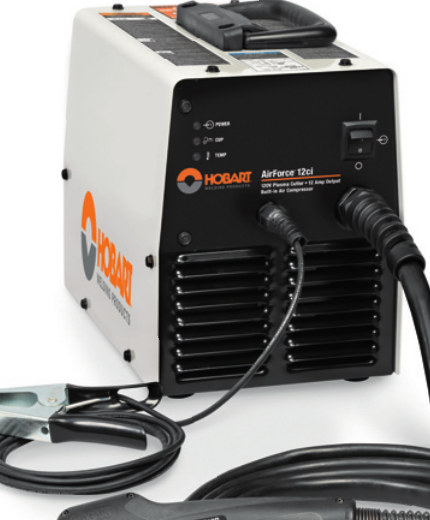
    The Hobart AirForce 12ci is a compact plasma cutter support case where the buying risk is usually not the cutter itself, but the parts that keep it running: torch fitment, consumables, protective gear, and whether the replacement item matches the machine’s input and torch family. This guide is built to help welders, fabricators, and maintenance buyers verify the basics before ordering.

    Key Takeaways

    • Use the Hobart AirForce 12ci support page as the first parts reference before you buy.
    • Verify torch model, consumable type, and input power before ordering any replacement item.
    • Do not assume a plasma torch, consumable kit, or cover fits because it looks similar.
    • Check wear items first: nozzle, electrode, shield, swirl ring, retaining parts, air supply, and cable condition.
    • Safety glasses and a protective cover are support items, not optional extras.

    Start with the WSP lookup page

    The primary support page for this unit is here: Hobart AirForce 12ci Plasma Cutter Support. The page indicates stock 500564 and lists 120 V specs, XT12R replacement torch, consumable kits, safety glasses, and a protective cover. Treat those listings as the starting point for verification, not as a substitute for checking your exact machine and torch tag.

    Check before you order

    • Inspect the machine label: confirm the model is Hobart AirForce 12ci, not a similar unit.
    • Verify input power: the support page shows 120 V specs. Confirm your unit nameplate and outlet setup match.
    • Inspect the torch tag: confirm whether the unit uses the XT12R replacement torch listed on the support page.
    • Check consumable wear: look for recessed electrode, enlarged nozzle orifice, heat damage, cracks, or unstable arc start.
    • Verify cable and lead condition: cuts, melted sections, or loose strain reliefs can mimic consumable failure.

    Troubleshooting and support checks

    If the cutter is not performing well, the fastest path is a basic inspection sequence. Start simple and document what you find.

    1) No start or weak start

    • Check: power source status, plug condition, and supply voltage at the receptacle.
    • Inspect: trigger switch, torch lead, and any visible torch damage.
    • Verify: the consumables are installed correctly and are not worn beyond serviceable condition.

    2) Arc starts but cut quality is poor

    • Check: air pressure and air quality at the cutter.
    • Inspect: nozzle, electrode, shield, and retaining parts for spatter buildup or heat distortion.
    • Verify: the work clamp is clean and attached to bare metal.

    3) Arc drops out during cutting

    • Check: thermal condition of the machine and duty cycle usage pattern.
    • Inspect: torch lead for intermittent breaks or damaged insulation.
    • Verify: the air supply is steady and dry. Moisture can cause unstable operation and consumable damage.

    4) Consumables wear too quickly

    • Check: cutting technique, standoff distance, and travel speed.
    • Inspect: whether the nozzle is being run beyond normal wear indicators.
    • Verify: you are using the correct consumable kit for the torch family. If uncertain, use Unknown (Verify) until the exact kit is matched.

    Parts lookup buying checks for this model

    For the Hobart AirForce 12ci, the most useful parts categories are torch replacement, consumable kits, and protective items. The support page points to an XT12R replacement torch, but buyers should verify the torch family, connector style, and lead length against the existing machine before ordering. Unknown (Verify) should be used for any detail that is not confirmed by the machine label or the support page.

    Replacement torch check

    • Inspect: the old torch for model markings, connector type, and damage location.
    • Verify: the new torch is listed for the same support page and matches the original torch family.
    • Confirm: no modification is required for fitment unless the manufacturer states otherwise.

    Consumable kit check

    • Inspect: all wear components removed from the torch.
    • Compare: thread shape, size, and seating surfaces.
    • Verify: the kit is intended for the same torch model, not just a similar plasma system.

    Protective gear and cover

    • Check: whether the shop already stocks plasma-rated eye protection.
    • Inspect: the machine’s storage location for dust, slag, and moisture exposure.
    • Verify: a protective cover will not trap heat when the machine is warm after use.

    Use the internal guides as support references

    If the cutter is giving you symptoms beyond basic wear, these related articles can help narrow the fault before you order parts:

    Safety notes

    • Disconnect power before inspecting torch leads, consumables, or internal connections.
    • Use eye protection and hand protection when checking the torch or removing worn parts.
    • Do not use damaged leads, cracked torch bodies, or loose consumable assemblies.
    • Verify ventilation and keep flammables clear of the cutting area.
    • If a part fitment is uncertain, mark it Unknown (Verify) and confirm through the machine label, torch tag, or support listing before use.

    FAQ

    What should I verify first for Hobart AirForce 12ci parts?

    Verify the machine model, input power, and torch family first. Then check consumables, cable condition, and air supply quality.

    Is the XT12R replacement torch listed on the support page the correct part for every unit?

    Unknown (Verify). The support page lists XT12R, but you should confirm the torch tag and connector style on your specific machine before ordering.

    How do I know if the problem is consumables or the torch?

    Inspect the nozzle, electrode, and shield first. If wear is visible or the arc is unstable, consumables are often the first suspect. If the lead, trigger, or torch body is damaged, the torch may need replacement.

    Can I buy based on similar-looking plasma parts?

    No. Similar appearance does not confirm fitment. Match the part to the support page and the machine tag, then verify before purchasing.

    Sources Checked

    Disclosure: As an Amazon Associate, Weld Support Parts may earn from qualifying purchases.

    Related Weld Support Guides

Listen with Audible