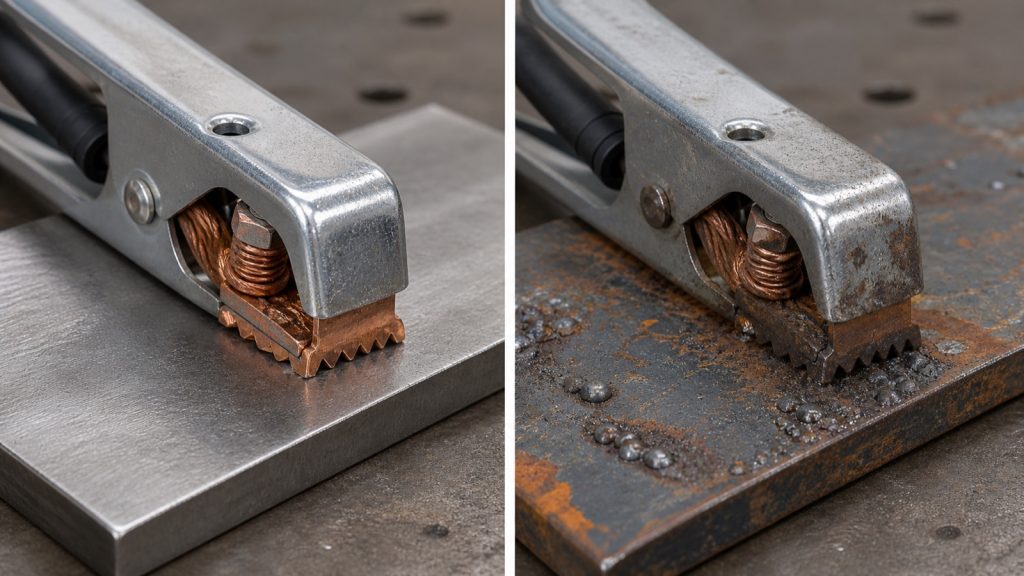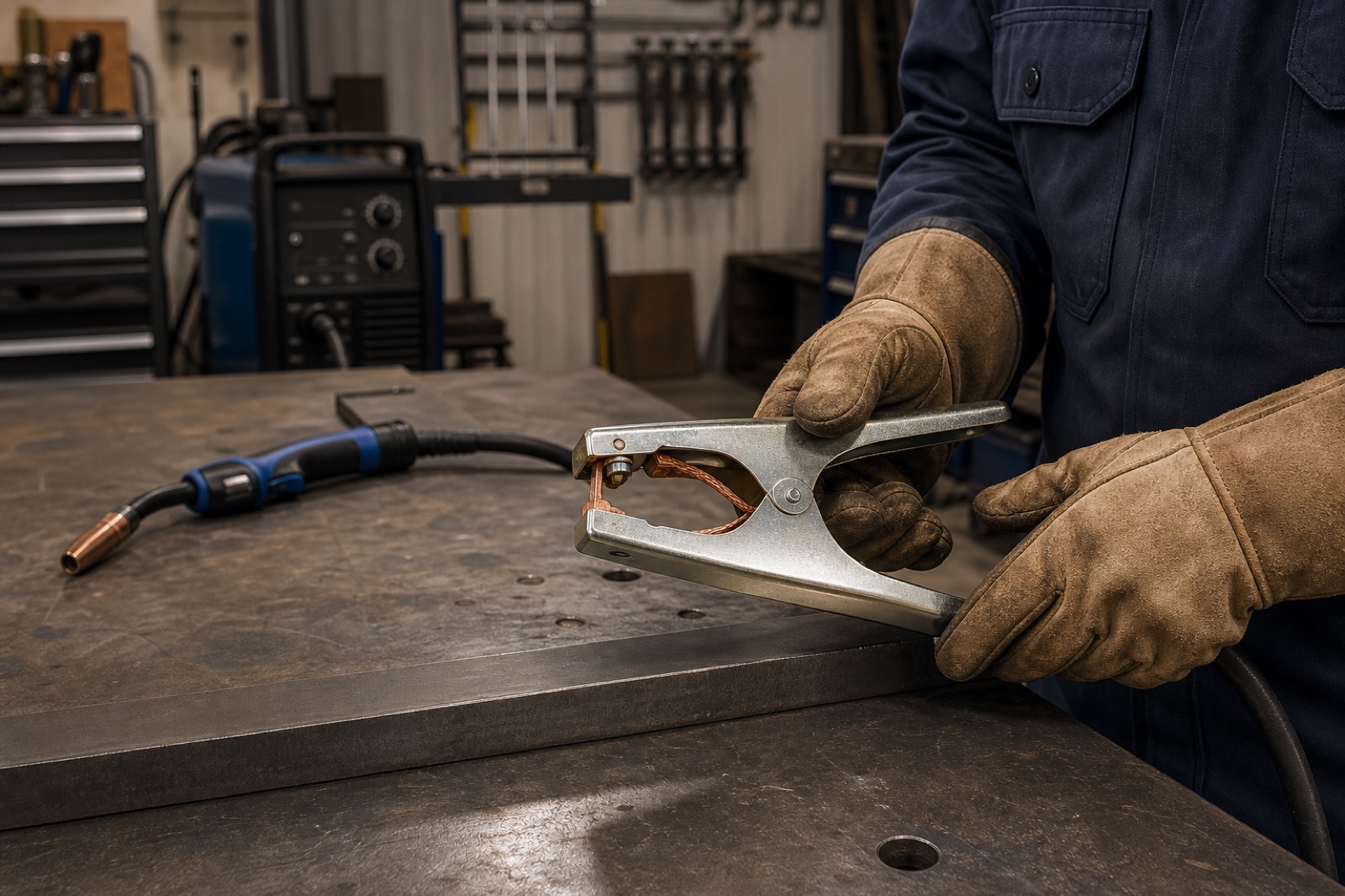
Tag: work clamp

  • Plasma Arc Starting Then Stopping Troubleshooting: Pilot Arc Dropout, Transfer Loss, Air, Work Clamp, and Consumable Checks

    If a plasma arc starts and then stops, fires briefly then drops out, starts the pilot arc but will not transfer, or cuts for a second and shuts off, troubleshoot air supply, consumables, torch assembly, work-lead path, and duty-cycle protection before replacing the power supply. Most arc dropout problems come from worn electrode/nozzle, low or unstable air pressure while flowing, wet or oily air, wrong consumable stack, bad work clamp contact, excessive standoff, pierce height error, or torch cap/parts-in-place faults.

    The fast check is to inspect the electrode, nozzle, swirl ring, retaining cap, shield, and work clamp, then verify air pressure while air is actually flowing. Static pressure at the regulator is not enough. If the pilot arc starts but stops before cutting, check transfer path and standoff. If the arc transfers then stops mid-cut, check air flow, cut speed, duty cycle, consumable wear, and material thickness. For related plasma failures, see plasma torch nozzle damage causes, plasma cutter won’t pierce metal, and plasma cutter not cutting through.

    Common Symptoms

    • Pilot arc fires, then disappears before touching the plate.
    • Arc transfers to the work, cuts briefly, then shuts off.
    • Torch blows air but arc only flashes for a moment.
    • Arc starts at the plate edge but drops out during travel.
    • Machine shows air pressure, torch cap, parts-in-place, or thermal fault.
    • Nozzle and electrode fail quickly after arc dropout starts.
    • Cut has sudden bevel, heavy dross, or incomplete penetration before the arc stops.
    • Arc stops when crossing rust, paint, gaps, expanded metal, or poor work contact.
    • Arc restarts after the machine cools, then stops again during longer cuts.

    Likely Causes

    CauseWhat It DoesQuick Check
    Worn electrode or nozzleWeak pilot arc, poor transfer, arc dropout, bad cut qualityInspect pit depth and nozzle orifice shape
    Low air pressure while flowingArc loses force and consumables overheatCheck pressure during purge or cutting
    Wet or oily airDestabilizes arc and shortens consumable lifeDrain traps and inspect filters/dryer
    Wrong consumable stackMisaligns arc and may trip cap/parts safetyVerify electrode, swirl ring, nozzle, cap, and shield
    Loose retaining capMay open parts-in-place circuit or misseat consumablesHand-snug cap and inspect threads
    Poor work clamp pathArc cannot transfer or stay attached to the workClamp to clean bare metal near cut
    Standoff too highPilot arc cannot transfer reliablyUse correct drag shield or standoff guide
    Duty cycle or thermal protectionMachine cuts briefly, then shuts down to protect itselfCheck duty-cycle light, fan, and cooling interval

    Fast Diagnosis Sequence

    1. Stop cutting when the arc drops out repeatedly. Do not continue burning up consumables.
    2. Turn the machine off and disconnect input power before torch disassembly.
    3. Remove the consumables and inspect the electrode pit, nozzle orifice, swirl ring, retaining cap, shield, and O-rings.
    4. Replace the electrode and nozzle as a set if either part is worn, off-center, pitted, melted, or contaminated.
    5. Reassemble with the correct matched consumable stack for the torch and amperage.
    6. Verify air pressure and flow while air is flowing, not only at idle.
    7. Drain the compressor tank, water separator, and filter bowl. Check for oil carryover.
    8. Move the work clamp to clean bare metal close to the cut.
    9. Test on clean scrap at correct amperage, pierce height, and cut height.
    10. If dropout remains with clean consumables, correct air, and clean work return, follow the service manual for torch lead, trigger, pilot arc, or internal power-supply testing.

    Pilot Arc Starts Then Stops Before Cutting

    When the pilot arc starts and stops before cutting, the machine is making an arc but not transferring it to the work. Check work clamp contact first. Clamp to clean bare metal, not painted, rusty, greasy, or loose material. Keep the torch close enough for the arc to transfer. Excessive standoff, wrong shield, missing drag shield, or a bad work lead can make the pilot arc time out.

    • Clean the clamp location and cutting path.
    • Use the correct drag shield, standoff guide, or torch height.
    • Start at an edge when possible for thick material.
    • Verify the material is conductive and within machine capacity.
    • Check torch lead and work lead for cuts, loose connectors, and internal breaks.

    Arc Transfers Then Stops Mid-Cut

    If the arc transfers and then stops during the cut, look for air pressure drop, blocked filter, compressor recovery issue, wet air, travel speed mismatch, material too thick, worn consumables, or duty-cycle shutdown. A machine can show correct pressure at idle and still starve the torch when air is flowing.

    • Watch pressure while cutting or using purge mode.
    • Check compressor CFM, regulator response, hose size, and filter restriction.
    • Replace consumables if the nozzle hole is oval or the electrode pit is deep.
    • Slow down if sparks are not exiting the bottom of the plate.
    • Reduce arc-on time if the machine is reaching thermal limit.

    Inspection Steps

    • Electrode: Replace if the hafnium pit is deep, rough, off-center, or blown out.
    • Nozzle: Replace if the orifice is oval, nicked, enlarged, keyholed, or spatter-packed.
    • Swirl ring: Check cracks, plugged holes, burns, missing O-rings, and wrong orientation.
    • Retaining cap: Inspect threads, sensing surfaces, heat damage, and seating.
    • Shield/drag cap: Verify correct shield for drag, standoff, gouging, or mechanized cutting.
    • Air system: Check pressure under flow, moisture, oil, filter restriction, dryer condition, and hose leaks.
    • Work lead: Inspect clamp spring, cable lug, connector, and contact surface.
    • Torch lead: Look for crushed sections, cuts, loose plug, intermittent trigger, and damaged torch head.

    Test Procedures

    • Known-good consumable test: Install a complete matched electrode, nozzle, swirl ring, cap, and shield. If dropout stops, the old stack was worn or mismatched.
    • Flowing-air test: Use purge mode and confirm pressure/flow while air moves through the torch. Correct static pressure does not prove cutting pressure.
    • Clean-work test: Clamp directly to clean bare metal and cut clean scrap. If transfer improves, the original work return was poor.
    • Standoff test: Use the correct drag shield or standoff height. Too high can stop transfer; too low can damage the nozzle during piercing.
    • Thermal test: Let the machine cool and retry within rated duty cycle. If the arc returns after cooling, reduce cut length or upgrade capacity.
    • Hand-cut isolation test: For CNC/table setups, disconnect table control and test by hand where safe. If hand cutting works, inspect torch height control, CNC start signal, work lead routing, and program settings.

    Compatibility Notes

    Do not order plasma consumables by amperage alone. Verify the plasma cutter model, torch model, hand or machine torch, amperage, cutting mode, retaining cap, shield, nozzle, electrode, swirl ring, and parts-in-place design. Standard cutting, drag cutting, shielded contact cutting, gouging, and mechanized cutting can use different stacks.

    Lincoln Tomahawk examples show why the torch family matters. LC30, LC40, LC45, LC65, LC65M, LC105, and LC105M torches use different consumable references and different air requirements depending on machine and torch. A nozzle or retaining cap that looks close can still misalign the stack and cause starting, transfer, or dropout faults.

    What To Verify Before Ordering

    • Plasma cutter make, model, serial number, and manual revision.
    • Torch model and whether it is hand, machine, CNC, or replacement torch.
    • Cutting amperage and material thickness.
    • Correct electrode, nozzle, swirl ring, retaining cap, shield, spacer, and O-ring set.
    • Standard cutting, drag cutting, gouging, grid cutting, or mechanized process.
    • Air pressure and flow requirement from the machine manual.
    • Compressor capacity, filter, dryer, and hose size.
    • Work clamp, torch lead, and torch cap/parts-in-place system condition.
    • Duty-cycle requirement for the cut length and production use.

    Common Wrong-Part Mistakes

    • Replacing only the nozzle while leaving a worn electrode in service.
    • Mixing drag, shielded contact, gouging, and standard cutting consumables.
    • Using the wrong swirl ring and causing off-center arc flow.
    • Ordering by plasma machine model while ignoring the installed replacement torch.
    • Using a small compressor that cannot hold pressure while cutting.
    • Ignoring water or oil in the air because the torch still blows air.
    • Overtightening a retaining cap to clear a cap fault instead of fixing the stack.

    Field Fix vs Proper Fix

    ProblemField FixProper Fix
    Pilot arc starts then times outMove clamp to clean metalVerify work lead, standoff, consumables, and transfer path
    Arc stops mid-cutPause and check air pressureCorrect compressor flow, filter restriction, moisture, cut speed, and duty cycle
    Cap fault appearsHand-snug retaining capInspect cap, torch head, stack height, and parts-in-place system
    Nozzle burns quicklyReplace nozzle/electrode setCorrect pierce height, air quality, amperage match, and swirl ring condition
    Dropout on CNC onlyTry hand-cut testCheck torch height control, work return, controller signal, and program lead-in

    Related Failure Paths

    • Pilot arc failure: Weak or missing pilot arc can come from worn consumables, torch stack error, or internal pilot-arc circuit faults.
    • Nozzle damage: Low pierce height, bad air, or wrong amperage can destroy the nozzle and cause dropout.
    • Retaining cap fault: Loose, damaged, or wrong caps can prevent the torch from firing or staying active.
    • Electrode failure: Deep or off-center electrode wear causes weak arc behavior and poor transfer.
    • Air pressure drop: Compressor or filter restriction can stop an arc that initially starts normally.
    • Thermal shutdown: Exceeding duty cycle can make the cutter stop until it cools.

    Safety Notes

    • Disconnect input power before servicing torch consumables or opening machine covers.
    • Plasma cutters use high voltage. Internal troubleshooting should be done only by qualified service personnel.
    • Let the torch cool before removing retaining caps, nozzles, or electrodes.
    • Close and bleed compressed air before servicing air fittings.
    • Wear proper eye, face, hand, body, and respiratory protection for plasma cutting.
    • Do not bypass torch cap, parts-in-place, trigger, or safety circuits.
    • Use ventilation or fume extraction when cutting coated, painted, galvanized, stainless, or unknown material.

    Sources Checked

    Sources checked include plasma torch starting-problem references, air-pressure and air-quality guidance, Lincoln Tomahawk torch data, consumable-stack references, and related Weld Support Parts plasma support articles. Final parts selection must be verified by exact plasma cutter, torch model, amperage, cutting mode, air requirement, duty cycle, and installed consumable stack.

  • Stick Electrode Sticking During Arc Start: Amperage, Arc Length, Rod Condition, Polarity, Ground, and Hot Start Checks

    Stick electrode sticking during arc start usually means the arc is not getting hot and stable fast enough to keep the rod from fusing to the work. The common causes are low amperage, poor scratch/tap technique, arc length too short, damp or damaged rods, wrong polarity, weak work clamp contact, undersized leads, low open-circuit voltage, or an electrode that is difficult to restart. 7018, small-diameter rods, cold plate, dirty base metal, and small inverter machines can make the problem more noticeable.

    Do not keep twisting a stuck rod until the flux breaks off. Break the arc, free the rod, chip the stuck metal off the end, and restart on clean steel. If the electrode sticks again, increase amperage slightly within the rod range, clamp directly to clean metal, use a confident scratch start, lift immediately to a short arc, and verify rod storage and polarity before blaming the welder.

    Related stick support checks include 7018 rod sticking causes, 7018 rod moisture contamination troubleshooting, electrode holder selection, and welding cable lead length and sizing.

    Common Symptoms

    SymptomLikely CauseFirst Check
    Rod sticks instantly on touchLow amperage, poor strike, bad groundIncrease amps slightly and clean clamp point
    Rod starts then goes outArc held too close or travel starts too slowLift to short arc immediately after strike
    7018 sticks repeatedlyDamp rod, low amps, wrong restart prepTry fresh dry rod at correct range
    Rod glows red near holderRod too small for amperage or held too longVerify electrode diameter and current
    Arc start is harsh and unstableWrong polarity, dirty metal, long leadsCheck polarity, work return, and cable size
    Only restarts stickSlag cap on electrode endSnap/clean the rod tip before restrike

    Root Cause Analysis

    During a stick start, the electrode must touch or nearly touch the work long enough to ionize the gap, then separate enough to form an arc. If the current is too low, the rod coating is damp, the work clamp path is weak, or the operator holds the rod against the plate too long, the electrode bonds to the work before the arc stabilizes. Sticking is most often a setup-and-technique problem, but weak leads, poor connectors, wrong polarity, or a welder with low start performance can contribute.

    Quick Checks

    • Amperage: Start near the middle of the rod manufacturer’s range, then adjust in small steps.
    • Arc start: Scratch like striking a match or tap cleanly, then lift immediately.
    • Arc length: Keep a short arc about the rod core diameter; do not bury the rod.
    • Rod condition: Use dry, undamaged electrodes. Damp 7018 is a common sticking trigger.
    • Work clamp: Clamp directly to clean bare metal, not paint, rust, mill scale, or a loose table.
    • Polarity: Confirm the electrode supports the selected AC, DCEN, or DCEP setting.
    • Leads: Check cable size, connector fit, lug tightness, and holder jaws.

    Inspection Steps

    1. Identify the rod. Confirm electrode classification, diameter, and manufacturer amperage range.
    2. Check the machine output. Verify AC/DC mode, polarity, amperage, hot-start setting if available, and input power.
    3. Clean the start point. Remove rust, paint, oil, mill scale, and slag before striking.
    4. Move the work clamp. Clamp close to the weld on clean metal and retest.
    5. Inspect holder jaws. A loose or burned holder can reduce current transfer at the electrode.
    6. Inspect cables and connectors. Look for undersized cable, long lead voltage drop, loose DINSE/Tweco connectors, hot lugs, or damaged insulation.
    7. Try a fresh rod. If a dry new rod starts better than shop-stored rods, storage is part of the fault.
    8. Use a controlled start. Scratch or tap, lift immediately, hold a short arc, then move into the joint.
    9. Adjust amperage last. Increase only within the rod’s range after ground, polarity, and rod condition are verified.

    7018 Start and Restart Notes

    7018 can be harder to restart than 6010, 6011, or 6013 because the flux can form an insulating cap at the rod end. For restart, snap the rod tip, file/scratch the end, or strike on a run-on area before returning to the joint. Use dry rods from proper storage. For code or critical low-hydrogen work, do not use questionable 7018 just because it will eventually start.

    Field Fix vs Proper Fix

    ProblemField FixProper Fix
    Rod sticks on first touchTurn amperage up slightlySet amperage by rod range and confirm ground/polarity
    7018 restart sticksBreak the flux cap and restrikeUse dry rods and proper restart technique
    Weak arc from bad clampMove clamp to clean metalReplace worn clamp, lug, or lead
    Long leads reduce startShorten lead routeUse correctly sized cable and tight connectors
    Damp rods stickUse fresh rodsStore low-hydrogen rods in approved oven control

    Common Wrong-Diagnosis Mistakes

    • Blaming the welder before checking amperage, ground, rod storage, and polarity.
    • Running 7018 too cold because the bead looks easier to control.
    • Holding the rod against the plate too long during tap starts.
    • Dragging the rod without lifting enough to establish the arc.
    • Trying to weld with damp, chipped, oily, or shop-floor electrodes.
    • Ignoring hot electrode holder jaws, loose cable lugs, or undersized leads.
    • Using an electrode that does not match the machine’s AC/DC output.

    Compatibility Notes

    Stick-start performance depends on the electrode, machine output, lead set, holder, and clamp. Verify rod classification, rod diameter, allowed polarity, welder AC/DC output, open-circuit voltage requirements, cable size, connector type, electrode-holder rating, and work-clamp rating before ordering parts. WSP accessory references such as Miller Thunderbolt 210 stick accessories and CST 282 stick lead sets and Tweco-style connectors show why lead and connector fitment must be verified.

    What To Verify Before Ordering

    • Welder output: AC, DC, or AC/DC.
    • Electrode classification, diameter, and polarity requirement.
    • Amperage range and whether hot start is available.
    • Electrode holder amperage rating and jaw condition.
    • Work clamp rating, jaw spring, copper contact, and lug condition.
    • Welding cable gauge, length, insulation, and connector style.
    • Whether the job requires low-hydrogen storage controls.

    Related Failure Paths

    • 7018 sticking from damp coating or low amperage.
    • Porosity from wet rods or long arc length.
    • Arc blow mistaken for starting trouble.
    • Weak arc from poor work return or undersized leads.
    • Slag inclusions from improper restarts.
    • Holder overheating from loose jaws or underrated parts.

    Safety Notes

    • Do not touch live electrode, holder jaws, or work with bare skin.
    • Turn off the machine before changing leads, connectors, holder, or clamp.
    • Wear eye, hand, and body protection when striking and restarting electrodes.
    • Keep electrode stubs, hot rods, and slag away from gloves, leads, and combustibles.
    • Replace damaged cable insulation, cracked holders, and weak work clamps before welding.

    Sources Checked

    • Weld Support Parts stick rod sticking, electrode holder, cable, and 7018 storage support pages.
    • Weld Support Parts stick lead set and connector product pages.
    • Hobart E7018 amperage and operating guidance.
    • Lincoln Electric 7018 AC product reference and stick support search results.
  • Stick Welding Arc Blow Causes and Fixes: Magnetic Arc Deflection, Ground Clamp Placement, AC/DC Settings, and Weld Sequence

    Stick welding arc blow happens when the arc is pulled, pushed, or deflected away from the joint instead of staying under the electrode. The usual symptoms are a wandering arc, undercut on one side, heavy spatter, poor fusion, slag trapped at the toe, root bead washout, or a weld puddle that keeps being blown toward the end of the joint. Arc blow is most common with DC stick welding on magnetized steel, long welds, corners, ends of plates, pipe roots, heavy tack-ups, and poor return-lead placement.

    Do not assume every rough stick arc is arc blow. First verify amperage, polarity, rod condition, arc length, work clamp contact, and base-metal cleanliness. If the arc consistently deflects in one direction even with a short arc and correct amperage, suspect magnetic arc blow. Move the work clamp, weld toward the clamp or away from it as needed, use a shorter arc, reduce amperage slightly, change weld sequence, use backstep welding, or switch to AC if the electrode and machine allow it.

    Related stick support checks include 7018 rod sticking causes, 6010 vs 7018 electrode behavior, welding electrode holder selection, and welding cable lead length and sizing.

    Common Symptoms

    SymptomLikely CauseFirst Check
    Arc pulls to one side of jointMagnetic field imbalanceMove work clamp and shorten arc
    Arc blows forward at plate endEnd-of-joint magnetic concentrationUse run-off tab or backstep sequence
    Arc blows backward into finished beadReturn path or weld-sequence issueChange clamp location and travel direction
    Heavy spatter with wandering arcArc blow, high amperage, long arcReduce amperage slightly and tighten arc length
    Root arc will not stay centeredMagnetized pipe or joint geometryCheck residual magnetism and return lead layout
    Arc only rough on startsLow amperage, damp rod, poor strike techniqueRule out setup before blaming arc blow

    Root Cause Analysis

    Arc blow is caused by magnetic forces acting on the welding arc. DC current creates a magnetic field around the electrode, workpiece, welding cable, and return path. When the magnetic field is unbalanced, the arc bends away from the intended path. Corners, plate ends, heavy tacks, residual magnetism, poor clamp placement, long current paths, and high current can all make the arc harder to control.

    Thermal conditions can also move the puddle, and bad technique can look like arc blow. Long arc length, excessive amperage, wrong electrode angle, damp 7018, contaminated base metal, or a loose work clamp may create spatter and wandering behavior without true magnetic arc blow. Fix the basic setup first, then correct the magnetic path.

    Quick Checks

    • Shorten the arc: Keep a tight, controlled arc. A long arc is easier for magnetic force to deflect.
    • Move the work clamp: Clamp closer to the weld, at the opposite end, or on a run-off tab to change current flow.
    • Reduce amperage slightly: High current increases magnetic force and spatter.
    • Change travel direction: Weld toward or away from the work connection and compare arc behavior.
    • Use backstep welding: Deposit short segments in the opposite direction of overall progress.
    • Try AC: If the electrode supports AC, switching from DC can reduce magnetic arc blow.
    • Check rod condition: Damp or damaged electrodes can mimic unstable arc symptoms.

    Inspection Steps

    1. Confirm the electrode. Verify rod classification, diameter, storage condition, polarity, and amperage range.
    2. Check work clamp contact. Clamp to clean bare metal, not paint, rust, mill scale, a loose table, or a long indirect path.
    3. Watch arc direction. True arc blow usually deflects consistently in one direction or worsens near ends and corners.
    4. Move the clamp and retest. A change in arc behavior after moving the return lead confirms the magnetic path is involved.
    5. Shorten the arc and reduce current slightly. If the arc stabilizes, high current or excessive arc length was part of the problem.
    6. Change sequence. Use shorter beads, skip welds, backstep welds, or run-off tabs near plate ends.
    7. Check for magnetized parts. Pipe, repair parts, and lifted steel can carry residual magnetism.
    8. Use AC only when allowed. Confirm the rod and machine can run AC before switching.

    Field Fix vs Proper Fix

    ProblemField FixProper Fix
    Arc blows at plate endShorten arc and reduce currentAdd run-off tab or change weld sequence
    Arc pulls away from jointMove work clampPlan return-lead path before welding
    Pipe root arc deflectsChange ground locationMeasure residual magnetism and degauss if required
    Heavy spatter from long arcTighten arc lengthReset amperage, angle, and travel speed
    7018 arc rough and unstableTry fresh dry rodsControl rod storage and confirm machine output

    Common Wrong-Diagnosis Mistakes

    • Calling every rough stick arc “arc blow” when the amperage is too low or arc length is too long.
    • Moving the electrode angle only, without moving the work clamp or changing the current path.
    • Using damp 7018 rods and blaming magnetic arc blow for sticking and spatter.
    • Welding into plate ends without run-off tabs or sequence control.
    • Ignoring residual magnetism on pipe or repaired machinery parts.
    • Switching to AC without confirming the electrode is suitable for AC.

    Compatibility Notes

    Arc blow fixes depend on the machine, electrode, and lead setup. Some electrodes run well on AC; others are intended mainly for DC polarity. Verify the rod classification, welder output mode, DINSE/Tweco connector style, cable size, cable length, electrode holder rating, and work clamp rating before changing leads or polarity. WSP accessory references such as Miller Thunderbolt 210 stick accessories and stick lead sets and Tweco-style connectors show why connector and lead compatibility must be checked before ordering.

    What To Verify Before Ordering

    • Welder output type: AC, DC, or AC/DC.
    • Electrode classification and allowed polarity.
    • Electrode diameter and amperage range.
    • Work clamp amperage rating and jaw condition.
    • Electrode holder rating and insulation condition.
    • Welding cable size, length, connector type, and lug condition.
    • Whether longer leads are needed to reposition the return path.
    • Whether the part is magnetized and requires degaussing support.

    Related Failure Paths

    • Undercut caused by arc deflection.
    • Lack of fusion in root passes.
    • Porosity from unstable arc and slag/gas disturbance.
    • Excessive spatter from high current or arc blow.
    • Rod sticking from low amperage or damp electrodes.
    • Rejected welds from incomplete fusion at plate ends or corners.

    Safety Notes

    • Do not touch live electrical parts or change leads with the machine energized.
    • Inspect electrode holder insulation, work clamp jaws, cable lugs, and connectors before welding.
    • Keep welding cables routed to avoid trip hazards, sharp edges, hot slag, and pinch points.
    • Use proper eye, face, hand, and body protection for SMAW.
    • Use ventilation and avoid welding on coated or contaminated steel without controls.
    • If severe arc blow prevents fusion control on code work, stop welding and involve supervision, inspection, or welding engineering.

    Sources Checked

    • Lincoln Electric arc blow prevention guidance.
    • Lincoln Electric stick welding quality guidance.
    • ESAB magnetic arc blow guidance.
    • Weld Support Parts stick welding cable, holder, and electrode support pages.
    • Weld Support Parts stick accessory product pages.
  • MIG Contact Tip Overheating Causes: Wire Drag, Short Stickout, Loose Tip, Duty Cycle, Ground, and Gun Setup

    MIG contact tip overheating shows up as blue/purple discoloration, repeated burnback, wire sticking inside the tip, unstable arc, spatter welded to the tip face, loose consumables, or tips that fail after only a few welds. The contact tip is supposed to carry welding current into the wire, but it overheats when electrical contact is poor, wire drag is high, heat is held too close to the puddle, or the gun is being run beyond its front-end capacity.

    Start with the feed path and front end: verify the contact tip matches wire diameter and gun family, tighten the tip into the diffuser, remove spatter from the nozzle/diffuser area, straighten the gun lead, remove the tip, and jog wire. If wire feeds smoothly without the tip, replace the tip. If wire still drags, inspect the liner, drive rolls, spool tension, wire condition, and gun cable before increasing drive-roll pressure.

    Related checks include MIG wire burning back to the contact tip, MIG wire sticking to the contact tip, contact tip troubleshooting, and nozzle spatter and gas-flow restriction checks.

    Common Symptoms

    SymptomLikely CauseFirst Check
    Tip turns blue or purpleHeat overload, loose tip, poor current transferCheck tightness, duty cycle, and gun rating
    Wire fuses inside tipBurnback from slow feed or tip dragReplace tip and test feed with tip removed
    Arc wanders or sputtersWorn/oversize tip or poor work returnInstall correct tip and move work clamp
    Tip clogs with spatterNozzle/diffuser buildup, short stickout, wrong settingsClean front end and reset stickout
    Tip loosens during weldingDamaged threads, heat cycling, wrong diffuserInspect diffuser and contact-tip thread
    Tip overheats after liner changeLiner cut wrong, wire drag, wrong tip sizeVerify liner trim and wire feed resistance

    Root Cause Analysis

    The contact tip overheats when heat cannot leave the front end as fast as it is being generated. Heat comes from normal welding current, resistance at loose or damaged threads, micro-arcing between wire and a worn tip bore, wire drag through an undersized or dirty tip, short contact-tip-to-work distance, excessive amperage for the gun, poor ground return, or spatter blocking the nozzle and diffuser.

    Main Causes of Contact Tip Overheating

    • Wrong tip size: An undersized tip drags on the wire. An oversized or worn tip can create poor electrical transfer and arc wander.
    • Loose contact tip: Loose threads increase resistance and make the diffuser/tip area heat faster.
    • Short stickout: Running the tip too close to the puddle heat-soaks the tip and raises burnback risk.
    • Liner drag: A dirty, kinked, wrong-size, or short-cut liner slows wire and forces heat back into the tip.
    • Wrong drive-roll pressure: Excess pressure deforms wire; low pressure lets wire slip. Both can create unstable feed at the tip.
    • Spatter-packed nozzle or diffuser: Buildup traps heat and can disturb shielding gas around the tip.
    • Poor work clamp path: A weak return path can overheat front-end consumables and destabilize the arc.
    • Duty-cycle overload: Running a light-duty gun at high amperage or long arc-on time shortens tip life.

    Inspection Steps

    1. Let the gun cool and disconnect input power before service.
    2. Remove the nozzle. Check for spatter buildup, blocked diffuser ports, loose adapter parts, and heat discoloration.
    3. Remove the contact tip. Replace it if the bore is oval, tight, spatter-packed, discolored, or wire has fused inside.
    4. Verify tip size and series. Match the tip to wire diameter and installed MIG gun family.
    5. Jog wire with the tip removed. Smooth feed points to a failed tip. Rough feed points to liner, wire, drive roll, or spool drag.
    6. Check liner drag. Straighten the gun cable. If feed changes when the cable bends, inspect or replace the liner.
    7. Check drive-roll pressure. Use only enough pressure to feed without slipping. Do not crush the wire to overcome a blocked tip.
    8. Move the work clamp. Clamp to clean bare metal close to the weld and retest.
    9. Reset stickout and angle. Avoid jamming the nozzle into the work or welding with the tip buried in the puddle heat.
    10. Check gun rating and duty cycle. Use a higher-capacity gun or reduce arc-on time if front-end parts are heat-soaked.

    Compatibility Notes

    MIG contact tips are not universal. Verify gun brand, gun series, tip thread, tip length, wire diameter, diffuser style, nozzle style, and wire type before ordering. Miller M-Series, Lincoln Magnum, Tweco, Bernard, Tregaskiss, ESAB, Hobart, and Binzel-style guns use different front-end systems. WSP examples include the Miller M-25 gun breakdown, Lincoln Magnum 250L breakdown, and Tweco Fusion 180 gun breakdown. Use the installed gun, not just the welder model.

    Field Fix vs Proper Fix

    ProblemField FixProper Fix
    Tip overheated or discoloredReplace tipVerify tightness, duty cycle, gun rating, and work clamp path
    Wire stuck in tipClip wire and install new tipCorrect feed drag, stickout, WFS, and tip size
    Spatter-packed nozzleClean nozzleReplace worn nozzle/diffuser and correct settings
    Tip keeps looseningRetighten when coolReplace damaged tip/diffuser threads
    Tip burns back repeatedlyIncrease WFS slightlyFix liner drag, drive rolls, spool brake, stickout, and work return

    Common Wrong-Part Mistakes

    • Ordering contact tips by welder model instead of installed gun model.
    • Using a tip bore that does not match wire diameter.
    • Mixing contact tips and diffusers from different gun front-end systems.
    • Reusing a heat-damaged diffuser that will not hold the tip tight.
    • Replacing tips repeatedly while leaving a dirty liner in service.
    • Using anti-spatter gel to mask a true wire-feed restriction.
    • Running a small gun above its duty-cycle range and blaming tip quality.

    What To Verify Before Ordering

    • MIG gun brand, model, amperage class, and cable length.
    • Contact tip series, thread, length, and wire bore.
    • Wire diameter and wire type: solid steel, stainless, aluminum, or flux-cored.
    • Diffuser/adapter style and condition.
    • Nozzle type, bore, recess, and fit.
    • Liner size, material, and trim condition.
    • Machine output range, transfer mode, and duty cycle.
    • Whether the gun has been replaced or converted.

    Related Failure Paths

    • Burnback from wire slowing before the arc.
    • Birdnesting caused by blocked tip or liner drag.
    • Poor arc stability from worn or oversized tip bore.
    • Porosity from spatter-packed nozzle and disturbed shielding gas.
    • Premature diffuser failure from loose contact tips.
    • Front-end overheating from poor work clamp return or duty-cycle overload.

    Safety Notes

    • Let hot consumables cool before removing nozzle, tip, or diffuser.
    • Disconnect input power before gun, feeder, liner, or drive-roll service.
    • Wear eye protection when clipping wire or clearing burnback.
    • Do not point the MIG gun at yourself or others while jogging wire.
    • Use ventilation and keep spatter buildup under control around the front end.

    Sources Checked

    • Weld Support Parts contact tip, burnback, and nozzle-spatter troubleshooting pages.
    • Weld Support Parts Miller M-25, Lincoln Magnum 250L, and Tweco Fusion 180 breakdown pages.
    • Bernard/Tregaskiss MIG gun overheating guidance.
    • American Torch Tip contact-tip wear and burnback guidance.
    • ABICOR BINZEL contact-tip issue guidance.
  • Lincoln Power MIG Poor Arc Stability Troubleshooting: Wire Feed, Contact Tip, Liner, Gas, Ground, and Settings

    Lincoln Power MIG poor arc stability usually comes from inconsistent wire delivery, poor electrical return, wrong setup, or shielding gas problems before it comes from a failed control board. Common symptoms include a popping arc, sputtering starts, wandering arc, uneven bead, burnback, wire stubbing, excessive spatter, or an arc that feels good for a few inches and then gets rough. Start with the contact tip, liner, drive rolls, spool tension, work clamp, polarity, shielding gas, and wire-feed settings.

    The fast test is to remove the contact tip, straighten the gun lead, and jog wire through the gun. If feed improves with the tip removed, replace the tip and inspect the diffuser/nozzle. If feed still surges, inspect the liner, drive rolls, wire guides, spool brake, and gun cable. If feed is smooth but the arc is still unstable, check work clamp contact, polarity, gas flow, voltage/WFS balance, stickout, and base-metal cleanliness.

    Related support checks include Lincoln Power MIG wire feed troubleshooting, Lincoln MIG burnback troubleshooting, Lincoln drive roll pressure adjustment, and the Lincoln MIG gun selection chart.

    Common Symptoms

    SymptomLikely CauseFirst Check
    Arc pops and sputtersWire-feed inconsistency, bad tip, wrong WFS/voltageRemove tip and test feed
    Arc wandersWorn contact tip, poor work clamp, inconsistent stickoutReplace tip and clamp to clean metal
    Burnback at startsWire feeding too slow or tip/liner dragReplace tip and check liner drag
    Heavy spatterWrong settings, gas issue, polarity error, poor groundVerify polarity, gas, and settings chart
    Arc good then rough mid-beadLiner drag, spool brake drag, drive roll pressureTest feed with gun straight and bent
    Porosity with unstable arcGas leak, blocked nozzle, wind, dirty metalCheck gas at nozzle and clean joint

    Root Cause Analysis

    A stable MIG arc depends on steady wire speed, steady voltage, good electrical contact through the tip, clean work return, correct polarity, and enough shielding gas. If any one of those changes during the weld, the arc length changes and the weld sounds rough. A Lincoln Power MIG may be set correctly on the panel but still weld poorly if the wire is dragging in the liner, the contact tip is worn oval, the drive rolls are crushing the wire, or the work clamp is attached to paint, rust, or a dirty table.

    Quick Checks

    • Contact tip: Replace worn, loose, wrong-size, overheated, or spatter-packed tips.
    • Liner: Check for copper dust, rust, kinks, wrong liner size, and feed drag when the cable bends.
    • Drive rolls: Match groove type and size to the wire. Use only enough pressure to feed without slip.
    • Spool brake: Too tight causes drag; too loose can overrun and create birdnesting.
    • Work clamp: Clamp directly to clean work when possible, not through paint, mill scale, or a loose table path.
    • Gas coverage: Confirm correct gas, steady flow, clean nozzle, clear diffuser ports, and no drafts.
    • Polarity: Verify polarity for solid wire, gas-shielded flux-core, or self-shielded flux-core.

    Inspection Steps

    1. Disconnect input power before feeder or gun service.
    2. Confirm wire, gas, polarity, and process. Solid wire, self-shielded flux-core, and aluminum setups do not use the same settings or polarity.
    3. Remove the contact tip. Jog wire with the gun cable straight. Smooth feed with the tip removed points to tip or diffuser restriction.
    4. Feed wire with the gun cable bent normally. If feed changes, suspect liner drag or gun cable damage.
    5. Check drive-roll groove and pressure. Look for slipping, wire shaving, deep roll marks, or wrong groove selection.
    6. Check spool tension. The spool should not coast after trigger release, but it should not drag hard while feeding.
    7. Inspect the front end. Clean the nozzle, verify diffuser gas ports, tighten the tip, and replace heat-damaged consumables.
    8. Move the work clamp. Clamp to clean bare metal close to the weld and retest.
    9. Check shielding gas. Set flow while gas is moving and block fans or cross-drafts.
    10. Reset welding parameters. After feed and gas are verified, adjust voltage and wire-feed speed using the Lincoln chart or procedure.

    Compatibility Notes for Power MIG Guns

    Do not order arc-stability parts by “Power MIG” name alone. Power MIG 140, 180, 200, 210, 215, 216, 255, 256, 260, 300, and 350MP machines may use different Magnum gun families, liners, tips, diffusers, and drive systems. Verify the machine model, code number, installed gun, gun length, wire diameter, and wire type before ordering parts.

    For gun-side checks, compare the installed gun against the Lincoln Magnum PRO 100L breakdown or Lincoln Magnum 250L breakdown. If the gun has been replaced in the field, the original welder model may not identify the correct contact tip or liner.

    Field Fix vs Proper Fix

    ProblemField FixProper Fix
    Arc sputtersReplace contact tipVerify tip, liner, feed pressure, gas, and work clamp
    BurnbackClip wire and install new tipCorrect liner drag, WFS, stickout, and heat buildup
    Wire surgesStraighten gun cableReplace worn liner or damaged cable assembly
    Heavy spatterAdjust voltage/WFS slightlyCorrect polarity, gas, stickout, material cleanliness, and feed
    Arc wanderMove work clampClean clamp path, replace worn tip, verify gun connection

    Common Wrong-Part Mistakes

    • Replacing the control board before checking the contact tip, liner, and work clamp.
    • Using a worn oversized tip that lets the wire wander electrically.
    • Installing a liner by wire diameter but not gun length or gun family.
    • Using drive-roll pressure to force wire through a dirty liner.
    • Running solid wire with the wrong polarity after switching from flux-core.
    • Ordering tips or liners by welder model when a replacement Magnum gun is installed.

    What To Verify Before Ordering

    • Lincoln Power MIG model and code number.
    • Installed Magnum gun model and cable length.
    • Wire diameter and wire type.
    • Contact tip series and bore size.
    • Liner size, material, and length.
    • Drive-roll groove style and wire-size marking.
    • Diffuser/nozzle style and condition.
    • Shielding gas type and polarity setup.

    Safety Notes

    • Disconnect input power before opening feeder panels or replacing drive parts.
    • Do not point the gun at yourself or others while jogging wire.
    • Wear eye protection when clipping wire or clearing burnback.
    • Keep hands away from drive rolls during feeding.
    • Use ventilation and avoid welding through coatings, solvents, or unknown contamination.
    • If the arc remains unstable after feed-path, ground, gas, polarity, and settings checks, use qualified Lincoln service support.

    Sources Checked

    • Lincoln Electric MIG problems and remedies guidance.
    • Lincoln Electric Power MIG manual references.
    • Lincoln Electric aluminum feeding guidance.
    • Weld Support Parts Lincoln gun selection chart.
    • Weld Support Parts Lincoln Power MIG, burnback, and drive-roll troubleshooting pages.
  • Plasma Cutter Pilot Arc Failure Troubleshooting: No Start, Weak Spark, Arc Dropout, and Torch Consumable Checks

    Plasma cutter pilot arc failure usually comes from worn consumables, poor air supply, incorrect torch assembly, a bad work lead path, torch safety-circuit problems, or internal pilot-arc circuit failure. If the torch blows air but will not fire, fires a weak spark, starts and drops out, or will not transfer to the plate, check the electrode, nozzle, swirl ring, retaining cap, air pressure while flowing, moisture in the air, and work clamp before assuming the power supply is bad.

    The fastest field test is to install known-good consumables, connect the work clamp directly to clean bare metal, confirm dry compressed air at the required flowing pressure, and test-cut clean scrap by hand. If the pilot arc comes back, the issue was consumable, air, torch assembly, or work return related. If there is still no pilot arc with correct air and correct consumables, stop and move to torch switch, cap sensor, lead, relay, or service-level checks.

    Related plasma support checks include plasma cutter air requirements and duty cycle, plasma consumable wear support, and plasma nozzle wear symptoms.

    Common Symptoms

    SymptomLikely CauseFirst Check
    Air flows but no pilot arcBad consumables, cap not seated, torch switch/safety circuit, internal pilot circuitReseat consumables and retaining cap
    Weak blue spark onlyHigh frequency present but DC pilot component missingService-level pilot relay/resistor check
    Pilot arc starts then dropsLow air pressure, moisture, worn electrode/nozzle, duty-cycle tripCheck air pressure while flowing
    Pilot arc will not transfer to cutBad work clamp, painted/rusted metal, wrong standoff, low ampsClamp directly to clean plate
    Arc starts but cut is roughWorn nozzle/electrode, wrong consumable set, wet airInspect nozzle orifice and electrode pit

    What the Pilot Arc Does

    The pilot arc starts inside the torch between the electrode and nozzle before the cutting arc transfers to the workpiece. It gives the plasma stream a path to start cutting, especially on rusted, painted, expanded, or irregular material. Once the arc transfers, the work lead becomes critical. A machine can appear to have a torch problem when the real issue is a weak work clamp connection.

    Inspection Steps

    1. Disconnect input power before torch disassembly. Plasma torches contain high voltage starting circuits.
    2. Install known-good consumables. Replace the electrode and nozzle as a set if either part is visibly worn.
    3. Inspect the nozzle orifice. Replace it if the hole is out-of-round, oversized, nicked, or spatter damaged.
    4. Inspect the electrode pit. Deep pitting, off-center wear, or burned faces can prevent reliable starting.
    5. Check the swirl ring or baffle. Cracks, blocked passages, wrong orientation, or missing O-rings can disturb air flow.
    6. Seat the retaining cap correctly. Many torches use cap-sensing circuits; a loose cap can stop firing.
    7. Check air pressure while flowing. Static regulator pressure is not enough. Verify pressure with air moving through the torch.
    8. Drain water and check filtration. Moisture and oil damage consumables and destabilize the arc.
    9. Clamp directly to clean metal. Remove paint, rust, primer, and scale at the clamp point.
    10. Test by hand on clean scrap. If CNC or table cutting fails but hand cutting works, isolate the controller, height control, and table wiring.

    Consumable Wear Signs

    PartWear SignEffect on Pilot Arc
    ElectrodeDeep pit, off-center erosion, burned faceHard starts, weak pilot, arc dropout
    NozzleOval or enlarged orificeUnfocused arc, rough cut, failure to transfer
    Swirl ringCracks, blocked holes, heat damageBad gas swirl, unstable pilot arc
    Retaining capDamaged threads, poor seating, cracked bodySafety circuit may prevent firing
    Shield/deflectorSpatter packed, wrong type, damaged facePoor standoff, double arcing, poor cut starts

    Air Supply Checks

    Do not troubleshoot the pilot arc with unknown air quality. Plasma cutters need clean, dry, steady air. Low flow, fluctuating pressure, plugged filters, undersized hose, wet air, oil carryover, or a compressor that cannot keep up will shorten consumable life and can make the pilot arc drop out. Hypertherm notes that gas flow and pressure should be checked regularly, and that constant gas pressure is important to maintaining the cutting arc.

    Field Fix vs Proper Fix

    ProblemField FixProper Fix
    Worn electrode/nozzleReplace both partsTrack consumable life and correct air quality
    Wet airDrain compressor and filter bowlAdd correct dryer/filter system
    Loose retaining capReseat capReplace damaged cap or torch head parts
    Poor work clamp pathClamp to clean bare metalRepair clamp, lug, cable, or table return
    Weak spark with no true pilotStop field cuttingQualified service check for pilot relay/resistor/circuit

    Common Wrong-Part Mistakes

    • Mixing electrodes and nozzles from different torch systems because they look similar.
    • Using machine-torch consumables in a hand torch or hand-torch consumables in a machine torch.
    • Using fine-cut parts at amperage or standoff intended for standard cutting parts.
    • Replacing only the nozzle while leaving a deeply pitted electrode in the torch.
    • Ignoring the swirl ring because it does not look “consumable.”
    • Ordering by plasma cutter model instead of confirming the installed torch model.

    Compatibility Notes

    Plasma consumables must match the torch model, amperage range, cut mode, shielded or unshielded setup, drag or mechanized cutting style, and retaining cap system. Weld Support Parts lists different consumable stacks for Duramax LT, Duramax 45XP, PAC123T, PAC123M, MAX20 PAC110, and ESAB PT-27 torch families. Do not treat electrodes, nozzles, swirl rings, shields, or retaining caps as interchangeable across torch families.

    For verified WSP breakdowns, compare the installed torch to Hypertherm Duramax LT consumables, Hypertherm Duramax 45XP consumables, Hypertherm PAC123T consumables, and ESAB PT-27 torch consumables.

    When It Becomes a Service Problem

    If correct consumables are installed, the retaining cap is seated, air pressure is correct while flowing, the work clamp is on clean metal, and the torch still produces no pilot arc, the fault may be in the torch switch, torch lead, cap sensor, pilot relay, pilot resistor, high-frequency circuit, or power supply. Hypertherm identifies weak blue spark at the torch as a possible high-frequency-without-DC pilot condition, which points to service-level pilot-arc components rather than normal consumable replacement.

    Safety Notes

    • Disconnect input power before removing torch parts or opening covers.
    • Do not bypass torch cap sensors, safety switches, or interlocks.
    • Plasma starting circuits can involve high voltage; internal repair should be done by qualified service personnel.
    • Wear eye, face, hand, and flame-resistant protection during test cuts.
    • Use ventilation or local exhaust; plasma cutting fumes and metal dust can be hazardous.
    • Keep compressed air dry and regulated according to the machine manual.

    Sources Checked

    • Hypertherm plasma starting-problem and plasma cutting mistake guidance.
    • Weld Support Parts plasma cutter air requirements guide.
    • Weld Support Parts Hypertherm Duramax LT, Duramax 45XP, PAC123T, PAC123M, MAX20 PAC110, and ESAB PT-27 pages.
    • Weld Support Parts plasma consumable and nozzle support pages.
  • MIG Ground Clamp Connection Problems: Arc Sputter, Heat, Poor Starts, and Weak Current Return

    A bad MIG ground clamp connection causes arc instability, poor starts, extra spatter, weak penetration, burnback, and random sputtering even when voltage and wire speed look correct. The work clamp is not just an accessory; it completes the welding circuit. If the clamp is loose, corroded, undersized, attached over paint/rust, or connected through a weak table path, the machine cannot deliver steady current to the weld.

    Start with the simple test: move the work clamp directly to clean bare metal on the workpiece, as close to the weld as practical. If the arc immediately becomes smoother, the problem is in the work return path, not the MIG gun, wire, or machine settings. Do this before changing voltage, wire speed, drive-roll pressure, or gas flow.

    Related MIG checks include welding cable and connector sizing, MIG wire feed slipping troubleshooting, and MIG burnback at the contact tip.

    Common Symptoms

    SymptomLikely Ground Clamp CauseFirst Check
    Arc sputters or cuts in and outLoose clamp, dirty contact, weak cable lugClamp directly to clean bare metal
    Hard arc startsHigh resistance at work clamp or table connectionClean workpiece and clamp jaws
    Clamp gets hotUndersized clamp, loose cable connection, poor jaw contactInspect lug, spring pressure, and cable size
    Spatter increases suddenlyUnstable current return pathMove clamp closer to weld
    Settings seem inconsistentVoltage drop through bad work lead or connectionInspect full work cable path

    What This Part Does

    The MIG work clamp connects the workpiece to the machine’s work lead so welding current can return to the power source. A clean, tight, low-resistance path lets the arc stay consistent. A poor path forces current through rust, paint, bearings, table hinges, loose bolts, thin sheet edges, or damaged cable strands. That resistance turns into heat and unstable arc behavior.

    Inspection Steps

    1. Stop welding and let hot parts cool. A hot clamp or lug can burn gloves and damage insulation.
    2. Move the clamp to the workpiece. Do not rely on the welding table unless the table connection is clean and proven.
    3. Clean the clamp spot. Grind or brush to bare metal. Remove paint, rust, mill scale, primer, oil, and heavy oxidation.
    4. Check jaw bite. Weak spring tension or worn copper/brass contact surfaces reduce contact area.
    5. Inspect the cable-to-clamp lug. Look for loose bolts, dark heat marks, melted insulation, green corrosion, or broken strands.
    6. Check cable size and length. Long leads or undersized cable can overheat and drop voltage.
    7. Check the machine-end connector. Loose Dinse, Tweco-style, stud, or lug connections can create the same symptoms as a bad clamp.
    8. Run a test bead. Use the same settings before and after moving the clamp so the ground-path change is isolated.

    What Wears Out First

    • Clamp jaws: arcing, rust, and grinding dust reduce metal-to-metal contact.
    • Spring tension: weak springs allow vibration and poor bite on the workpiece.
    • Cable lug: heat cycling loosens bolts and oxidizes the connection.
    • Cable strands: repeated bending near the clamp breaks copper under the jacket.
    • Machine connector: loose or worn plugs create heat and voltage drop.

    Test Procedures

    Clamp relocation test: Attach the work clamp directly to bright metal on the part. If the arc stabilizes, clean the old clamp point or repair the table/work lead path.

    Heat test: After a short weld, carefully check whether the clamp, lug, or machine connector is hotter than expected. Heat at a connection usually means resistance.

    Cable flex test: With power off, flex the work lead near the clamp and connector. Crunching, soft spots, or intermittent stiffness can indicate broken copper strands or jacket damage.

    Field Fix vs Proper Fix

    ProblemField FixProper Fix
    Clamp on painted metalMove to bare metalAdd a cleaned clamp pad to the workflow
    Clamp jaws dirtyWire brush jawsReplace worn or burned clamp
    Loose lug boltTighten after coolingReplace damaged lug and verify crimp/bolt connection
    Clamp gets hotReduce duty cycle and inspectInstall properly rated clamp/cable assembly
    Table path unreliableClamp directly to partMaintain dedicated work lead connection point

    Common Wrong-Part Mistakes

    • Buying a clamp by jaw size only instead of current rating and cable size.
    • Installing a new clamp on a burned or undersized cable.
    • Reusing a loose lug that has already overheated.
    • Assuming a clean welding table guarantees a clean work return path.
    • Replacing the MIG gun or contact tip before testing the work clamp connection.

    Compatibility Notes

    Ground clamp replacement depends on machine output amperage, duty cycle, cable size, connector style, and lead length. Do not assume one clamp fits every MIG welder. If the machine uses a Dinse, Tweco-style, stud, or lug connection, verify connector size before ordering. Some Weld Support Parts accessory pages list lead sets and connector styles, but compatibility must be matched to the actual welder and cable assembly.

    For connector and cable planning, see the welding cable connector kit guide and verify any machine-specific connector before replacement.

    Related Failure Paths

    • Arc instability mistaken for wire-feed trouble.
    • Spatter increase blamed on voltage settings.
    • Contact tip burnback caused by unstable arc behavior.
    • Poor penetration caused by current loss through a bad return path.
    • Overheated work lead insulation from undersized cable or loose lugs.

    Safety Notes

    • Disconnect input power before servicing cable lugs, connectors, or internal machine terminals.
    • Do not touch hot clamps, lugs, or cable ends with bare hands.
    • Replace melted insulation, cracked clamps, or burned connectors instead of continuing to weld.
    • Never let welding current return through bearings, chains, lift tables, hinges, or vehicle electronics.
    • Use welding PPE and adequate ventilation during test welds.

    Sources Checked

    • Weld Support Parts welding cable connector kit guide.
    • Weld Support Parts MIG support pages mentioning work clamp checks.
    • Lincoln Electric MIG troubleshooting resources.
    • American Torch Tip MIG cable conductivity troubleshooting.
    • Weld Support Parts machine accessory pages showing cable/connector examples.
  • Ground Clamp Replacement Guide: FGC200 200 Amp Clamp for Welding Setups

    Why this matters

    A weak ground clamp causes arc instability, poor starts, and wasted time. If the clamp is loose, corroded, or undersized for the job, the machine cannot deliver a consistent return path.

    For a simple replacement path, the FGC200 Ground Clamp 200 Amp is a verified option to check first. The key is matching the clamp to the current load and the cable setup you already run.

    When to replace the clamp

    • Arc starts are erratic
    • The clamp jaws are dirty or burnt
    • The spring tension is weak
    • The cable connection is damaged
    • You need a new clamp for a 200 amp class setup

    Compatibility table

    Part typePart numberCompatible modelsNotesUse cases
    Ground clampFGC200Welding setups using a 200 amp clamp classConfirm cable lug size and connection method before orderingMIG, TIG, Stick return path
    Work clampFGC200General welding machine ground leadsMatch amperage needs to the workpiece and cable sizeShop and field welding

    Copy table

    AAWP box: 

    Last update on 2026-06-17 / Affiliate links / Images from Amazon Product Advertising API

    What to verify before you buy

    • Cable connection style
    • Lug or clamp attachment method
    • Current demand of the machine and workpiece
    • Clamp jaw condition and contact surface

    Recommended use case

    Choose this clamp if you need a straightforward replacement for a worn ground clamp in a 200 amp class setup and want a simple upgrade path without changing the rest of the lead assembly.

    Safety note

    Shut the machine off before replacing the clamp. Make sure the work lead is connected correctly and the contact surface is clean. For structural work, follow the applicable welding procedure and code requirements.

Watch with Prime Video