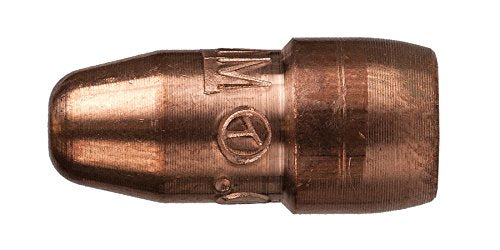
Tag: contact tip

  • Why does my MIG wire feed keep slipping? (Fast Fix Guide)

    If your MIG wire feed keeps slippingโ€”especially mid-beadโ€”youโ€™ll see an unstable arc, hear the drive rolls โ€œchirp,โ€ and end up with inconsistent penetration. This guide walks you through a fast diagnosis and a clean, one-variable-at-a-time fix so you stop chasing settings.

    Where to Buy (Quick Fix Parts)

    Most โ€œwire slippingโ€ complaints come down to these components:

    • Drive rolls (wrong groove / worn groove):ย rolls spin but canโ€™t grip the wire consistently.
    • Spool hub tension (too tight):ย the feeder canโ€™t pull wire off the spool smoothly, so it surges/slips.
    • Gun liner (dirty, kinked, wrong length):ย too much drag; the rolls slip before the wire moves.

    Top Pick (Primary Fix)

    Unknown (Verify ASIN) โ€” liner choices are highly gun-specific (length + wire size + brand compatibility). To avoid recommending the wrong part, no AAWP box is included.

    Backup / Consumable Option

    Unknown (Verify ASIN) โ€” drive rolls are feeder/model-specific. No AAWP box included.


    Key Takeaways

    • Wire โ€œslippingโ€ is usuallyย dragย (liner/tip) orย mismatchย (drive roll groove/wire size), not voltage/WFS settings.
    • Fix it fastest by checkingย spool brake tensionย andย drive roll grooveย first.
    • If itโ€™s not fixed inย 2โ€“3 minutes, stop adjusting andย replace the liner or contact tipย (most common wear items).
    • Keep one rule:ย one change at a timeย so you donโ€™t create a second problem.

    Symptoms (Fast Diagnosis)

    • Drive rolls spin but wire speedย surgesย orย stalls
    • Arc sounds like itโ€™sย cutting in/out
    • Wire feed feelsย jerkyย when you pull the trigger
    • You hearย clicking/chirpingย from the feeder
    • You get randomย burnbackย or the wire โ€œsticksโ€ at the tip
    • You seeย wire shavingsย near the drive rolls (wire being crushed)

    Root Causes (Mapped to Symptoms)

    • Surging wire speedย โ†’ spool brake too tight, liner drag, or contact tip partially blocked
    • Clicking/chirping at feederย โ†’ drive roll tension wrong, wrong groove for wire size/type, worn rolls
    • Wire shavings/dustย โ†’ too much drive roll pressure, wrong knurl/V-groove selection, misaligned inlet guide
    • Feeds fine with tip removedย โ†’ contact tip worn/blocked, diffuser/nozzle contamination, or tip size mismatch
    • Feeds worse when gun is bentย โ†’ liner kinked, liner too short/too long, cable damage, tight bends in lead

    Quick Fix (Do This First)

    • Stop adjusting voltage/WFS.ย Slipping is mechanical 90% of the time.
    • Set the gun lead straightย (no tight loops) and test again.
    • Back off spool brake tensionย until the spoolย justย stops free-spinning when you release the trigger.
    • Confirm drive roll groove matches the wireย (size and type).
    • Remove the contact tipย and test feed for 2 seconds:
      • If it feeds smoothly now โ†’ tip/diffuser/nozzle area is the restriction.
      • If it still slips โ†’ liner/drive rolls/spool tension is the restriction.

    (AAWP omitted โ€” no verified ASIN.)


    Step-by-Step Fix

    1. Confirm wire size and type
      • Verify the spool label (example: .030 in / 0.8 mm solid ER70S-6, or flux-core).
      • Make sure your drive rolls are correct for that wire (V-groove for solid, knurled for flux-coreโ€”model dependent).
    2. Check drive roll groove selection
      • Many rolls are double-sided. Make sure youโ€™re on the correct groove for your wire diameter.
      • If the groove is polished/worn, it may slip even with correct tension.
    3. Reset drive roll tension (donโ€™t crush the wire)
      • Start low. Increase only until the wire feeds without slipping.
      • Too much tension creates wire shavings and makes liner drag worse.
    4. Set spool hub/brake tension
      • Too tight = feeder struggles to pull wire, causing surging/slip.
      • Too loose = overrun/birdnesting risk when you stop feeding.
    5. Isolate the gun end
      • Remove nozzle and contact tip. Feed wire briefly.
      • If itโ€™s smooth now, replace theย contact tipย first (cheap, fast).
    6. If still slipping: service/replace the liner
      • Blow out the liner (dry air only) and inspect for kinks or rust/dirt.
      • If the liner is worn, kinked, or contaminated, replacement is usually faster than trying to โ€œsave it.โ€
    7. Re-test with the lead in a normal working bend
      • If it only fails under bend, the liner/cable is the culprit.

    Parts That Actually Fix This

    Liner
    Replace when: feed gets worse with bends, you see dust/rust, or it wonโ€™t feed smoothly even with correct roll setup.
    Adjust when: liner is clean and straight, and the issue disappears with the tip removed.

    Contact tips
    Replace when: wire sticks, arc is unstable, tip is ovaled, or feeding improves when the tip is removed.
    Adjust when: tip size is correct and the problem is clearly upstream (rolls/spool/liner).

    Drive rolls
    Replace when: groove is worn/polished, wire slips even at correct tension, or wire is being deformed.
    Adjust when: wrong groove/side is selected or tension is mis-set.

    Diffuser / nozzle (if relevant)
    Replace/clean when: spatter buildup constricts the wire path or the tip seat is damaged.
    Adjust when: itโ€™s simply dirtyโ€”cleaning restores normal feed.


    Replace vs Adjust (Fast Decision Table)

    ProblemAdjust FirstReplace
    Wire slips only at higher WFSSpool brake tension + correct roll grooveDrive rolls (worn groove)
    Feeds smooth with tip removedTip size/condition checkContact tip
    Worse when gun lead is bentStraighten lead + check routingLiner
    Wire shavings at feederReduce roll tension + correct roll typeLiner (if packed with debris)

    Copy table

    Rule: If not fixed in 2โ€“3 minutes โ†’ replace the consumable causing drag (tip or liner).


    Prevention Tips

    • Keep the gun lead as straight as practical; avoid tight coils on the floor.
    • Store wire dry; rust/dirt increases liner drag fast.
    • Donโ€™t overtighten drive rollsโ€”set tension to feed reliably without crushing wire.
    • Replace contact tips proactively when arc stability drops (interval: Unknown; depends on amperage/time-on-arc).
    • Use proper ventilation and fume control; keep spatter under control so the nozzle/tip area doesnโ€™t clog.

    Safety note: Wear ANSI Z87.1-rated eye protection under your hood, welding gloves, and ensure adequate ventilation when welding and when blowing out liners (avoid breathing dust/particulate).


    FAQ

    Why does my MIG wire feed slip only when Iโ€™m welding (not when I free-feed)?
    Heat and load increase drag at the tip/nozzle area. A marginal contact tip or spatter buildup can show up only under arc conditions.

    Should I crank drive roll tension until it stops slipping?
    No. Too much tension deforms wire, creates shavings, and makes liner drag worse. Fix the restriction first.

    How do I know if itโ€™s the liner or the contact tip?
    Remove the contact tip and test feed. If it becomes smooth, the tip/nozzle area is the restriction. If it still slips, look upstream (liner/rolls/spool tension).

    Can the wrong drive roll groove cause slipping?
    Yes. A mismatch between groove and wire size/type is a common cause of inconsistent feed and wire deformation.

  • Why does my MIG wire keep sticking in the contact tip? (Fast Burnback Fix)

    If your MIG wire keeps welding itself to the contact tip and stopping the weld cold, youโ€™re dealing with burnbackโ€”the arc climbs up the wire and fuses it inside the tip. The good news: you can usually fix it in minutes by addressing feed consistency first, then consumables.

    This guide is a fast, symptom-first troubleshooting path that avoids random setting changes and gets you back to a stable arc.


    Where to Buy (Quick Fix Parts)

    The most likely failed components when wire sticks in the tip are:

    • Contact tipย (worn, spattered, wrong size, overheated)
    • Gun linerย (dirty, kinked, wrong size, or packed with dust/rust)
    • Nozzle/diffuser areaย (spatter buildup causing heat and drag)

    Top Pick (Primary Fix)

    Unknown (Verify ASIN).
    Reason: contact tips are the #1 โ€œswap firstโ€ consumable for burnback, but the correct tip depends on gun style (Tweco/Lincoln/Miller) and wire diameter.

    Backup / Consumable Option

    Unknown (Verify ASIN).
    Reason: liners are the next most common fix when feeding is inconsistent, but liner fit depends on gun model + length + wire type.


    Key Takeaways

    • If wire sticks in the tip, assumeย wire feed slowed downย before you assume settings are wrong.
    • Swap theย contact tip firstย (fastest, cheapest diagnostic).
    • Then check forย liner dragย andย drive-roll issuesย (tension, size, debris).
    • Donโ€™t chase voltage/WFS until the wire feeds smoothly with the gun straight.

    Symptoms (Fast Diagnosis)

    • Wire fuses to the contact tip during a start or mid-bead
    • Arc gets harsh, then the gun โ€œstutters,โ€ then stops feeding
    • You hear the drive rolls slip or chatter
    • Tip is discolored/blue, wire is balled up at the end
    • Wire feeds fine with the gun straight, but sticks when the lead is bent

    Root Causes (Mapped to Symptoms)

    • Wire sticks on startsย โ†’ wire speed too low at start, stickout too short, tip partially blocked
    • Random sticking mid-beadย โ†’ inconsistent feeding (liner drag, roll tension wrong, spool drag too high)
    • Drive rolls slip + stickingย โ†’ roll tension too loose, wrong roll groove, worn rolls, dirty wire
    • Only happens when lead is bentย โ†’ liner kinked/worn, lead routed too tight, liner too short/long
    • Tip burns up fastย โ†’ wrong tip size, poor electrical contact at tip/diffuser, excessive heat from short stickout

    Quick Fix (Do This First)

    Do these in order. This avoids over-adjusting your machine.

    • Stop and cut the wireย clean (donโ€™t yank it out under tension).
    • Replace the contact tipย (fastest way to eliminate a partially blocked/worn tip).
    • Straighten the gun leadย and test-feed wire. If it feeds better straight than bent, suspect the liner/lead routing.
    • Back off drive-roll tension, then re-tighten just enough to feed without slipping (donโ€™t crush the wire).
    • Check spool drag: the spool should not freewheel, but it also shouldnโ€™t feel โ€œbraked.โ€

    Step-by-Step Fix

    1. Power downย and remove the nozzle and contact tip.
    2. Inspect the tip bore: if itโ€™s ovaled, packed with spatter, or the wire shows scoring, replace it.
    3. Check stickoutย (typical short-circuit MIG is often around 3/8 in. / 10 mm; exact value depends on process and parameters). If youโ€™re extremely short, you can overheat the tip fast.
    4. Verify wire size matches tip sizeย (Unknownโ€”verify whatโ€™s installed). A mismatch can cause drag or arcing at the tip.
    5. Open the feeder:
      • Confirm correctย drive-roll grooveย (solid vs flux-core knurled; correct diameter).
      • Setย tensionย so the wire feeds reliably but does not deform.
    6. Check the liner:
      • Blow out debris (dry air only; avoid introducing oil).
      • If the liner is kinked, rusty, or packed with dust, replace it.
    7. Reassembleย and run a short test bead.
    8. Only after feed is stable:ย fine-tune wire speed and voltageย one change at a time.

    Parts That Actually Fix This

    Contact Tip

    Replace when:

    • Wire sticks repeatedly
    • Tip bore is worn/oval
    • Spatter is baked inside the tip Adjust instead when:
    • Tip is clean/new and the problem tracks with feed speed or stickout

    Liner

    Replace when:

    • Feeding changes dramatically when the lead is bent vs straight
    • Wire feels โ€œgrittyโ€ when you hand-feed
    • You see rust/dirt coming out when you remove the tip

    Drive Rolls

    Replace/repair when:

    • Rolls are worn smooth
    • Wrong groove type/size is installed Adjust instead when:
    • Tension is simply too tight/too loose

    Diffuser / Nozzle (if relevant)

    Replace when:

    • Threads are damaged or the tip doesnโ€™t seat tightly
    • Spatter buildup is severe and recurring

    Replace vs Adjust (Fast Decision Table)

    ProblemAdjust FirstReplace
    Wire sticks only on startsIncrease wire feed slightly, confirm stickoutContact tip
    Wire sticks randomly mid-beadCheck drive-roll tension + spool dragLiner (if feed changes with lead bend)
    Drive rolls slip/chatterIncrease tension slightly, verify grooveDrive rolls (if worn/wrong type)
    Tip overheats/discolors fastIncrease stickout slightly, confirm duty cycle habitsTip + check diffuser seating

    Copy table

    Rule: If not fixed in 2โ€“3 minutes โ†’ replace the consumable.


    Prevention Tips

    • Keep wire clean and dryย (rusty wire increases liner drag fast).
    • Store spools sealed when possible; wipe dust off before loading.
    • Route the gun lead withย wide bends, not tight loops.
    • Replace tips on a routine interval based on usage (Unknownโ€”verify for your duty cycle and wire type).
    • Periodically blow out or replace linersโ€”especially if you run dirty environments (fabrication dust, grinding debris).

    Safety Notes

    • Wear anย ANSI Z87.1ย rated welding helmet and safety glasses under the hood.
    • Use proper welding gloves and keep hands clear of pinch points in the feeder.
    • Maintain ventilation appropriate for the material and process (especially galvanized, stainless, and flux-core fumes).

    FAQ

    Why does burnback happen even when my settings โ€œused to workโ€?

    Consumables drift. A slightly worn tip, dirty liner, or tight spool brake can slow feed just enough that the arc climbs into the tip.

    Can a bad ground cause wire sticking in the tip?

    It can contribute to unstable arc behavior, but most โ€œwire welded to tipโ€ events still trace back to feed inconsistency or a blocked/worn tip.

    Should I crank drive-roll tension to stop slipping?

    No. Too much tension can deform the wire, increase liner drag, and make feeding worse. Set tension to the minimum that feeds reliably.

    Why is it worse when the gun cable is bent?

    Thatโ€™s a classic liner/lead-routing indicator: bending increases friction, which slows wire feed and triggers burnback.


    Internal Links (Related WSP Guides)

  • MIG Contact Tip Burnback: Why Your Tip Welds Itself (And How to Fix It)

    Intro

    Your MIG gun stops feeding wire mid-weld. You power down, open the feeder, and find the wire welded solid into the contact tip. This is contact tip burnbackโ€”and it costs you time, consumables, and weld quality. The good news: it’s preventable with the right tip and maintenance routine.

    Key Takeaways

    • Contact tip burnback happens when the wire binds inside the tip under heat and spatter, creating a weld joint between wire and tip
    • Worn or undersized tips are the primary culprit; spatter buildup traps heat and restricts wire flow
    • Replacing the contact tip is the fastest, lowest-cost fix; cleaning alone rarely solves the root problem
    • Proper nozzle cleaning and tip inspection after every 8โ€“10 hours of welding prevents burnback
    • Using the correct tip size for your wire diameter and amperage reduces friction and heat

    The Problem

    Contact tip burnback occurs when the wire gets stuck inside the contact tip and actually welds itself to the copper. This happens because:

    1. Heat accumulation:ย Spatter builds up on the inside of the tip, trapping heat and raising the temperature above the wire’s melting point
    2. Friction:ย A worn or undersized tip creates drag, slowing wire feed and causing the wire to heat up further
    3. Electrical resistance:ย A corroded or damaged tip increases resistance, generating more heat at the contact point
    4. Wire binding:ย The wire catches on rough edges inside the tip, creating a mechanical bind that generates friction heat

    The result: the wire literally welds itself to the tip, and your feeder can’t push it through.

    Why It Matters

    Burnback stops your weld mid-joint. You lose:

    • Production time:ย Downtime to clear the jam, replace the tip, and re-feed wire
    • Weld quality:ย Restarting a weld often leaves a weak restart point or incomplete fusion
    • Consumables:ย You waste wire, spatter, and tips
    • Equipment stress:ย Forcing the feeder to push a jammed wire can damage the drive rollers

    On a job site or in a production shop, one burnback can cascade into multiple restarts and rework.

    The Fix

    Contact tip burnback is a tip problem, not a feeder problem. Here’s what to do:

    1. Power down the welder and open the feeder.
    2. Clip the wireย at the contact tip with wire cutters.
    3. Pull the wire backย 3โ€“4 inches to clear the jam.
    4. Remove the nozzleย and inspect the tip for spatter, corrosion, or pitting.
    5. Replace the contact tipย with a new one (don’t try to clean a burnt tipโ€”it’s damaged).
    6. Clean the nozzleย with a nozzle dip or brass brush to remove spatter.
    7. Re-feed the wireย and resume welding.

    Prevention: Replace contact tips every 8โ€“10 hours of welding, or sooner if you notice spatter buildup or inconsistent arc.

    Why This Product Solves It

    The Miller MDX Series MIG Contact Tip (.045″ or 1.2mm) is engineered for consistent wire flow and durability. Miller’s AccuLock design ensures:

    • Precise bore:ย The .045″ bore is sized for .045″ wire, eliminating undersizing friction
    • Copper construction:ย High-conductivity copper dissipates heat faster than lesser materials
    • Smooth interior:ย No pitting or rough edges means wire slides freely, reducing burnback risk
    • Reliable fit:ย AccuLock threads ensure the tip seats flush, preventing spatter leakage

    Using the correct tip size for your wire diameter is non-negotiable. A .035″ tip on .045″ wire will jam; a .045″ tip on .035″ wire will spit spatter. Miller tips are sized precisely to match your wire.

    Product Link: Miller MDX Series MIG Contact Tip (.045" or 1.2mm), part no. T-M045 (10 per pack).

    ” target=”_blank” rel=”noreferrer noopener”>Miller MDX Series MIG Contact Tip (.045″ or 1.2mm), part no. T-M045 (10 per pack)

    What to Check Before You Buy

    • Wire diameter:ย Confirm your wire size (.023″, .030″, .035″, or .045″). The tip bore must match.
    • Gun compatibility:ย Miller MDX tips work with Miller MDX-100 and MDX-250 guns. If you use a different gun (Lincoln, ESAB, Tweco), verify fitment first.
    • Amperage range:ย Unknown (Verify). Contact Miller or ArcWeld.store for your specific amperage range.
    • Quantity:ย This pack includes 10 tipsโ€”a good supply for regular replacement.

    Real-World Use

    A fabrication shop running a Miller MDX-100 on .045″ mild steel was experiencing burnback every 30โ€“40 minutes. The operator was using undersized .035″ tips (wrong size). After switching to Miller .045″ tips and cleaning the nozzle every 4 hours, burnback stopped entirely. Production time increased by 15%.

    Common Mistakes

    • Using the wrong tip size:ย Biggest cause of burnback. Always match tip bore to wire diameter.
    • Not cleaning the nozzle:ย Spatter buildup traps heat. Clean the nozzle every 4โ€“8 hours.
    • Reusing burnt tips:ย A burnt tip is damaged. Replace it; don’t try to clean it.
    • Ignoring wire speed surges:ย If the feeder suddenly pushes harder, the tip is likely binding. Replace it immediately.
    • Assuming it’s a feeder problem:ย Burnback is almost always a tip or nozzle issue, not a feeder malfunction.

    Safety Notes

    Contact tips get hot during welding. Always allow the gun to cool before removing the nozzle or tip. Wear welding gloves when handling hot consumables. If you’re replacing tips while the welder is still warm, keep your hands clear of the arc area and power down the welder first.

    Always follow the manufacturer’s instructions and your shop’s safety procedures. If you’re unsure about fitment or ratings, verify before you buy or install.

    Related Reading

    Where to Buy

    Available at ArcWeld.store (stock and shipping: Unknown โ€“ verify)

    Miller MDX Series MIG Contact Tip (.045" or 1.2mm), part no. T-M045 (10 per pack).

    ” target=”_blank” rel=”noreferrer noopener”>View this product at ArcWeld.store

  • Why Does My MIG Wire Feed Keep Slipping? (Fast Fix in 10 Minutes)

    If your MIG wire feed โ€œslipsโ€ (you hear clicking, the rolls spin but wire stalls, or the arc keeps cutting out), youโ€™re not dealing with a settings problem firstโ€”youโ€™re dealing with a wire-path problem. This guide walks you through a fast diagnosis and a clean troubleshooting path that fixes most slipping feeds in minutes.

    Youโ€™ll start with the highest-failure consumables and only adjust tension/settings after youโ€™ve confirmed the wire can physically move through the gun.

    Where to Buy (Quick Fix Parts)

    Most โ€œslippingโ€ wire feed problems trace back to a restriction at the end of the gun or inside the liner, which makes the drive rolls lose traction. The three most likely failed components are:

    • Contact tipย (burnt, oversized, spattered, or wrong size for wire)
    • Gun linerย (dirty, kinked, wrong length, worn)
    • Drive rollsย (wrong groove/type for wire, worn, misaligned)

    Top Pick (Primary Fix)

    If you need the fastest, highest-probability replacement: start with a fresh contact tip in the correct wire size.

    Last update on 2026-05-11 / Affiliate links / Images from Amazon Product Advertising API

    Disclosure: As an Amazon Associate, I earn from qualifying purchases.

    Backup / Consumable Option

    If the problem returns quickly (or gets worse when you straighten the gun lead), the liner is usually the next failure point.

    Last update on 2026-05-11 / Affiliate links / Images from Amazon Product Advertising API

    Key Takeaways

    • Slipping wire feed is usuallyย friction or restriction, not voltage/WFS.
    • Replace theย contact tip firstย if thereโ€™s any burnback, spatter clogging, or wrong size.
    • If the gun lead position changes the symptom, suspect theย linerย (kink/contamination/wear).
    • Set drive-roll tension to theย minimum that feeds reliablyโ€”too tight causes deformation and adds drag.
    • If itโ€™s not fixed inย 2โ€“3 minutes, replace the consumable instead of over-adjusting.

    Symptoms (Fast Diagnosis)

    • Drive rolls spin but wireย stallsย orย surges
    • You hearย clicking/chatteringย at the feeder
    • Arcย cuts in/outย like the wire is โ€œskippingโ€
    • Wire shaves or getsย flat spotsย (drive-roll marks)
    • Wire feeds fine straight, but slips when the gun lead isย curved
    • Burnback events increase (wire melts to tip) after feed starts slipping

    Root Causes (Mapped to Symptoms)

    • Slips worse when the gun lead is bent/loopedย โ†’ liner kinked, dirty, wrong length, or wrong type
    • Clicking at feeder + wire shavingsย โ†’ drive-roll tension too high, wrong groove, worn rolls, or misalignment
    • Wire stalls at the tip / arc stuttersย โ†’ contact tip clogged, wrong size, or burnback damage
    • Feeds fine with tip removedย โ†’ restriction is at the tip/nozzle area (tip, diffuser, spatter, nozzle blockage)
    • Slips more at higher WFSย โ†’ spool brake too tight, liner friction, or drive-roll traction issue

    Quick Fix (Do This First)

    Do these in orderโ€”fast, high-probability, and low-risk:

    • Replace the contact tipย (correct size for your wire).
    • Clip wire cleanย and re-thread with the gun lead as straight as possible.
    • Back drive-roll tension off, then increase only until it feeds without slipping.

    Last update on 2026-05-11 / Affiliate links / Images from Amazon Product Advertising API

    Step-by-Step Fix

    1. Stop and make it safe
      • Turn the machine off before opening the feeder or handling the drive rolls.
      • Wear gloves and eye protection (ANSI Z87.1 safety glasses under your hood).
    2. Rule out tip/nozzle restriction (fastest test)
      • Remove the nozzle.
      • Remove the contact tip.
      • Try feeding wire with the gun lead straight.
      • If it feeds smoothly with the tip removed, your restriction is likely theย tip/nozzle/diffuser area.
    3. Replace the contact tip (donโ€™t โ€œclean it and hopeโ€)
      • If thereโ€™s burnback, ovaling, heavy spatter, or the wrong size tip: replace it.
      • Unknown (Verify): exact tip-to-wire fit guidance varies by manufacturerโ€”confirm with your gun manual.
    4. Check drive-roll type and groove
      • Solid wire typically wants aย V-groove.
      • Flux-core often wants aย knurledย roll (varies by wire typeโ€”verify wire manufacturer guidance).
      • Make sure the roll matches your wire diameter (e.g., 0.030 in / 0.035 in).
    5. Set drive-roll tension correctly (minimum effective tension)
      • Start low.
      • Increase tension only until wire feeds consistently without slipping.
      • Too much tension can deform wire, increase liner drag, and create a โ€œfeeds bad everywhereโ€ problem.
    6. Check spool brake / hub tension
      • If the spool is hard to pull and the wire โ€œsnapsโ€ tight when you stop feeding, the brake may be too tight.
      • Set it so the spool doesnโ€™t overrun, but also doesnโ€™t fight the drive system.
    7. Suspect the liner if the symptom changes with lead position
      • If it slips when the lead is curved but feeds when straight, the liner is likely dirty, kinked, worn, or cut wrong.

    Parts That Actually Fix This

    Liner

    Replace when:

    • Feed changes dramatically with gun lead position
    • You see wire shavings/dust inside the gun
    • Youโ€™ve had repeated birdnesting or burnback events

    Adjust/clean when:

    • The liner is new and you suspect contamination from wire dust (blow out per manufacturer guidance; avoid unsafe practices)

    Contact tips

    Replace when:

    • Any burnback, ovaling, heavy spatter clogging, or erratic arc starts
    • Wire feels โ€œstickyโ€ through the tip even with the gun straight

    Adjust when:

    • Tip is correct size and clean, and restriction is clearly elsewhere

    Drive rolls

    Replace when:

    • Groove is worn smooth, chipped, or misaligned
    • Correct groove/type still slips at reasonable tension

    Adjust when:

    • Wrong groove selected or tension is clearly excessive/insufficient

    Diffuser / nozzle (when relevant)

    Replace when:

    • Spatter buildup blocks gas flow and physically crowds the tip area
    • Threads are damaged or the tip wonโ€™t seat correctly

    Replace vs Adjust (Fast Decision Table)

    ProblemAdjust FirstReplace
    Wire slips only when gun lead is bentStraighten lead, reduce drive-roll tensionLiner
    Clicking at feeder + wire shavingsReduce tension, confirm correct roll groove/typeDrive rolls (if worn)
    Arc stutters and wire feels tight at the tipRemove nozzle/tip and test feedContact tip
    Slips worse at higher wire speedReduce spool brake tension, confirm roll tractionLiner (if friction-related)

    Copy table

    Rule: If not fixed in 2โ€“3 minutes โ†’ replace the consumable.

    Prevention Tips

    • Keep wire clean and covered; wire dust increases liner drag over time.
    • Donโ€™t crank drive-roll tension โ€œjust to make it feedโ€โ€”set the minimum that works.
    • Store consumables (tips/liners) dry and organized by wire size to avoid mix-ups.
    • Replace tips proactively if youโ€™re doing frequent starts/stops or running hot (burnback risk increases).
    • Avoid tight loops in the gun lead during welding; tight bends increase friction and accelerate liner wear.

    FAQ

    Why does my MIG wire feed slip but not birdnest?

    Birdnesting is usually the feeder pushing wire into a restriction until it tangles. Slipping can happen earlierโ€”when the rolls canโ€™t maintain traction due to friction, wrong rolls, or low tension.

    How do I know if itโ€™s the liner or the contact tip?

    Quick test: remove the contact tip and feed wire with the lead straight. If it feeds smoothly, suspect the tip/nozzle area. If it still strugglesโ€”especially when the lead is bentโ€”suspect the liner.

    Can drive-roll tension being too tight cause slipping?

    Yes. Too much tension can deform wire, increase drag through the liner, and create inconsistent feeding that looks like slipping or surging.

    Should I change voltage or wire speed to fix slipping?

    Not first. Fix the mechanical feed path (tip, liner, rolls, spool brake) before touching settings. Settings changes can mask the real issue and waste time.

    Internal Linking (Add These)

  • Title: Worn MIG Contact Tips Causing Porosity? Here’s the Fix

    Intro

    Your MIG welds look porous. You’ve checked your gas flow, cleaned the base metal, and verified your settingsโ€”but the problem persists. The culprit is often sitting right at the end of your gun: a worn contact tip. A damaged or burnt-back contact tip disrupts the electrical arc and wire feed, creating weak welds and wasted material. This guide walks you through diagnosis and replacement in under 10 minutes.

    Key Takeaways

    • Worn contact tips cause porosity, spatter, and inconsistent arc
    • Burnback happens when the tip overheats from improper voltage/wire speed ratio or poor contact
    • Replace tips every 50โ€“100 hours of welding or when you see damage
    • Always match wire size to tip size (e.g., .035″ wire = .035″ tip)
    • Stock replacement tips on hand to avoid downtime

    The Problem

    A contact tip is a small copper tube that carries current to your wire. Over time, it erodes from heat and electrical wear. When the tip is damaged or burnt back, several things go wrong:

    • Poor electrical contact: The wire doesn’t seat properly, creating resistance and weak arc initiation.
    • Inconsistent wire feed: A damaged tip can catch or bind the wire, causing feed stutters.
    • Arc instability: The arc becomes erratic, leading to porosity and spatter.
    • Weld quality drops: Porosity, lack of fusion, and surface defects become common.

    You’ll notice:

    • Spatter clustering around the weld
    • Dull, unstable arc
    • Wire feed hesitation or grinding sounds
    • Visible burnback or erosion on the tip itself

    Why It Matters

    A bad weld costs money. Porosity weakens the joint, spatter wastes time cleaning, and rework eats into your schedule. In structural or pressure-vessel work, porosity can fail inspection. Replacing a $2โ€“5 contact tip takes 2 minutes and prevents hours of rework.

    The Fix

    1. Power down the welderย and wait 30 seconds.
    2. Unscrew the contact tipย from the gun nozzle (usually hand-tight or one-quarter turn with a wrench).
    3. Inspect the old tipย for burnback, erosion, or debris.
    4. Clean the gun nozzleย with a wire brush to remove spatter buildup.
    5. Install the new tip, hand-tight. Don’t over-tighten.
    6. Test the wire feedย before weldingโ€”pull the trigger briefly to confirm smooth feed.
    7. Strike a test beadย on scrap to verify arc stability.

    Why This Product Solves It

    The S19391-1 Lincoln Style Contact Tip .035 – Arc Weld by Masterweld Pack of (25) is a direct replacement for Lincoln-style MIG guns. It’s made from high-quality copper, ensuring reliable electrical conductivity and durability. At .035″ bore, it matches the most common MIG wire size. A pack of 25 means you’ll always have spares on hand, eliminating downtime from tip searches.

    Product Link: S19391-1 Lincoln Style Contact Tip .035 - Arc Weld by Masterweld Pack of (25)

    ” target=”_blank” rel=”noreferrer noopener”>
    S19391-1 Lincoln Style Contact Tip .035 - Arc Weld by Masterweld Pack of (25)

    S19391-1 Lincoln Style Contact Tip .035 – Arc Weld by Masterweld Pack of (25)

    $30.75

    In Stock

    View Product

    What to Check Before You Buy

    Real-World Use

    A fabrication shop running 8-hour shifts was seeing porosity in every third weld. The operator had replaced the liner and checked gasโ€”but hadn’t changed the contact tip in 3 months. After swapping in fresh tips, arc stability returned immediately, and porosity dropped to near zero. Cost: $3 per tip. Downtime saved: 2 hours per week.

    Common Mistakes

    Safety Notes

    Always follow the manufacturer’s instructions and your shop’s safety procedures. If you’re unsure about fitment or ratings, verify before you buy or install.

    Related Reading

  • Why Does My MIG Wire Feed Slip or Surge? (Fast Fix in 10 Minutes)

    If your MIG wire feed feels inconsistentโ€”slipping at the drive rolls, surging at the arc, or randomly stoppingโ€”youโ€™re usually dealing with a restriction in the wire path, not a โ€œbad welder.โ€ The goal is to restore smooth, low-friction wire travel from spool to contact tip. This guide walks you through a fast diagnosis and a one-variable-at-a-time fix.

    Where to Buy (Quick Fix Parts)

    Most likely failed components for slipping/surging feed:

    • Gun liner (clogged with debris, wrong size, kinked, or cut too long/short)
    • Contact tip (worn/oversized, spatter-packed, or wrong size for wire)
    • Drive roll setup (wrong groove, worn groove, or tension crushing the wire)

    Top Pick (Primary Fix)

    1-pk 42-3035-15 .030″-.035″ 15ft Liner Compatible with Tweco MIG Gun
    • ๐Ÿ”ง COMPATIBILITY NOTICE: This is a replacement part compatible with specific vehicle/machine models. Please carefully check the part number, vehicle model, and size before purchasing.
    • โš™๏ธ RELIABLE PERFORMANCE: Manufactured to meet or exceed standard replacement specifications, providing stable performance and reliable operation under normal working conditions.
    • ๐Ÿ›ก๏ธ DURABLE MATERIALS: Made from high-quality materials, resistant to wear, corrosion, and heat, ensuring a long lifespan and stable use.
    • ๐Ÿงฐ EASY INSTALLATION: Designed for direct replacement installation. No modifications required. Professional installation is recommended if you are unfamiliar with replacing parts.
    • ๐Ÿš— WIDE APPLICATION: Suitable for use with a wide range of vehicles and equipment such as cars, motorcycles, lawnmowers, snowmobiles, and other compatible machinery.

    Last update on 2026-05-11 / Affiliate links / Images from Amazon Product Advertising API

    Disclosure: As an Amazon Associate, I earn from qualifying purchases.

    Backup / Consumable Option

    Last update on 2026-05-11 / Affiliate links / Images from Amazon Product Advertising API

    Key Takeaways

    • If the drive rolls are slipping, donโ€™t crank tension firstโ€”check for a liner restriction and crushed wire.
    • If the arc surges, the wire is often sticking in the tip or dragging in the liner.
    • Set drive roll tension using the โ€œjust enough to feedโ€ method; too tight creates debris that clogs liners.
    • If itโ€™s not fixed in 2โ€“3 minutes, replace the consumable (tip/liner) before changing machine settings.

    Symptoms (Fast Diagnosis)

    • Drive rolls spin but wire doesnโ€™t move (or moves in bursts)
    • Wire feed feels jerky when you pull the trigger
    • Arc stutters/surges even with stable voltage/WFS settings
    • You see copper dust/shavings near the feeder (crushed wire)
    • Wire is flattened or has shaved edges after the drive rolls
    • Feed improves when you straighten the gun lead, then gets worse again

    Root Causes (Mapped to Symptoms)

    • Rollers spin but wire doesnโ€™t feed โ†’ liner restriction, wrong drive roll groove, tension too low or wire crushed from too much tension
    • Jerky feed / surging arc โ†’ contact tip worn/dirty, liner packed with debris, tight bends in lead, spool drag too high
    • Copper dust at feeder โ†’ drive roll tension too high crushing wire (debris migrates into liner)
    • Feed changes with lead position โ†’ kinked liner, damaged lead, liner not seated, too many tight bends

    Quick Fix (Do This First)

    Replace the most common failure components first:

    1. Contact tip (fastest swap)
    2. Liner (most common hidden restriction)
    3. Then re-set drive roll tension (donโ€™t over-tighten)

    Avoid over-adjusting voltage/WFS until the wire path is confirmed smooth.

    1-pk 42-3035-15 .030″-.035″ 15ft Liner Compatible with Tweco MIG Gun
    • ๐Ÿ”ง COMPATIBILITY NOTICE: This is a replacement part compatible with specific vehicle/machine models. Please carefully check the part number, vehicle model, and size before purchasing.
    • โš™๏ธ RELIABLE PERFORMANCE: Manufactured to meet or exceed standard replacement specifications, providing stable performance and reliable operation under normal working conditions.
    • ๐Ÿ›ก๏ธ DURABLE MATERIALS: Made from high-quality materials, resistant to wear, corrosion, and heat, ensuring a long lifespan and stable use.
    • ๐Ÿงฐ EASY INSTALLATION: Designed for direct replacement installation. No modifications required. Professional installation is recommended if you are unfamiliar with replacing parts.
    • ๐Ÿš— WIDE APPLICATION: Suitable for use with a wide range of vehicles and equipment such as cars, motorcycles, lawnmowers, snowmobiles, and other compatible machinery.

    Last update on 2026-05-11 / Affiliate links / Images from Amazon Product Advertising API

    Step-by-Step Fix

    1. Stop and inspect the wire after the drive rolls
      Cut 6โ€“12 in (150โ€“300 mm) off and look for flattening or shaving.
      • Flattened wire = too much tension or wrong groove.
    2. Check spool drag (donโ€™t let it freewheel, donโ€™t choke it)
      You want the spool to stop without coasting into a birdnest when you release the trigger. If drag is excessive, the feeder will slip.
    3. Confirm drive roll groove matches wire type and size
      • Solid wire typically uses V-groove.
      • Flux-core often prefers knurled (verify your feeder manual).
        Unknown (Verify): your specific feederโ€™s recommended roll type.
    4. Set drive roll tension correctly (the โ€œjust enoughโ€ method)
      Start low. Feed wire into a block of wood (or pinch lightly with gloved fingers at the gun end). Increase tension only until it feeds without slipping.
      If you crank tension to โ€œfixโ€ slipping, you often create crushed-wire debris that plugs the liner.
    5. Straighten the gun lead and test feed
      If feed improves when straight, you likely have liner drag, a kink, or a lead issue.
    6. Pull the nozzle and contact tip; test wire feed without the tip
      • If it feeds smooth with the tip removed, the tip is the restriction (wrong size, worn, spatter-packed).
    7. Replace/clean the liner if drag is suspected
      If youโ€™ve had a birdnest, crushed wire, or lots of dust, assume liner contamination. Replace is usually faster than trying to โ€œsaveโ€ it.
    8. Re-test with one change at a time
      Make one change, run a 10โ€“15 second feed test, then move to the next variable.

    Parts That Actually Fix This

    Gun liner
    Replace when:

    • Wire feels rough when feeding
    • You see debris/copper dust and feed is inconsistent
    • The lead position changes feed quality
      Adjust/clean when:
    • Minor contamination and you can blow it out safely (manufacturer guidance varies; replacement is often the most reliable)

    Contact tips
    Replace when:

    • Wire binds at the tip
    • Tip bore is worn (arc becomes inconsistent)
    • Tip is spatter-packed
      Adjust when:
    • You simply had spatter buildup you can remove and the bore isnโ€™t damaged

    Drive rolls
    Replace when:

    • Groove is visibly worn/polished and slips even at correct tension Adjust when:
    • Wrong groove selection or tension was incorrect

    Diffuser / nozzle (if applicable)
    Replace when:

    • Threads are damaged, tip wonโ€™t seat correctly, or gas coverage is inconsistent due to damage
      Adjust/clean when:
    • Itโ€™s just spatter buildup affecting seating

    Replace vs Adjust (Fast Decision Table)

    ProblemAdjust FirstReplace
    Drive rolls slippingReduce spool drag; confirm correct groove; set โ€œjust enoughโ€ tensionLiner (if debris); drive rolls (if worn)
    Surging/stuttering arc with stable settingsTest feed with tip removedContact tip (most common)
    Feed changes when lead is bentStraighten lead; check routingLiner or damaged lead
    Copper dust near feederBack off tension; confirm grooveLiner (likely contaminated)

    Rule: If not fixed in 2โ€“3 minutes โ†’ replace the consumable.

    Prevention Tips

    • Keep the gun lead as straight as practical; avoid tight loops on the floor.
    • Donโ€™t over-tighten drive rolls. Crushing wire creates debris that clogs liners.
    • Store wire dry and covered; rust/contamination increases liner drag.
    • Replace contact tips proactively if you notice arc instability or frequent spatter packing.
    • Routine interval: Unknown (Verify). It varies by duty cycle, wire type, environment, and technique.

    Safety Notes

    • Wear an ANSI Z87.1-rated helmet and safety glasses under the hood.
    • Use welding gloves when handling hot consumables and sharp wire.
    • Ensure proper ventilation; fume exposure increases during troubleshooting because you tend to do repeated short test welds.

    FAQ

    Why does my wire feed fine until I start welding, then it surges?
    Often the wire is binding at the contact tip under heat/spatter, or the liner drag shows up under load. Test feed with the tip removed to isolate it.

    Should I just tighten the drive rolls until it stops slipping?
    No. Over-tension crushes the wire, creates debris, and makes the liner clog worse. Set tension to โ€œjust enough to feed.โ€

    Can a bad ground clamp cause wire feed surging?
    A poor work clamp can cause arc instability that feels like surging, but it wonโ€™t usually cause true mechanical slipping at the feeder. Fix the wire path first, then confirm your clamp and connections.

    How do I know if my liner is the wrong size?
    If the wire drags even when everything is clean and straight, or youโ€™re using a different wire diameter/material than the gun was set up for, liner size mismatch is a common cause. Verify against your gun manual.

  • Why Your MIG Wire Stops Feeding (And How to Fix It in 5 Minutes)

    Intro

    Your MIG welder fires up fine, but halfway through the bead, the wire quits feeding. You hear the motor grinding. Nothing comes out. It’s frustrating, costly downtime, and it happens more often than it should. The fix is usually simpleโ€”but only if you know where to look.

    Key Takeaways

    • Wire feed failure is usually caused by liner wear, drive roll tension, or spool brake issues
    • A worn or dirty liner creates friction that stops the wire cold
    • Replacing the liner is the fastest fix and costs under $20
    • Check drive roll pressure and spool tension before assuming the worst
    • Keep a spare liner on hand to avoid shop downtime

    The Problem

    MIG wire feed failure shows up as:

    • Wire stops mid-weld with motor still running
    • Grinding or clicking sound from the feeder
    • Inconsistent feed speed (stuttering)
    • Wire bunching or bird nesting at the contact tip

    The culprit is almost always friction inside the liner. As you weld, the wire slides through a plastic or steel tube (the liner) thousands of times. Over time, the liner gets scored, kinked, or contaminated with spatter and oxidation. When friction builds up, the drive rolls can’t push the wire forwardโ€”it just slips and grinds.

    Why It Matters

    A dead wire feed kills productivity. You stop mid-bead, troubleshoot, waste time, and restart. On a production job, that’s money. On a tight deadline, it’s a missed commitment. Plus, repeated grinding wears out your drive rolls faster, turning a $15 liner replacement into a $60+ drive roll replacement.

    The Fix

    1. Disconnect the gun and remove the spool. Unplug the welder or kill the power.
    1. Inspect the liner. Pull the wire out and look inside the liner with a flashlight. If it’s scored, kinked, or clogged with spatter, it’s done.
    1. Measure the old liner. Note the length and diameter (usually .035″ or .045″ for MIG).
    1. Install the new liner. Feed it through the feeder, conduit, and gun. Make sure it seats flush at both endsโ€”no gaps.
    1. Reload the wire and test. Run a test bead at low amp to confirm smooth feed.

    Why This Product Solves It

    The LM3A-15 Miller Acculock MDX Liner (15′ Liner, 035/.045) is a direct replacement for Miller Acculock systems and compatible MDX guns. It’s the exact spec you need for smooth, consistent wire feed without grinding or slipping. Miller liners are precision-engineered to tight tolerances, so you get the same feed quality as factory equipment.

    Product Link:  Product not found.

    “>
    Product not found.
     

    What to Check Before You Buy

    Real-World Use

    A fabricator running a Miller MDX-250 noticed wire feed stuttering on 0.035″ mild steel. Swapped the liner in under 5 minutes. Feed was smooth again. No more grinding, no more restarts. One liner lasted 6 months of regular use before needing replacement.

    Common Mistakes

    Safety Notes

    Always disconnect power before removing the spool or working on the feeder. If you’re unsure about liner length or compatibility, verify your gun model and check the manual. Improper liner installation can cause erratic arc and poor weld quality.

    Always follow the manufacturer’s instructions and your shop’s safety procedures. If you’re unsure about fitment or ratings, verify before you buy or install.

    Related Reading

  • Read with Kindle Unlimited