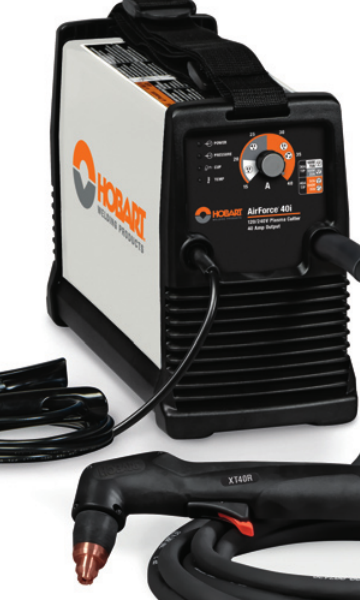
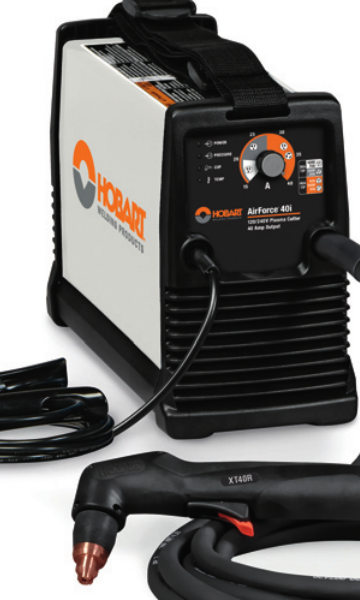
The Hobart AirForce 40i is a compact plasma cutter support topic that usually comes down to four checks: input power, torch condition, consumable wear, and air quality. If the machine is cutting poorly or not starting, the fastest path is to verify the torch setup and the air supply before replacing parts. This guide is built for parts lookup and buying checks, not a repair manual. Use it to confirm what to inspect, what to match, and what to verify before ordering.
Key Takeaways
- Confirm the machine identification and stock reference before ordering any support part.
- The listed support page for this unit references a replacement XT40R torch, consumables, MVP adapters, an air filter kit, and cutting guide support.
- Do not assume a torch, adapter, or consumable is correct from appearance alone. Verify by model reference and connector style.
- For cutting problems, check air pressure/flow, torch consumables, lead condition, and work lead attachment before replacing the power source.
- Use the WSP lookup page as the primary reference for the support page and linked parts path.
What to verify first on a Hobart AirForce 40i
Start with the machine nameplate and the support reference. The provided WSP lookup page identifies the Hobart AirForce 40i support page with stock 500576 and 120/240 V specifications. Verify the exact unit label on your machine, because buying decisions depend on the input version and the torch package, not just the model name. If the machine has been moved between shops, it may be wired differently than expected. Unknown (Verify) whether your specific installation is set up for 120 V or 240 V service until you check the nameplate and receptacle.
Check: machine name, serial or stock reference, input voltage, torch type, and connector style.
Inspect: power cord, plug, torch lead, trigger cable, and air line for damage or heat discoloration.
Verify: the torch package against the support page before ordering consumables or adapters.
Troubleshooting and support checks
1) No start or weak arc
If the torch does not initiate, or the arc starts weakly and drops out, isolate the basics first.
- Check that the machine is powered correctly and the breaker is not marginal under load.
- Inspect the torch tip, electrode, and swirl ring for wear, erosion, or contamination.
- Verify the air supply is dry and clean. Moisture or oil can shorten consumable life and cause arc instability.
- Check the work clamp connection and the cut table contact path.
If the torch parts are visibly worn, replace the full consumable set rather than mixing old and new parts. Mixed wear states can make troubleshooting harder.
2) Poor cut quality
When the machine starts but cut quality is inconsistent, focus on air and consumables before assuming a power source fault.
- Inspect the nozzle for oval wear or spatter damage.
- Check whether the torch stand-off or hand motion is too fast or too slow for the material being cut.
- Verify the air filter kit condition if water or debris is present in the line.
- Inspect the torch lead for cuts, tight bends, or repeated abrasion at the work area.
Do not buy replacement parts until you confirm which failure mode is present. A bad nozzle, dirty air, and low input power can produce similar symptoms.
3) Torch and adapter fit checks
The support page references an XT40R replacement torch and MVP adapters. Those items should be treated as model-specific support parts. Before ordering, match the torch family, connector interface, and any adapter callout shown on the support page. Unknown (Verify) whether any adapter is required for your existing setup until you confirm the current torch package and machine configuration.
- Check the printed torch model reference.
- Inspect the connector ends for wear, bent pins, or damaged locking features.
- Verify the replacement torch is the exact support path listed for this machine.
WSP lookup page: use it as the starting point
The provided WSP lookup page is the main source for this support topic:
Hobart AirForce 40i Plasma Cutter Support
Use that page to confirm the machine support path, the stock 500576 reference, and the listed support categories. The page references consumables, XT40R replacement torch support, MVP adapters, an air filter kit, cutting guides, and related plasma support links. That makes it a parts lookup starting point, not a blanket approval for every accessory you may see elsewhere.
Buying check: match the item to the machine and torch package before adding it to a quote or cart.
Verify: whether the part is a direct replacement, a service accessory, or a support accessory that only applies to a specific configuration.
Practical part selection checks
- Consumables: replace as a set when wear is visible or cut quality changes.
- Torch assembly: confirm the torch model before ordering. Do not assume a different torch in the same family will fit without verification.
- Air filter kit: choose this when the air line shows moisture, particulate, or oil contamination.
- MVP adapters: verify the machine-side and torch-side connection points before buying.
- Cutting guides: confirm the guide style works with your hand technique and work envelope.
Safety notes
Plasma cutters involve high voltage, hot metal, compressed air, and intense arc radiation. Disconnect input power before opening access panels or handling internal connections. Bleed stored air pressure before servicing the air system. Replace damaged torch leads or worn consumables before operation. Use approved eye, face, hand, and body protection for plasma cutting. Keep the work area dry and free of flammables.
FAQ
What is the first part I should inspect on an AirForce 40i with arc issues?
Inspect the consumables first, then verify air quality and work lead connection. Those are the most common support checks before replacing the torch or power source.
Can I order a replacement torch from appearance alone?
No. Verify the torch model reference and connector style first. The support page references an XT40R replacement torch, but you should confirm the exact machine and torch package before buying.
Do the listed accessories mean every item is required?
No. The support page is a parts lookup starting point. Some items, such as an air filter kit or MVP adapter, may only be needed if your current setup has a matching need. Verify against your machine configuration.
How do I know if the input power is correct?
Check the machine nameplate and the site wiring. The provided support page references 120/240 V specifications, but your installed service must still be verified at the machine and receptacle.
Sources Checked
- WSP lookup: Hobart AirForce 40i Plasma Cutter Support
- Plasma Cutter Buying Guide 2025 | Duty Cycle, Cut Capacity & Air Requirements
- Plasma Cutter Not Cutting Through: Causes and Fixes
- Plasma Cutter Pilot Arc Failure Troubleshooting
Use the support page as the primary reference, then verify the machine condition and part match before ordering. That reduces avoidable returns and prevents mismatched torch or consumable purchases.
Disclosure: As an Amazon Associate, Weld Support Parts may earn from qualifying purchases.
Related Weld Support Guides
- Powermax30 XP Plasma Cutter Review: Precision Cutting Power in a Compact Package
- Plasma Cutter Buying Guide 2025 | Duty Cycle, Cut Capacity & Air Requirements
- Plasma Cutter Not Cutting Through: Causes and Fixes
- Plasma Cutter Pilot Arc Failure Troubleshooting: No Start, Weak Spark, Arc Dropout, and Torch Consumable Checks
Leave a Reply