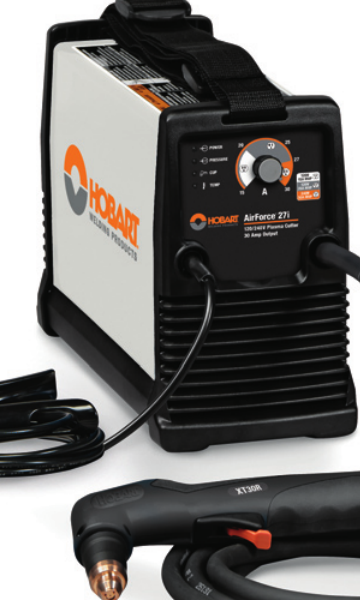
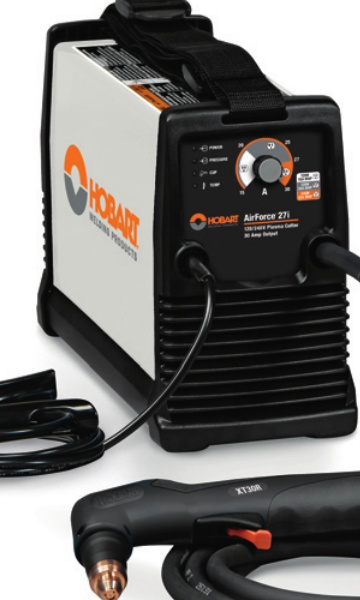
If you maintain a Hobart AirForce 27i, the fastest way to avoid wrong-parts orders is to verify the machine identifier, torch family, power input, and air-side support items before you buy. The AirForce 27i support page from Weld Support Parts is set up as a lookup starting point for those checks. It lists the unit support page, the stock reference 500575, 120/240 V information, an XT30R replacement torch reference, consumables, MVP adapters, an air filter kit, cutting guides, and plasma support links.
Key Takeaways
- Use the support page to confirm the AirForce 27i parts path before ordering.
- Verify torch model, consumable style, and power input at the machine nameplate and on the existing torch.
- Air quality matters. Inspect the air filter path before troubleshooting arc problems.
- Do not assume adapter or torch compatibility from appearance alone.
- When details are unclear, mark them as Unknown (Verify) and confirm against the machine and torch labels.
What the Support Page Is Useful For
The Weld Support Parts AirForce 27i page is a parts lookup and support reference, not a substitute for the machine manual. It is useful when you need to match the cutter to support items such as the replacement torch, consumables, and air-side accessories. For this model, the page references stock 500575 and indicates 120/240 V support information. Treat those details as lookup cues and verify them on the machine before purchasing or installing parts.
Open the Hobart AirForce 27i support page
Buying Checks Before You Order Parts
Before a maintenance buyer releases an order, do these checks in order:
- Check the machine data plate. Verify the exact model is Hobart AirForce 27i and confirm input power requirements. If the plate is unclear, record Unknown (Verify).
- Inspect the torch neck and handle label. Confirm whether the installed torch matches the XT30R family reference shown on the support page. Do not assume the torch is original.
- Pull the consumable set and compare wear patterns. Look at the nozzle, electrode, swirl ring, shield, and retaining parts. Replace only with the correct style for the torch in use.
- Check the air delivery path. Inspect filters, fittings, hoses, and water or oil contamination. A plasma cutter with poor air quality will often show unstable arc behavior.
- Confirm adapter needs. If the shop uses an alternate power plug or input arrangement, check whether the MVP adapter reference is relevant to your setup. Compatibility details not shown on the support page should stay Unknown (Verify).
Troubleshooting and Support Checks
Use these checks when the cutter starts to misbehave or when you are deciding which support part to buy.
1) Torch and Consumable Check
- Inspect: Look for heat damage, cracked cups, eroded electrodes, and loose retaining parts.
- Verify: Match the torch consumables to the actual torch family on the machine. If the torch label is unreadable, mark the torch type Unknown (Verify) until confirmed.
- Replace: Only the parts that are visibly worn or listed for the identified torch family.
2) Air Supply Check
- Inspect: Air filter kit condition, bowl contamination, hose leaks, and regulator settings.
- Verify: The shop air is dry and clean enough for plasma use. If you see oil, water, or heavy debris, correct that before blaming the torch.
- Check: Flow remains stable during trigger pull. A pressure drop can mimic a bad torch or bad consumable.
3) Power and Input Check
- Inspect: Input cord, plugs, adapters, and receptacle condition.
- Verify: The machine is connected to the correct input class shown for the AirForce 27i support reference. If the exact electrical setup is not confirmed, note it Unknown (Verify).
- Check: Any adapter or extension is rated and approved for the actual jobsite setup. Do not use an adapter just because the plug shape fits.
4) Cut Quality Check
- Inspect: Edge squareness, dross, and arc consistency.
- Verify: The torch is held at a consistent standoff and travel speed.
- Check: The cut guide or drag shield is appropriate for the work method you are using.
WSP Lookup Page Notes
The AirForce 27i support page is the correct first stop when you need a parts and support overview for this machine. It identifies the machine support page, stock 500575, the XT30R replacement torch reference, consumables, MVP adapters, air filter kit, cutting guides, and other plasma support links. Use those references to narrow the search, then confirm exact fitment against the machine and torch markings.
Important: This page is a selection aid, not a blanket approval for every installed torch or accessory. If the part family is not confirmed from labels or existing component markings, the correct status is Unknown (Verify).
Go to the Hobart AirForce 27i support page
Practical Inspection Routine for Shops
For routine maintenance, use a short inspection routine before each parts order or service ticket:
- Record the machine model and serial tag information.
- Compare torch markings to the support page reference.
- Pull the last installed consumables and note wear pattern.
- Inspect air filters and moisture traps.
- Check the power plug, adapters, and cord strain relief.
- Confirm any cutting guides or accessories are intended for the actual torch setup.
Safety Notes
- De-energize the machine before inspecting internal or electrical components.
- Bleed pressure from the air system before opening filters or fittings.
- Do not touch hot consumables immediately after cutting.
- Use eye, hand, and body protection suitable for plasma cutting and grinding cleanup.
- Do not bypass safety devices or use unverified adapters in an attempt to make a part fit.
FAQ
Is the XT30R replacement torch definitely the correct torch for every AirForce 27i?
No. The support page references XT30R as a replacement torch reference, but you should still verify the torch family on the machine and existing torch. If the installed torch is not confirmed, mark it Unknown (Verify).
Can I order consumables just by machine model?
Not safely. Consumables must match the actual torch family and installed setup. Start with the AirForce 27i support page, then verify the torch label and worn parts before ordering.
What should I check first if the cutter will not make a stable arc?
Start with the consumables and the air supply. Inspect electrode and nozzle wear, then verify that air is clean, dry, and steady. If those checks are inconclusive, move to power input and torch condition.
Are the MVP adapters universal?
Do not assume that. The support page lists MVP adapters as a support reference, but any actual compatibility must be confirmed against the machine and power setup. If it is not confirmed, use Unknown (Verify).
Sources Checked
- Weld Support Parts: Hobart AirForce 27i Plasma Cutter Support
- Weld Support Parts internal blog: Plasma Cutter Buying Guide 2025 | Duty Cycle, Cut Capacity & Air Requirements
- Weld Support Parts internal blog: Plasma Cutter Not Cutting Through: Causes and Fixes
- Weld Support Parts internal blog: Plasma Cutter Pilot Arc Failure Troubleshooting
- Weld Support Parts internal blog: Powermax30 XP Plasma Cutter Review
For maintenance teams, the key is simple: verify the machine, verify the torch, verify the air, then buy the parts that match what is actually installed. That is the cleanest way to support a Hobart AirForce 27i without creating avoidable returns or downtime.
Disclosure: As an Amazon Associate, Weld Support Parts may earn from qualifying purchases.
Related Weld Support Guides
- Powermax30 XP Plasma Cutter Review: Precision Cutting Power in a Compact Package
- Plasma Cutter Buying Guide 2025 | Duty Cycle, Cut Capacity & Air Requirements
- Plasma Cutter Not Cutting Through: Causes and Fixes
- Plasma Cutter Pilot Arc Failure Troubleshooting: No Start, Weak Spark, Arc Dropout, and Torch Consumable Checks
Leave a Reply