Tag: gas diffuser

  • MIG Contact Tip Overheating Causes: Wire Drag, Short Stickout, Loose Tip, Duty Cycle, Ground, and Gun Setup

    MIG contact tip overheating shows up as blue/purple discoloration, repeated burnback, wire sticking inside the tip, unstable arc, spatter welded to the tip face, loose consumables, or tips that fail after only a few welds. The contact tip is supposed to carry welding current into the wire, but it overheats when electrical contact is poor, wire drag is high, heat is held too close to the puddle, or the gun is being run beyond its front-end capacity.

    Start with the feed path and front end: verify the contact tip matches wire diameter and gun family, tighten the tip into the diffuser, remove spatter from the nozzle/diffuser area, straighten the gun lead, remove the tip, and jog wire. If wire feeds smoothly without the tip, replace the tip. If wire still drags, inspect the liner, drive rolls, spool tension, wire condition, and gun cable before increasing drive-roll pressure.

    Related checks include MIG wire burning back to the contact tip, MIG wire sticking to the contact tip, contact tip troubleshooting, and nozzle spatter and gas-flow restriction checks.

    Common Symptoms

    SymptomLikely CauseFirst Check
    Tip turns blue or purpleHeat overload, loose tip, poor current transferCheck tightness, duty cycle, and gun rating
    Wire fuses inside tipBurnback from slow feed or tip dragReplace tip and test feed with tip removed
    Arc wanders or sputtersWorn/oversize tip or poor work returnInstall correct tip and move work clamp
    Tip clogs with spatterNozzle/diffuser buildup, short stickout, wrong settingsClean front end and reset stickout
    Tip loosens during weldingDamaged threads, heat cycling, wrong diffuserInspect diffuser and contact-tip thread
    Tip overheats after liner changeLiner cut wrong, wire drag, wrong tip sizeVerify liner trim and wire feed resistance

    Root Cause Analysis

    The contact tip overheats when heat cannot leave the front end as fast as it is being generated. Heat comes from normal welding current, resistance at loose or damaged threads, micro-arcing between wire and a worn tip bore, wire drag through an undersized or dirty tip, short contact-tip-to-work distance, excessive amperage for the gun, poor ground return, or spatter blocking the nozzle and diffuser.

    Main Causes of Contact Tip Overheating

    • Wrong tip size: An undersized tip drags on the wire. An oversized or worn tip can create poor electrical transfer and arc wander.
    • Loose contact tip: Loose threads increase resistance and make the diffuser/tip area heat faster.
    • Short stickout: Running the tip too close to the puddle heat-soaks the tip and raises burnback risk.
    • Liner drag: A dirty, kinked, wrong-size, or short-cut liner slows wire and forces heat back into the tip.
    • Wrong drive-roll pressure: Excess pressure deforms wire; low pressure lets wire slip. Both can create unstable feed at the tip.
    • Spatter-packed nozzle or diffuser: Buildup traps heat and can disturb shielding gas around the tip.
    • Poor work clamp path: A weak return path can overheat front-end consumables and destabilize the arc.
    • Duty-cycle overload: Running a light-duty gun at high amperage or long arc-on time shortens tip life.

    Inspection Steps

    1. Let the gun cool and disconnect input power before service.
    2. Remove the nozzle. Check for spatter buildup, blocked diffuser ports, loose adapter parts, and heat discoloration.
    3. Remove the contact tip. Replace it if the bore is oval, tight, spatter-packed, discolored, or wire has fused inside.
    4. Verify tip size and series. Match the tip to wire diameter and installed MIG gun family.
    5. Jog wire with the tip removed. Smooth feed points to a failed tip. Rough feed points to liner, wire, drive roll, or spool drag.
    6. Check liner drag. Straighten the gun cable. If feed changes when the cable bends, inspect or replace the liner.
    7. Check drive-roll pressure. Use only enough pressure to feed without slipping. Do not crush the wire to overcome a blocked tip.
    8. Move the work clamp. Clamp to clean bare metal close to the weld and retest.
    9. Reset stickout and angle. Avoid jamming the nozzle into the work or welding with the tip buried in the puddle heat.
    10. Check gun rating and duty cycle. Use a higher-capacity gun or reduce arc-on time if front-end parts are heat-soaked.

    Compatibility Notes

    MIG contact tips are not universal. Verify gun brand, gun series, tip thread, tip length, wire diameter, diffuser style, nozzle style, and wire type before ordering. Miller M-Series, Lincoln Magnum, Tweco, Bernard, Tregaskiss, ESAB, Hobart, and Binzel-style guns use different front-end systems. WSP examples include the Miller M-25 gun breakdown, Lincoln Magnum 250L breakdown, and Tweco Fusion 180 gun breakdown. Use the installed gun, not just the welder model.

    Field Fix vs Proper Fix

    ProblemField FixProper Fix
    Tip overheated or discoloredReplace tipVerify tightness, duty cycle, gun rating, and work clamp path
    Wire stuck in tipClip wire and install new tipCorrect feed drag, stickout, WFS, and tip size
    Spatter-packed nozzleClean nozzleReplace worn nozzle/diffuser and correct settings
    Tip keeps looseningRetighten when coolReplace damaged tip/diffuser threads
    Tip burns back repeatedlyIncrease WFS slightlyFix liner drag, drive rolls, spool brake, stickout, and work return

    Common Wrong-Part Mistakes

    • Ordering contact tips by welder model instead of installed gun model.
    • Using a tip bore that does not match wire diameter.
    • Mixing contact tips and diffusers from different gun front-end systems.
    • Reusing a heat-damaged diffuser that will not hold the tip tight.
    • Replacing tips repeatedly while leaving a dirty liner in service.
    • Using anti-spatter gel to mask a true wire-feed restriction.
    • Running a small gun above its duty-cycle range and blaming tip quality.

    What To Verify Before Ordering

    • MIG gun brand, model, amperage class, and cable length.
    • Contact tip series, thread, length, and wire bore.
    • Wire diameter and wire type: solid steel, stainless, aluminum, or flux-cored.
    • Diffuser/adapter style and condition.
    • Nozzle type, bore, recess, and fit.
    • Liner size, material, and trim condition.
    • Machine output range, transfer mode, and duty cycle.
    • Whether the gun has been replaced or converted.

    Related Failure Paths

    • Burnback from wire slowing before the arc.
    • Birdnesting caused by blocked tip or liner drag.
    • Poor arc stability from worn or oversized tip bore.
    • Porosity from spatter-packed nozzle and disturbed shielding gas.
    • Premature diffuser failure from loose contact tips.
    • Front-end overheating from poor work clamp return or duty-cycle overload.

    Safety Notes

    • Let hot consumables cool before removing nozzle, tip, or diffuser.
    • Disconnect input power before gun, feeder, liner, or drive-roll service.
    • Wear eye protection when clipping wire or clearing burnback.
    • Do not point the MIG gun at yourself or others while jogging wire.
    • Use ventilation and keep spatter buildup under control around the front end.

    Sources Checked

    • Weld Support Parts contact tip, burnback, and nozzle-spatter troubleshooting pages.
    • Weld Support Parts Miller M-25, Lincoln Magnum 250L, and Tweco Fusion 180 breakdown pages.
    • Bernard/Tregaskiss MIG gun overheating guidance.
    • American Torch Tip contact-tip wear and burnback guidance.
    • ABICOR BINZEL contact-tip issue guidance.
  • ESAB MIG Gas Flow Troubleshooting: Porosity, Nozzle Blockage, Gas Leaks, Flowmeter Settings, and Torch Checks

    ESAB MIG gas flow problems usually show up as porosity, pinholes, black soot, popping starts, oxidized welds, or welds that look contaminated even when the wire feed feels normal. On ESAB Rebel, Rogue, Fabricator, and Tweco-style MIG gun setups, check the gas cylinder, regulator/flowmeter, rear gas hose, machine gas valve, torch connection, diffuser, nozzle, gun cable, and weld-area drafts before changing drive rolls or replacing the liner.

    Gas trouble is not always low flow. Too much flow can create turbulence, a spatter-packed nozzle can choke coverage, a loose rear fitting can leak before gas reaches the gun, and wind can strip shielding from the puddle. Pull the trigger, confirm steady gas at the nozzle, inspect the diffuser ports and nozzle bore, soap-test external fittings, then run a clean indoor test weld with fans off.

    Related MIG support checks include nozzle spatter and blocked gas flow, MIG consumable inspection, welding troubleshooting checks, and MIG wire feed stuttering fixes.

    Common Symptoms

    SymptomLikely CauseFirst Check
    Pinholes or wormholesAir entering weld pool, low/unstable gas, contaminationConfirm gas at nozzle and clean base metal
    Black soot around beadWrong gas, poor coverage, dirty material, excessive stickoutVerify gas type and nozzle position
    Porosity comes and goesLoose fitting, damaged hose, drafts, intermittent gas valveSoap-test fittings and weld indoors
    No gas heard at nozzleClosed cylinder, empty bottle, regulator closed, blocked hose, valve faultCheck cylinder, regulator, and inlet hose
    Flowmeter moves but weld is porousLeak after regulator, blocked diffuser/nozzle, windCheck torch connection and front-end parts
    Porosity near corners or edgesShielding envelope pulled away by joint geometry or gun angleAdjust angle, stickout, and nozzle distance

    What the ESAB MIG Gas System Does

    The shielding gas system protects the molten MIG weld pool from oxygen, nitrogen, and moisture in air. Gas must travel from the cylinder through the regulator/flowmeter, gas hose, machine inlet, solenoid valve, torch connection, torch cable, diffuser, and nozzle. A restriction, leak, wrong part, or blocked gas port anywhere in that path can create the same visible defect at the bead.

    Quick Checks

    • Cylinder: Confirm the bottle is not empty and the valve is open.
    • Gas type: Verify the shielding gas matches wire and process. Do not run solid steel MIG with 100% argon.
    • Flowmeter: Set flow with the trigger pulled, not just at static pressure.
    • External leaks: Use leak-detection solution or soapy water on cylinder/regulator/hose fittings.
    • Nozzle: Remove spatter, anti-spatter gel buildup, slag, or deformation that disrupts coverage.
    • Diffuser: Replace if gas holes are blocked, damaged, or uneven.
    • Work area: Turn off fans and block drafts before blaming the welder.

    Inspection Steps

    1. Secure the cylinder upright. Never troubleshoot with an unsecured shielding-gas cylinder.
    2. Confirm gas and wire match. C25 or CO2 may be used for many mild-steel short-circuit setups; stainless, aluminum, and specialty wires require different gas guidance.
    3. Open the cylinder and set the flowmeter. Pull the trigger and watch for stable flow while gas is moving.
    4. Listen and feel at the nozzle. You should have steady gas at the front end before welding.
    5. Inspect the nozzle bore. Clean or replace if spatter is reducing the opening or causing uneven gas direction.
    6. Inspect diffuser ports. Spatter inside the diffuser can make gas flow out one side and leave the puddle exposed.
    7. Check the torch connection at the machine. Loose seating, damaged O-rings, or wrong rear connector can leak gas before it reaches the gun.
    8. Inspect gas hoses. Look for cracked hose, loose clamps, kinked line, blocked inlet hose, or damage from heat and grinding.
    9. Check gun angle and stickout. Long stickout and excessive push/pull angle can move the nozzle too far from the puddle.
    10. Run a controlled test bead. Use clean scrap indoors, same wire/gas, fans off, and one setting change at a time.

    Flow Rate Notes

    Use the ESAB manual, wire data sheet, and procedure as the final authority. ESAB defect guidance commonly references proper shielding coverage and a typical MIG gas-flow range around 25–40 CFH, but the correct setting depends on gas mix, nozzle bore, amperage, wire size, joint access, travel speed, and air movement. Do not fix wind by cranking flow excessively; high flow can become turbulent and pull air into the shielding envelope.

    Compatibility Notes

    Do not order ESAB MIG gas parts by machine name alone. Rebel EMP/EM machines, Fabricator machines, Rogue MIG units, and replacement Tweco-style guns can use different rear connectors, nozzles, diffusers, contact tips, liners, and gas seals. WSP lists a general ESAB MIG machine support page, but Rebel-specific gas-flow parts should be verified by exact machine model, serial/product number, and installed torch.

    If a Rebel has a replacement Tweco-style gun, verify the actual gun before ordering front-end parts. WSP’s Tweco Fusion 180 gun breakdown lists Rebel rear-connector versions and separate gun consumable references, which means the torch identity matters. A gasless flux-core nozzle, wrong diffuser, missing O-ring, or loose gun connection can all cause MIG gas coverage complaints.

    Field Fix vs Proper Fix

    ProblemField FixProper Fix
    Nozzle packed with spatterClean bore and retestReplace nozzle and inspect diffuser/tip seating
    Loose hose fittingTighten fitting and soap-testReplace damaged hose, clamp, or fitting
    Porosity outdoorsBlock windUse correct process control, wind protection, or self-shielded wire where appropriate
    Unstable gas flowCheck bottle and regulatorInspect regulator, solenoid, hose, and torch gas path
    Wrong gas mixStop and swap cylinderDocument gas/wire/material setup for repeat jobs

    Common Wrong-Part Mistakes

    • Using a gasless flux-core nozzle while trying to run solid wire with shielding gas.
    • Ordering nozzles or diffusers by “ESAB Rebel” instead of installed torch model.
    • Replacing the liner when porosity is from a blocked diffuser or loose gas fitting.
    • Using 100% argon for short-circuit mild-steel MIG.
    • Increasing CFH too high and creating turbulent shielding.
    • Ignoring a damaged gun O-ring or loose torch connector.

    What To Verify Before Ordering

    • Exact ESAB machine model and serial/product number.
    • Installed MIG gun brand, model, rear connector, and cable length.
    • Nozzle type, bore size, and recess/flush/stickout style.
    • Gas diffuser type and condition.
    • Contact tip series and wire size.
    • Gas hose size, fittings, clamps, and O-rings.
    • Shielding gas type and flowmeter/regulator condition.
    • Whether the machine is being used with solid wire, gas-shielded flux-core, or self-shielded flux-core.

    Safety Notes

    • Secure gas cylinders upright with caps installed during transport.
    • Do not use damaged regulators, flowmeters, hoses, or fittings.
    • Keep shielding gas away from confined-space oxygen-displacement hazards.
    • Use ventilation and keep your head out of welding fumes.
    • Disconnect input power before internal machine service.
    • Use leak-detection solution, not open flame, to check fittings.

    Sources Checked

    • ESAB Rebel EMP 215ic / EM 215ic instruction manual.
    • ESAB GMAW porosity guidance.
    • ESAB MIG defect troubleshooting guidance.
    • Weld Support Parts ESAB MIG support and Tweco Fusion gun pages.
    • Weld Support Parts MIG nozzle, consumable, and troubleshooting pages.
  • MIG Diffuser Clogging Symptoms: Porosity, Burnback, Spatter Buildup, and Poor Gas Coverage

    A clogged MIG diffuser usually shows up as porosity, unstable arc starts, extra spatter, fast nozzle buildup, contact tip overheating, and repeated burnback. The diffuser sits behind the nozzle and routes shielding gas around the contact tip. When spatter blocks the diffuser ports, gas flow becomes restricted or turbulent, leaving the weld pool exposed even if the regulator still shows gas flow.

    The quick test is to remove the nozzle, inspect the diffuser holes, clean out spatter, install a clean correct-size contact tip, and run a short test bead with the same settings. If porosity or spatter drops immediately, the front-end consumables were causing the problem. Do not keep raising gas flow to compensate for a blocked diffuser; excessive flow can also create turbulence.

    Related checks include MIG burnback troubleshooting, contact tip burnback causes, MIG wire feed slipping fixes, and MIG wire selection.

    Common Symptoms

    SymptomLikely Diffuser IssueFirst Check
    Porosity appears suddenlyGas ports blocked or gas flow turbulentRemove nozzle and inspect diffuser holes
    Nozzle fills with spatter quicklyArc instability and poor gas envelopeClean nozzle, tip, and diffuser together
    Contact tip runs hotSpatter bridges around tip or diffuserReplace tip and inspect diffuser threads
    Wire burns back into tipTip overheating or gas/front-end restrictionCheck diffuser, tip bore, and stickout
    Arc starts rough or sputtersUnstable shielding and current transfer areaClean front end before changing settings

    What This Part Does

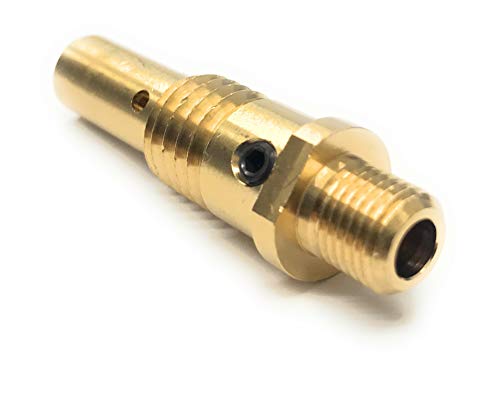
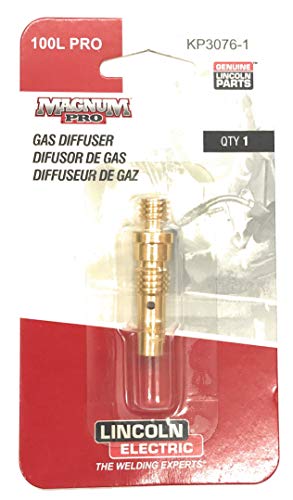
    The MIG diffuser, sometimes called a gas diffuser or contact tip adapter depending on gun design, directs shielding gas evenly into the nozzle area. On many guns it also holds the contact tip or connects the tip to the gooseneck. If the diffuser is packed with spatter, cross-threaded, overheated, loose, or wrong for the gun series, the weld can act like the gas is bad even when the cylinder, regulator, and hose are fine.

    Visual Wear Indicators

    • Spatter packed into diffuser gas holes.
    • Dark heat marks around the diffuser and contact tip seat.
    • Damaged or crossed threads where the tip screws in.
    • Loose contact tip that will not tighten squarely.
    • Nozzle spatter touching the tip or diffuser.
    • Gas holes unevenly blocked on one side, causing directional gas flow.

    Inspection Steps

    1. Turn off the machine and let the gun cool. Front-end parts can stay hot after short welds.
    2. Remove the nozzle. Look for spatter bridges between the nozzle, tip, and diffuser.
    3. Remove the contact tip. Replace it if the bore is oval, spatter-packed, or heat damaged.
    4. Inspect diffuser holes. Blocked ports are the main diffuser clogging sign.
    5. Clean only if the diffuser is still serviceable. Use a wire brush, small wire, or approved cleaning tool. Do not gouge the seating surfaces.
    6. Check tip seating. A loose or crooked tip can overheat and increase spatter.
    7. Confirm gas flow at the nozzle. Do this after cleaning, not just at the regulator.
    8. Run one test bead. Keep voltage and wire speed unchanged so the diffuser repair is the isolated variable.

    Common Causes of Diffuser Clogging

    • Excessive spatter: wrong voltage/WFS balance, dirty base metal, poor work connection, or wrong polarity.
    • Too much stickout: increases arc instability and front-end spatter exposure.
    • Dirty nozzle: spatter buildup redirects heat and gas flow back toward the diffuser.
    • Wrong consumable stack: mismatched nozzle, tip, or diffuser can disturb gas coverage.
    • Anti-spatter misuse: heavy gel or spray contamination can trap debris and carbonize around hot parts.
    • Overheated gun front end: duty-cycle abuse can cook spatter onto the diffuser and damage threads.

    Field Fix vs Proper Fix

    ProblemField FixProper Fix
    Light spatter in diffuser holesClean ports carefullyAdd diffuser/nozzle cleaning to routine maintenance
    Porosity after nozzle cloggingClean nozzle and diffuserReplace damaged consumables and verify gas coverage
    Tip will not tightenStop using that diffuserReplace diffuser/contact tip adapter
    Repeated burnbackReplace tip and clean diffuserFix wire feed drag, stickout, and front-end heat
    Spatter returns quicklyClean again and check settingsCorrect voltage/WFS, work clamp, polarity, gas, and metal prep

    Common Wrong-Part Mistakes

    • Ordering a diffuser by welder model instead of the actual MIG gun series.
    • Mixing MDX, M-series, Bernard, Tweco-style, or Lincoln consumables without verifying fitment.
    • Replacing only the contact tip when the diffuser holes are blocked.
    • Using a gasless nozzle while trying to run solid wire with shielding gas.
    • Installing a diffuser that fits the threads but does not match the nozzle/tip system.

    Compatibility Notes

    Verify the gun series before ordering diffusers. Weld Support Parts lists the Miller M-25 gas diffuser/contact tip adapter separately from Miller MDX diffuser parts, and those systems should not be treated as interchangeable. If the gun has been replaced in the field, the welder model alone is not enough to identify the diffuser.

    For verified WSP breakdowns, compare the installed gun to the Miller M-25 gun breakdown, Miller MDX-100 gun parts, and Miller MDX-250 gun parts.

    Related Failure Paths

    • Porosity blamed on bad gas when the diffuser is blocked.
    • Burnback blamed on wire speed when the tip is overheating.
    • Spatter blamed on machine settings when the nozzle and diffuser are packed.
    • Wire-feed slipping caused by a tip that overheats and grabs the wire.
    • Short consumable life caused by loose tip seating or damaged diffuser threads.

    Safety Notes

    • Let the nozzle, tip, and diffuser cool before removal.
    • Wear eye protection when brushing or chipping spatter from consumables.
    • Disconnect input power before deeper gun or feeder service.
    • Do not weld through poor gas coverage; porosity can weaken the weld.
    • Use ventilation or local exhaust to keep welding fumes away from the breathing zone.

    Sources Checked

    • Lincoln Electric MIG problems and maintenance guidance.
    • Bernard/Tregaskiss porosity and GMAW consumable troubleshooting.
    • Weld Support Parts Miller M-25, MDX-100, and MDX-250 gun breakdown pages.
    • Weld Support Parts burnback, wire-feed slipping, and MIG consumable support pages.

  • MIG Gun Neck Overheating Causes: Contact Tip, Diffuser, Duty Cycle, and Cable Problems

    A MIG gun neck overheats when heat cannot leave the front end fast enough or when electrical resistance builds at the contact tip, diffuser, neck, cable, or work return. The most common causes are welding above the gun’s duty cycle, a loose contact tip or diffuser, spatter-packed nozzle, wrong contact tip size, worn liner causing wire drag, poor work clamp contact, excessive stickout changes, or using a light-duty gun on high-amperage work. Treat neck overheating as a warning. If ignored, it can melt insulators, damage the neck, loosen consumables, burn back wire, and create erratic arc behavior.

    Common Symptoms

    SymptomLikely CauseFirst Check
    Neck too hot to handle quicklyGun over duty cycleCompare weld amperage and duty cycle rating
    Tip keeps looseningHeat cycling or wrong/loose diffuserInspect threads and tighten cold
    Burnback at contact tipTip overheating or wire feed dragReplace tip and check liner/feed path
    Nozzle discolors or spatter sticks heavilyGas/nozzle restriction or too much heat at front endClean nozzle and diffuser ports
    Arc stutters after several inchesHeat-related tip resistance or feed restrictionInstall correct tip and test feed straight
    Handle or cable gets hot tooUnderrated gun, loose power connection, or bad cableStop welding and inspect connections

    What This Part Does

    The MIG gun neck carries welding current forward, supports the diffuser/nozzle assembly, positions the contact tip, and directs shielding gas to the weld. In air-cooled guns, the neck and front-end consumables shed heat through the metal mass, shielding gas flow, and pause time between welds. In water-cooled guns, coolant removes heat from the torch body and neck area.

    Main Causes of MIG Gun Neck Overheating

    • Gun is underrated for the job: A 150A or 200A air-cooled gun will overheat faster on long welds, high wire feed speed, spray transfer, or heavy flux-cored work.
    • Duty cycle exceeded: A gun rated at 60% duty cycle is not intended for continuous welding at rated amperage.
    • Loose contact tip: Loose threads increase electrical resistance and heat at the tip/diffuser joint.
    • Loose or damaged diffuser: Poor current transfer at the diffuser or neck threads concentrates heat.
    • Wrong contact tip size: An oversized tip causes unstable current transfer; an undersized or blocked tip increases drag and burnback.
    • Spatter-packed nozzle: Restricted gas flow and radiant heat buildup raise front-end temperature.
    • Dirty or kinked liner: Wire drag makes the arc burn back and overheats the tip and neck area.
    • Poor work clamp path: Bad return contact increases arc instability and can make the operator raise settings unnecessarily.
    • Long stickout abuse: Excessive stickout can force higher settings or create an unstable arc, both adding heat.
    • Wrong consumable family: Mixing nozzles, tips, diffusers, or insulators from different systems can create poor seating and heat transfer.

    What Wears Out First

    The contact tip usually fails first. It carries current and guides wire at the hottest point of the gun. Once the bore is worn, the wire no longer transfers current consistently. The arc becomes unstable, burnback increases, and the neck absorbs more heat.

    The diffuser and insulator are next. Spatter, loose threads, damaged seats, or heat cycling can weaken the gas path and current path. If the diffuser does not seat tightly against the neck, the gun may overheat even with a new contact tip.

    Inspection Steps

    1. Stop welding and allow the gun to cool.
    2. Remove the nozzle and inspect for spatter buildup, discoloration, and blocked gas flow.
    3. Remove the contact tip. Check for oval wear, burnback, spatter, loose threads, or wrong wire size.
    4. Inspect the diffuser for blocked gas holes, damaged threads, cracks, and poor seating.
    5. Check the neck insulation and nozzle insulator for melting, cracking, or carbon tracking.
    6. Lay the cable straight and jog wire. Uneven feeding points to liner, drive roll, or spool drag issues.
    7. Check the work clamp on clean bare metal.
    8. Compare the welding amperage and arc-on time to the gun’s rated duty cycle.

    Test Procedure

    1. Install a new contact tip that matches the wire diameter.
    2. Clean or replace the nozzle if spatter is heavy.
    3. Confirm the diffuser is tight, correct, and not heat damaged.
    4. Verify the liner size and wire feed path.
    5. Clamp to clean metal close to the weld.
    6. Run a short bead at normal settings.
    7. If the neck overheats quickly again, reduce amperage/arc-on time or switch to a higher-rated gun.
    8. If the handle, cable, or connector gets hot, stop and inspect for loose power connections or cable damage.

    Compatibility Notes

    Order front-end parts by the actual gun and consumable system, not only by the welder model. A Miller MDX-100, Miller MDX-250 AccuLock S, Miller MDX-250 AccuLock MDX, Bernard Centerfire, Tweco-style, or Lincoln Magnum-style gun can use different tips, diffusers, nozzles, and insulators. Mixing systems can create poor seating, unstable current transfer, and overheating.

    For Miller gun lookup, start with the Miller MIG Gun Selection Chart. For MDX replacement paths, check Miller MDX-100 Gun Parts, Miller MDX-250 AccuLock S Gun Parts, and Miller MDX-250 AccuLock MDX Gun Parts. For general replacement categories, use MIG Contact Tips and MIG Liners.

    Common Wrong-Part Mistakes

    • Using a contact tip that fits the thread but does not match the diffuser system.
    • Replacing the tip but leaving a heat-damaged diffuser in place.
    • Installing a nozzle without the correct insulator or seat.
    • Using light-duty consumables on high-amperage spray or flux-cored welding.
    • Ordering by machine model instead of gun model, cable length, wire size, and consumable family.
    • Using a longer gun cable with the wrong liner, causing feed drag and burnback.

    Field Fix vs Proper Fix

    A field fix is to replace the contact tip, clean the nozzle, tighten the diffuser, reduce arc-on time, and let the gun cool between welds.

    The proper fix is to identify why the neck is getting hot. Verify gun amperage rating, duty cycle, consumable fit, liner condition, work return, and front-end seating. If production requires long high-amperage welds, upgrade to a heavier air-cooled gun or the correct water-cooled setup instead of burning up light-duty consumables.

    Related Failure Paths

    • Burnback into contact tip
    • Loose diffuser threads
    • Nozzle spatter buildup
    • Melted neck insulator
    • Wire feed surging from liner drag
    • Poor ground causing unstable arc
    • Underrated MIG gun for amperage

    Safety Notes

    Do not touch hot gun parts barehanded. Disconnect input power before servicing internal gun or feeder components. Keep fingers out of drive rolls while jogging wire. Stop welding if the gun handle, connector, or cable becomes hot, if insulation is melting, or if arcing is visible at the neck or power connection. Replace damaged gun parts before returning the welder to service.

Listen with Audible