Tag: welding equipment

  • Welding Fume Extractor Not Pulling Smoke: Causes and Fixes

    A welding fume extractor that fails to pull smoke effectively exposes operators to hazardous fumes and reduces overall shop safety. Poor suction is typically caused by airflow restriction, filter saturation, or incorrect positioning. Diagnosing the airflow path is critical to restoring proper extraction performance.

    Key Takeaways

    • Clogged filters are the most common cause of weak suction
    • Improper hood positioning reduces capture efficiency
    • Airflow restrictions limit extraction performance
    • Undersized systems struggle with high-fume processes
    • Routine maintenance prevents most extraction failures

    Problem / Context

    Fume extraction systems are designed to capture and remove airborne contaminants at the source. When suction drops, fumes remain in the breathing zone, increasing exposure risk. This issue is often gradual and may go unnoticed until visible smoke buildup occurs.

    Root Causes

    • Clogged filters: saturated media reducing airflow
    • Blocked ducting: debris or buildup restricting flow
    • Poor hood placement: positioned too far from the arc
    • Leaks in system: air loss reducing suction at the source
    • Undersized extractor: insufficient CFM for application
    • Fan or motor wear: reduced airflow performance

    Solution / Explanation

    • Replace or clean filters according to manufacturer guidelines
    • Inspect ducting for obstructions and remove debris
    • Position extraction hood as close to the weld arc as possible
    • Check system for air leaks and seal connections
    • Verify extractor capacity matches welding process requirements
    • Inspect fan and motor performance for wear or failure

    Specs / Verification Notes

    • Airflow Capacity (CFM): Unknown (Verify per unit)
    • Filter Type: HEPA or multi-stage (application dependent)
    • Duct Diameter: System dependent
    • Capture Velocity: Unknown (Verify)
    • Process Type: MIG, TIG, Stick, Flux-Cored (fume levels vary)

    Product Option

    ArcOne S240-10 Horizontal Single Auto-Darkening Filter for Welding, 2 x 4, Shade 10
    • Two independent sensors, High Definition clear view technology
    • 5.25 square inches of active viewing area
    • Switching speed of 0.5 milliseconds
    • Water and dust resistant
    • Dark to light state delay of 0.2 seconds

    Last update on 2026-06-04 / Affiliate links / Images from Amazon Product Advertising API

    Comparison Table

    IssueSymptomImpactFix
    Clogged FilterWeak suctionPoor air qualityReplace filter
    Blocked DuctReduced airflowFume buildupClear obstruction
    Poor Hood PlacementSmoke not capturedOperator exposureReposition hood
    Undersized UnitConstant smokeIneffective extractionUpgrade system

    Safety Notes

    Follow ANSI Z49.1 and OSHA ventilation standards for welding environments. Always verify proper airflow before welding. Use respiratory protection if extraction is insufficient.

    FAQ

    Why is my fume extractor not pulling smoke?

    This is usually caused by clogged filters, airflow restrictions, or improper hood placement.

    How often should filters be replaced?

    Filter replacement depends on usage, but should be done when airflow noticeably decreases.

    Does hood position affect performance?

    Yes. The hood must be positioned close to the arc to effectively capture fumes.

    Next Step

    Inspect filters and airflow path before the next weld. Adjust hood position and confirm suction strength using a visible smoke test.

    Sources Checked

    • ANSI Z49.1 Safety in Welding and Cutting
    • OSHA ventilation guidelines
    • Fume extraction system manufacturer documentation
  • 7018 Rod Sticking: Causes & Solutions

    Introduction

    Welding with 7018 rods can be challenging, especially when they start sticking during operation. This issue not only affects the quality of the weld but also disrupts workflow. Understanding the underlying causes and solutions can help welders achieve more efficient results.

    Key Takeaways

    – 7018 rods are prone to sticking due to improper technique or settings.
    – Correct amperage and angle can reduce sticking.
    – Proper rod storage is crucial for optimal performance.
    – Using the right equipment can significantly improve weld quality.

    Problem / Context

    Sticking occurs when the electrode fuses to the workpiece, interrupting the arc and making it difficult to complete the weld. This is a common issue with 7018 rods, which require precise conditions to function correctly.

    Causes

    Low Amperage

    – Inadequate amperage fails to sustain the arc, causing the rod to stick.

    Incorrect Angle

    – Holding the rod at an incorrect angle reduces arc stability.

    Poor Rod Condition

    – Moisture absorption in 7018 rods can lead to sticking.

    Fixes

    Step 1: Adjust Amperage

    Increase Amperage: Slowly increase amperage until the arc is stable and the rod flows smoothly without sticking.

    Step 2: Correct Angle

    Maintain a 10-15 Degree Angle: Keep the rod at a consistent angle to ensure smooth arc movement.

    Step 3: Ensure Dry Storage

    Proper Storage: Store rods in a dry, sealed container or rod oven to prevent moisture absorption.

    Step 4: Consistent Movement

    Steady Motion: Employ a steady, consistent movement along the weld joint to reduce sticking.

    Product Section

    Washington Alloy 7018 Stick Electrode 5LB Package (7018 1/8″)
    • All-position, Flux coated
    • 70,000 lbs Tensile Strength
    • 5 Lb Package

    Last update on 2026-06-04 / Affiliate links / Images from Amazon Product Advertising API

    Safety Notes

    Eye Protection: Follow ANSI Z87.1 standards for eye protection.
    Welding Codes: Adhere to AWS D1.1 and D1.3 for safe and effective welding practices.

    FAQ

    What amperage should be used for 7018 rods?

    Amperage settings typically range from 90 to 160 amps, depending on the rod diameter. Adjust based on welding parameters and practice.

    How should 7018 rods be stored?

    Store in a temperature-controlled rod oven at 250°F (121°C) to keep them dry and prevent moisture absorption.

    Can rod sticking damage my welding machine?

    Prolonged sticking can overheat and damage your welding machine, so it’s vital to address issues promptly.

    Conclusion / Next Step

    Addressing 7018 rod sticking involves proper technique and equipment adjustments. By implementing these solutions, welders can enhance their welding performance and minimize disruptions. For more tips on stick welding, explore additional resources and comparisons of welding rods like 7018 vs 6011.

  • YESWELDER 205A TIG Welder with Pulse Large LED Display

    YESWELDER 205A TIG Welder with Pulse Large LED Display

    Intro
    Upgrading your welding setup? The YESWELDER 205A TIG Welder delivers precise TIG, stick, and pulse welding performance with a clear, shop-tough interface—ideal for pros and serious DIYers.

    Key Takeaways

    • Dual voltage (110V/220V) for shop or field use
    • DC TIG, stick, and pulse TIG modes—versatile for steel, stainless, and more
    • Large LED display for fast, accurate settings
    • Hot start and auto memory for repeatable welds
    • Pulse function helps control heat and distortion

    Performance & Use

    This unit handles DC TIG, stick, and pulse TIG processes. Suitable for mild and stainless steel. Not rated for aluminum TIG (no AC). The intuitive LED panel speeds setup, and dual voltage makes it portable for jobsite or bench.

    Durability & Build

    Rugged steel case, reinforced corners, and quality internal components. Designed for daily use in demanding environments. Cooling fan and overheat protection included.

    Power / Specs

    • Input: 110V/220V dual voltage
    • Output: 205A max (DC)
    • TIG/Stick/Pulse modes: Verified
    • Duty cycle: Unknown (Verify)
    • Weight: Unknown (Verify)
    • AC TIG: Not supported

    Who It’s For

    • Welders upgrading from entry-level machines
    • Fabricators needing pulse control for thin material
    • Not for those requiring AC TIG (aluminum) or ultra-lightweight portability

    Quick FAQ

    Q: Can it weld aluminum TIG?
    A: No, AC TIG not supported.

    Q: Is the torch included?
    A: Yes, per Amazon listing.

    Q: Can it run on standard home outlets?
    A: Yes, via 110V input.

    Q: Does it have pulse mode?
    A: Yes, pulse TIG is verified.

    Q: Warranty?
    A: Unknown (Verify with seller).

    Q: Is the display easy to see with gloves?
    A: Yes, large LED is glove-friendly.

    Safety Notes

    • Always use proper PPE: gloves, jacket, auto-darkening helmet
    • Ensure adequate ventilation; avoid welding in confined spaces
    • Inspect cables and torch before each use
    • Always follow the machine manual, SDS, and applicable code requirements. If unsure, verify with the manufacturer.

    Where to Buy

    Amazon pick: YESWELDER 205A TIG Welder with Pulse Large LED Display — ASIN: B0GGB7SSPR
    Amazon link: https://www.amazon.com/dp/B0GGB7SSPR?tag=weldsupport-20
    AAWP shortcode:

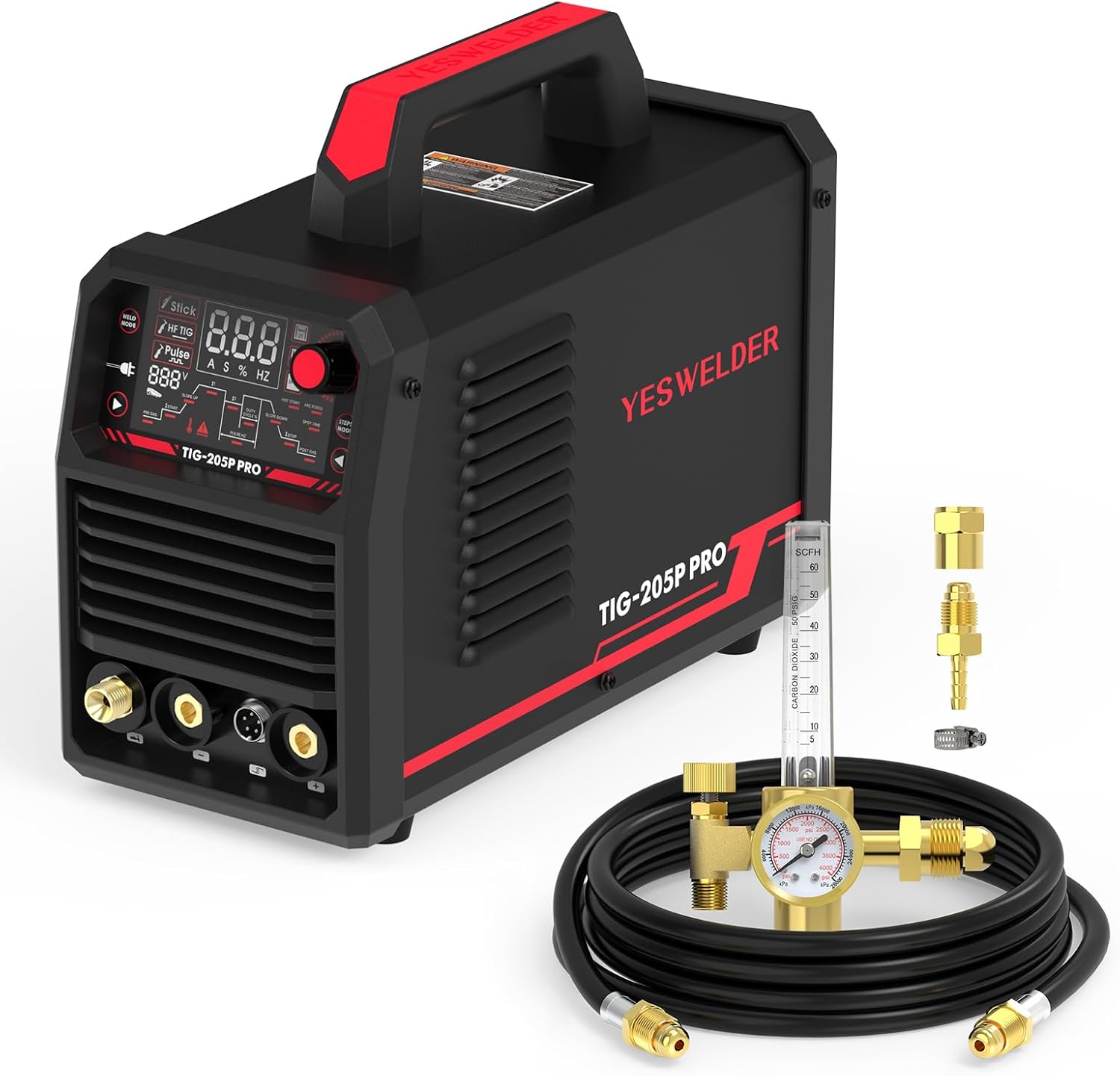
    YESWELDER 205A Tig Welder with Pulse Large LED Display, STICK/DC TIG/PULSE TIG 3 In 1, 110&220V Dual Voltage & Argon/CO2 Mig Tig Flow Meter Gas Regulator Gauge Welding Weld with 8ft Gas Hose
    • Large LED Display: Features a large LED screen for enhanced visibility and a clear display of welding parameters and settings. Its intuitive interface ensures effortless operation, enabling precise welding of diverse metals
    • More Powerful: The TIG welder delivers up to 200 amps, meeting the needs of both hobbyists and professionals—sufficient for versatile DIY projects and extended professional use. It features auto-sensing dual voltage input (110V/220V) for plug-and-play operation in home outlets and workshops, with no manual switching. Equipped with High-Frequency non-touch arc starting (HF Start), it ensures reliable ignition and stable arc performance for consistent, high-quality welds
    • 3-IN-1 TIG WELDER: Combines STICK (MMA), DC TIG, and PULSE TIG. Stick mode features HOT START, ARC FORCE, and ANTI-STICK for stable, versatile welding. DC TIG features HF arc ignition and 2T/4T/spot operation with adjustable settings, ideal for stainless and mild steel. Pulse TIG offers independent control over pulse frequency, duty cycle, and current, perfect for thin materials and non-ferrous metals. One welding machine meets all needs, from fabrication and auto repair to creative projects and
    • Wide Application: Has CGA – 580 Tank fitting so it will screw right into the Argon, Argon/CO2 Tanks. Ideal choice for MIG TIG welding, chemical and electronics industry
    • Accurate Gas Flow Gauge: The Square flow tube reads from 0 – 60 CFH, which is indicated by a ball which moves up and down in the flow tube. And has large 1 1/2″ diameter pressure gauge which reads from 0 – 4000 PSI. Easy to read, accurate

    Last update on 2026-06-04 / Affiliate links / Images from Amazon Product Advertising API

  • Millermatic 211 Pro MIG Welder | Powerful & Portable

    Millermatic 211 Pro MIG Welder | Powerful & Portable


    Model: Millermatic® 211 Pro

    ⚠️ Note for Readers: This post may contain affiliate links. If you purchase through them, we may earn a small commission at no cost to you. Thank you for supporting our site.


    Introduction

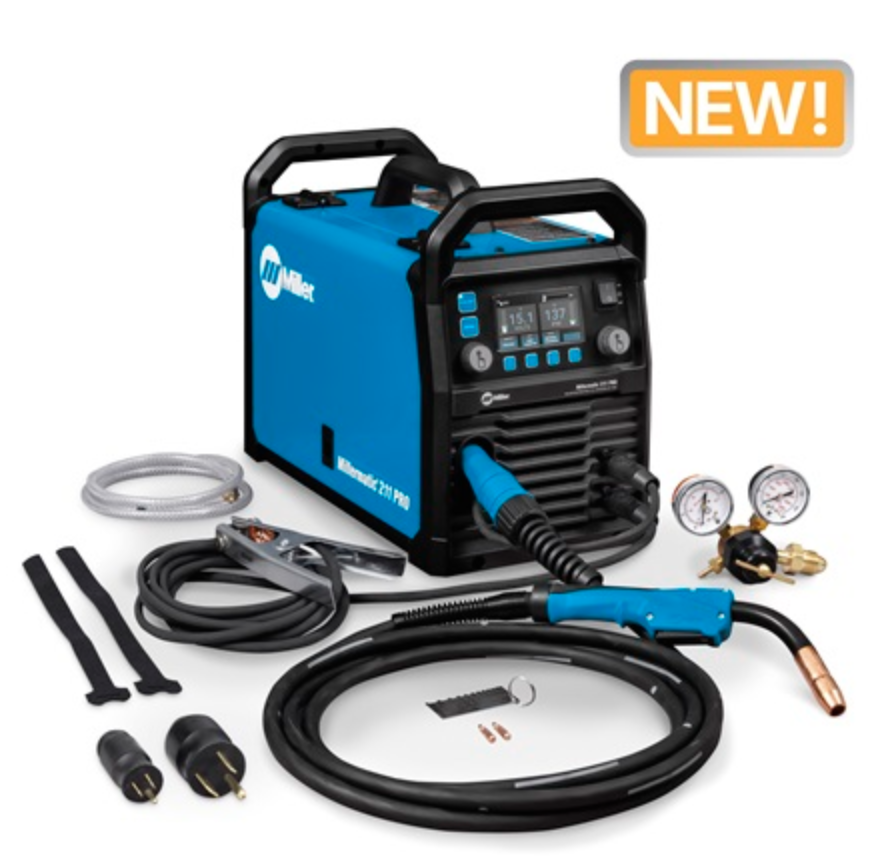
    The Miller Electric Millermatic 211 Pro is a compact, professional-grade MIG (GMAW) welder designed for use across a wide spectrum of metal fabrication tasks. Built with both portability and welding performance in mind, it’s an evolution of one of Miller’s most popular mid-range welders, optimized for ease-of-use, multi-voltage operation, and superior arc quality.

    This machine occupies a sweet spot for professional fabricators, maintenance personnel, students, field technicians, and DIY welders demanding industrial performance in a lightweight package. With its ability to run on both 120V and 240V input power, the Millermatic 211 Pro is suited for everything from shop settings to on-site jobs.


    Types / Variants / Models

    At the time of writing, Miller Electric lists only the Millermatic 211 Pro as a standalone model—this is a streamlined iteration of the previous Millermatic 211 (non-“Pro”) model.

    While there’s no fleet of variants under the “211 Pro” name, it’s useful to differentiate:

    • Millermatic® 211 Pro (Current Model)

      • Updated UI and design
      • Simplified interface with precision adjustment
      • New industrial-grade drive system
    • Millermatic® 211 (Legacy Models)

      • Auto-Set™ technology (not present in the “Pro”)
      • Slightly different interface and control system

    The “Pro” version is aimed more at professionals who prefer manual voltage and wire feed control over automated settings like Auto-Set™ found in consumer models.


    Key Features or Specifications

    Here’s a breakdown of the critical specs and design features that define the Millermatic 211 Pro:

    Power Source

    • Multi-voltage input: 120V or 240V
    • MVP™ (Multi-Voltage Plug): Adapts to varying job site power supplies
      Benefit: Maximum portability without sacrificing performance

    Output Amperage Range

    • 120V Input: 30–150 A
    • 240V Input: 30–230 A
      Benefit: Wide amperage range accommodates thin-gauge to thick materials (24 ga to 3/8″ in a single pass)

    Duty Cycle

    • 240V: 40% @ 150A
    • 120V: 20% @ 115A
      Benefit: Practical for extended use at medium output; improves productivity with adequate cooling time

    Machine Dimensions & Weight

    • Height: 12.5 in
    • Width: 11.25 in
    • Depth: 20.5 in
    • Net Weight: 38 lbs
      Benefit: Extremely portable for a welder with this power class

    Wire Compatibility

    • Wire sizes supported:
      • Solid wire: 0.023–0.035 in
      • Flux-cored wire: 0.030–0.045 in
        Benefit: Flexible enough for both MIG and FCAW applications

    Build & Durability

    • Industrial-grade cast aluminum drive system
    • Integrated spool gun control for aluminum welding
      Benefit: Long operational life and compatibility with spool guns like the Spoolmate™ 100

    Certifications

    • CSA-certified
    • IP23S-rated for rugged environments
      Benefit: Meets key safety and durability standards expected in professional use environments

    Usage & Compatibility

    Supported Welding Processes

    • GMAW (MIG)
    • FCAW (Flux-Cored Arc Welding)
      (Not compatible with SMAW or GTAW)

    Welder Compatibility

    • Ready out of the box for MIG and flux-cored processes
    • Compatible with accessories such as the Spoolmate™ 100 spool gun for aluminum
    • Works with standard MIG consumables and drive rolls

    User Experience Highlights

    • Manual controls: No Auto-Set™, requires knowledge of voltage/wire speed chart
    • Digital voltage and wire feed readouts: Ensures consistency and ease of setup
    • Smooth arc starts with minimal spatter: Reduces need for post-weld cleanup

    Pros

    • Lightweight and portable
    • Excellent arc characteristics
    • Dual-voltage capability
    • Ideal for aluminum with a compatible spool gun

    Cons

    • No Auto-Set™ feature may require a learning curve for beginners
    • Slightly more expensive than entry-level models

    Common Applications

    The Millermatic 211 Pro has been widely adopted across various use cases due to its ability to weld a broad range of materials and manage differing material thicknesses effectively.

    Industries and Job Types

    • Automotive repair & fabrication
    • Farm and ranch maintenance
    • General metal fabrication
    • Field/portable welding
    • Light industrial manufacturing
    • Technical education programs

    Material Compatibility

    • Mild steel, stainless steel, aluminum (with spool gun)
    • Welds steel thicknesses from 24-gauge to 3/8 in in a single pass

    Why It’s Ideal

    • Its power-to-weight ratio makes it perfect for mobile fabricators
    • Dual-voltage input means it works equally well in workshops and field settings
    • Designed for performance in demanding environments with consistent weld quality

    Tips & Best Practices

    To get the most from your Millermatic 211 Pro, consider these tips:

    Setup Tips

    • Use the included setup chart for voltage/wire feed references based on material type and thickness
    • Ensure correct polarity depending on weld wire type (e.g., reverse polarity for solid wire with shielding gas, straight polarity for flux-core)

    Welding Practices

    • Use clean, properly prepared material for stronger welds
    • Maintain a steady travel speed to avoid undercut or poor penetration

    Maintenance Recommendations

    • Clean drive rolls and liner regularly to avoid feed issues
    • Store indoors if possible—while IP23S rated, prolonged moisture exposure affects electronics
    • Blow out dust and debris periodically with dry compressed air

    Troubleshooting

    • Welds sputter? Check wire speed and contact tip size
    • No arc? Confirm ground clamp connection, spool gun toggle, and trigger circuit
    • Wire feeding erratically? Check for liner wear or incorrect tension on feed rolls

    Conclusion

    The Miller Electric Millermatic 211 Pro delivers professional-grade performance in a compact and portable MIG welder. Designed with structural repair

    Check out the Miller store!

Try Amazon Prime Free