Author: Adam

  • TIG Arc Starting Problems and Fixes: Hard Starts, Arc Wander, HF Start Failure, and Contaminated Tungsten

    TIG arc starting problems usually come from tungsten condition, work clamp contact, gas coverage, torch setup, or start-mode settings before they come from a failed machine. If the arc will not start, starts only when scratched, wanders at ignition, snaps to the cup, or contaminates the tungsten immediately, check the tungsten point, work lead, cup/gas lens, collet grip, polarity, amperage start setting, and HF or lift-arc mode first.

    The fastest check is to install a clean sharpened tungsten, clamp directly to clean bare metal, verify argon at the cup, remove drafts, and try a start on clean scrap. If the arc starts normally after those steps, the problem was setup or consumable condition, not the power source.

    Related TIG checks include unstable TIG arc from poor tungsten prep, why TIG tungsten turns black, TIG porosity troubleshooting, and TIG cup size and gas coverage selection.

    Common Symptoms

    SymptomLikely CauseFirst Check
    Arc will not start with HFWrong mode, poor work lead, dirty tungsten, HF issueConfirm HF start mode and clamp to clean metal
    Arc starts only by touchingHF not active or work path too weakVerify start mode, pedal/remote, and work clamp
    Arc wanders at startPoor tungsten grind, contaminated tungsten, long arc lengthRegrind tungsten and shorten arc gap
    Tungsten sticks on lift startToo much pressure or wrong lift techniqueTouch lightly and lift smoothly
    Arc jumps to cup or side of tungstenLoose collet, cracked cup, dirty gas lens, off-center tungstenInspect torch front end
    Starts rough after every stopToo little post-flow or contaminated tungstenCheck tungsten color and post-flow time

    Most Common Causes

    • Contaminated tungsten: touching the filler, puddle, bench, or dirty base metal makes starts rough.
    • Poor tungsten prep: uneven grind marks, blunt tips, split tips, and wrong taper make the arc wander.
    • Weak work clamp path: paint, rust, mill scale, loose lugs, or clamping through a table can block a clean start.
    • Wrong start mode: HF, lift-arc, scratch start, 2T/4T, pedal, or remote settings may not match the torch setup.
    • Gas coverage failure: bad cup, clogged gas lens, loose back cap, low post-flow, or drafts oxidize the tungsten.
    • Wrong tungsten size for amperage: oversized tungsten can be hard to start at very low amperage; undersized tungsten overheats.
    • Dirty base metal: aluminum oxide, oil, rust, and coatings interfere with stable starts.

    Inspection Steps

    1. Confirm process and polarity. Most DC TIG on steel/stainless uses DCEN. AC is used for aluminum and magnesium on AC-capable machines.
    2. Confirm start mode. Know whether the machine is set for HF start, lift-arc, or scratch start.
    3. Regrind tungsten. Use a clean dedicated wheel or tungsten grinder. Grind lengthwise, not around the electrode.
    4. Check tungsten size. Match electrode diameter to amperage range and machine start capability.
    5. Clamp directly to the work. Clean to bare metal and avoid relying on rusty tables, hinges, or fixtures.
    6. Inspect the torch front end. Check cup, gas lens, collet, collet body, back cap, O-ring, and tungsten centering.
    7. Verify argon at the cup. Flow at the regulator does not prove gas is reaching the tungsten.
    8. Check post-flow. If tungsten turns blue, gray, or black after the stop, it may start poorly next time.
    9. Try clean scrap. If the arc starts clean on scrap, the original part may be dirty, coated, oxidized, or poorly grounded.

    HF Start vs Lift-Arc Checks

    Start TypeProblemFix
    HF startNo arc unless touchingConfirm HF mode, remote settings, work clamp, and torch connection
    HF startArc wanders before stabilizingRegrind tungsten, shorten arc gap, clean base metal
    Lift-arcTungsten sticksUse lighter touch and smoother lift; clean tungsten and workpiece
    Scratch startTungsten contaminationUse a copper strike plate or HF/lift start where procedure allows
    Any modeHard restartIncrease post-flow, regrind tungsten, inspect gas leaks

    Field Fix vs Proper Fix

    ProblemField FixProper Fix
    Dirty tungstenRegrind pointFix dipping, filler angle, gas coverage, and post-flow
    Weak work pathMove clamp to clean metalRepair cable, lug, clamp, or table return path
    Arc wandersShorten arc lengthCorrect tungsten grind, size, and torch angle
    Lift start sticksTouch lighterConfirm lift mode and clean contact point
    HF start fails repeatedlyTry lift mode if availableHave HF circuit/service items checked by qualified repair

    Common Wrong-Part Mistakes

    • Using a collet that does not match tungsten diameter.
    • Installing a gas lens without the matching cup and insulator setup.
    • Buying torch parts by welder model instead of torch series.
    • Using oversized tungsten for low-amp work and blaming the machine for hard starts.
    • Replacing the foot pedal before checking torch switch, remote setting, work clamp, and tungsten condition.

    Compatibility Notes

    TIG start behavior depends on welder start type, torch switch or pedal setup, tungsten size, torch family, collet size, gas lens or standard collet body, cup size, and work lead condition. WP-9/20-style consumables and WP-17/18/26-style consumables are not automatically interchangeable. Verify torch series and tungsten diameter before ordering consumables.

    Related Failure Paths

    • Black tungsten from low post-flow or gas leaks.
    • Arc wander from poor tungsten preparation.
    • Porosity from poor gas coverage during start and stop.
    • Tungsten inclusion from scratch starting or sticking lift starts.
    • Hard starts from poor work clamp contact.
    • Unstable starts from dirty aluminum oxide or contaminated base metal.

    Safety Notes

    • Disconnect input power before servicing torch leads, work leads, or internal machine connections.
    • Use eye protection when grinding tungsten.
    • Follow shop rules for thoriated tungsten handling and dust control.
    • High-frequency start can interfere with sensitive electronics; follow equipment and site requirements.
    • Secure argon cylinders and use ventilation during test welds.

    Sources Checked

    • Weld Support Parts tungsten prep, tungsten discoloration, TIG porosity, and TIG cup support pages.
    • CK Worldwide TIG guide and TIG troubleshooting guidance.
    • Miller TIG welding basics and TIG problem troubleshooting guidance.
    • Lincoln Electric high-frequency TIG start technology reference.
  • TIG Post-Flow Setting Troubleshooting: Black Tungsten, Porosity, Gas Waste, and Torch Cooling

    TIG post-flow is the shielding gas that keeps flowing after the arc stops. If it is too short, the hot tungsten and cooling weld crater are exposed to air, causing black, blue, gray, or crusty tungsten, rough restarts, porosity, and contaminated weld starts. If post-flow is too long, weld quality may be fine, but argon usage goes up fast during tack welding or short beads.

    Start by watching the tungsten after arc stop. If the tungsten is still glowing when argon shuts off, increase post-flow. If the tungsten stays clean but gas keeps flowing long after the torch cools, reduce post-flow in small steps. Do not fix black tungsten by only increasing flow rate; a cracked cup, leaking back cap O-ring, clogged gas lens, or loose torch fitting can still expose the electrode to oxygen.

    Related TIG checks include why TIG tungsten turns black, TIG porosity troubleshooting, sooty TIG weld gas coverage fixes, and TIG cup size and gas lens selection.

    Common Symptoms

    SymptomLikely Post-Flow IssueFirst Check
    Tungsten turns black after weldPost-flow too short or gas leakIncrease post-flow and inspect gas path
    Tungsten turns blue or grayHot tungsten exposed during coolingWatch whether gas stops before glow is gone
    Rough arc restartOxidized tungsten from previous stopRegrind tungsten and extend post-flow
    Porosity at crater or restartWeld pool loses shielding while coolingHold torch over crater during post-flow
    Argon bottle empties quicklyPost-flow too long for short weldsReduce time gradually after tungsten stays clean

    What Post-Flow Does

    Post-flow protects three hot areas after the arc shuts off: the tungsten, the weld crater, and the end of the filler rod if it remains inside the gas envelope. Tungsten can oxidize after the bead looks finished because the electrode remains hot longer than many operators expect. The goal is enough shielding to let the tungsten cool without discoloration, not maximum gas flow for every weld.

    Starting Point for Post-Flow

    A common field rule is about 1 second of post-flow per 10 amps of welding current. Some Miller GTAW guidance also lists 10–15 seconds as a corrective range when inadequate post-flow is causing tungsten or arc problems. Use those as starting points, then tune by tungsten color, material, torch heat, tungsten size, and weld length.

    Welding CurrentCommon Starting RangeWhat To Watch
    50 amps5 secondsTungsten should not color after gas stops
    80 amps8 secondsGood range for many light TIG jobs
    120 amps12 secondsCheck torch heat and tungsten color
    150 amps15 secondsOften needs longer protection on hot torch setups
    200 amps20 secondsVerify torch rating and cooling; gas use increases quickly

    Inspection Steps

    1. Confirm the gas. Most TIG work uses 100% argon. Do not use MIG gas with CO2 or oxygen for TIG.
    2. Watch tungsten color. Black, gray, blue, or crusted tungsten after arc stop points to oxygen exposure, contamination, or too little post-flow.
    3. Hold the torch still. Keep the cup over the crater until post-flow ends. Moving away early defeats the setting.
    4. Check flow at the cup. A regulator reading does not prove gas is reaching the tungsten.
    5. Inspect the cup. Replace cracked, chipped, loose, or overheated cups.
    6. Inspect the gas lens or collet body. Blocked screens or damaged gas passages can cause poor coverage even with long post-flow.
    7. Check the back cap O-ring. A damaged O-ring can pull air into the torch and oxidize tungsten.
    8. Check hoses and fittings. Use approved leak-check methods and repair leaks before welding.
    9. Adjust gradually. Add or subtract a few seconds at a time, then retest on clean material.

    Post-Flow Too Short vs Too Long

    ConditionResultCorrective Action
    Too shortBlack tungsten, rough restarts, crater oxidationIncrease time and hold torch over weld
    Too longHigh argon consumption with no quality gainReduce time after tungsten remains clean
    Correct time but black tungstenLeak, cracked cup, bad O-ring, dirty gas lensInspect torch and gas path
    Correct time but porosityDraft, contamination, wrong cup, no purgeCheck shielding coverage and base-metal prep

    Field Fix vs Proper Fix

    ProblemField FixProper Fix
    Tungsten blackens after stopAdd post-flow timeSet time by amps and repair leaks or worn torch parts
    Gas wastes during tacksLower post-flow slightlyUse a repeatable tack schedule that still protects tungsten
    Crater porosityHold torch over crater longerCorrect post-flow, torch angle, cup size, and cleanliness
    Blue tungsten on aluminumAdd post-flowCheck AC heat, torch cooling, gas lens, and cup size
    Soot remains after increasing post-flowClean cup and tungstenFix gas coverage, contaminated material, or wrong gas

    Common Wrong-Part Mistakes

    • Replacing tungsten repeatedly while ignoring a leaking back cap O-ring.
    • Using a cracked cup and trying to compensate with longer post-flow.
    • Installing gas lens parts that do not match the torch series or cup setup.
    • Using a collet that does not match tungsten diameter, causing poor alignment and overheating.
    • Turning gas flow too high and creating turbulence instead of fixing post-flow time.

    Compatibility Notes

    Post-flow is a machine setting, but the correct result depends on torch family, cup size, gas lens or standard collet body, tungsten diameter, amperage, material, and torch cooling. Consumables for WP-9/20-style torches and WP-17/18/26-style torches are not automatically interchangeable. Verify torch series and tungsten diameter before replacing cups, collets, gas lenses, or back caps.

    Related Failure Paths

    • Black tungsten from oxygen exposure after arc stop.
    • Rough arc starts from oxidized tungsten.
    • TIG porosity at crater or restart.
    • Sooty TIG welds caused by poor gas coverage.
    • Cracked cups or clogged gas lenses mistaken for bad post-flow.
    • High argon use from excessive post-flow during tack welding.

    Safety Notes

    • Let tungsten, cups, and torch parts cool before handling.
    • Secure argon cylinders upright and protect regulators from impact.
    • Argon can displace oxygen in confined areas; use ventilation and confined-space controls where required.
    • Use eye protection when grinding tungsten.
    • Do not weld through suspected gas leaks or damaged hoses.

    Sources Checked

    • Weld Support Parts TIG tungsten discoloration support page.
    • Weld Support Parts TIG porosity and soot troubleshooting pages.
    • Weld Support Parts TIG cup size and gas lens support page.
    • CK Worldwide TIG troubleshooting and gas shielding guidance.
    • Miller GTAW troubleshooting guidance.
  • TIG Torch Consumable Wear Signs: Cup Cracks, Collet Slip, Gas Lens Clogs, and Dirty Tungsten

    Worn TIG torch consumables usually show up as dirty tungsten, rough arc starts, porosity, black soot, poor gas coverage, tungsten slipping, cup cracking, and inconsistent bead color. The problem is often not the welder. It is usually in the torch front end: cup, collet, collet body, gas lens, back cap, O-ring, insulator, or tungsten.

    Start by checking the parts that control gas flow and tungsten grip. A cracked cup leaks shielding gas. A worn collet lets the tungsten slide or sit off-center. A clogged gas lens disrupts argon flow. A damaged back cap O-ring can pull air into the torch. If the tungsten turns black, the weld gets sooty, or the arc wanders after consumables heat up, inspect the torch before changing amperage or blaming the machine.

    Related TIG support checks include why TIG tungsten turns black, TIG porosity troubleshooting, TIG cup size selection, and sooty TIG weld gas coverage fixes.

    Common Symptoms

    SymptomLikely Worn ConsumableFirst Check
    Tungsten slips or pulls backCollet, collet body, back capInspect collet grip and correct tungsten size
    Black or gray tungstenCup, gas lens, O-ring, gas leakVerify argon flow and post-flow
    Porosity appears suddenlyCracked cup, clogged gas lens, leaking torchInspect cup and gas lens screen
    Arc wandersContaminated tungsten, loose collet, worn collet bodyRegrind tungsten and check clamp force
    Soot around weldPoor gas coverage, damaged cup, turbulent flowCheck cup size, gas lens, and torch angle
    Cup keeps crackingOverheating, impact, wrong cup setupCheck amperage, cup fit, and torch cooling

    What Each TIG Consumable Does

    • Cup/nozzle: directs shielding gas around the tungsten and weld pool.
    • Collet: grips the tungsten when the back cap is tightened.
    • Collet body: holds the collet and positions the tungsten in the torch.
    • Gas lens: smooths gas flow and improves coverage, especially with longer stickout.
    • Back cap: tightens the collet and seals the rear of the torch.
    • O-rings and insulators: prevent gas leaks and keep torch parts sealed and aligned.
    • Tungsten: carries the arc; contamination or overheating changes arc shape immediately.

    Visual Wear Indicators

    PartWear SignsReplace When
    CupCracks, chips, white/brown heat marks, spatter, metal dustCracked, leaking, loose, or no longer shielding evenly
    ColletSplit end spread open, burn marks, weak grip, oval boreTungsten slips or will not center
    Collet bodyDamaged threads, poor seating, discoloration, loose fitCollet will not tighten or tungsten sits crooked
    Gas lensClogged screen, dark deposits, crushed mesh, blocked holesGas flow becomes uneven or soot/porosity continues
    Back capCracked body, damaged threads, missing or flat O-ringGas leaks or tungsten will not clamp correctly
    Insulator/gasketBurned edges, cracks, missing seal, loose cup fitCup leaks, torch heats unevenly, or gas coverage fails

    Inspection Steps

    1. Let the torch cool. Ceramic cups, tungsten, and copper parts can stay hot after short welds.
    2. Remove the cup. Check for cracks, chips, dirt, and signs of gas leakage.
    3. Remove the tungsten. If it is black, crusted, split, balled unexpectedly, or contaminated, regrind or replace it.
    4. Inspect the collet. Match it to the tungsten diameter. Replace it if grip is weak or the split end is distorted.
    5. Inspect the collet body or gas lens. Look for blocked screens, damaged threads, and heat discoloration.
    6. Check the back cap and O-ring. A damaged seal can cause gas coverage problems that look like bad argon.
    7. Reassemble with matching parts. Do not mix standard cups with gas lens hardware unless the setup is designed for it.
    8. Test gas flow at the cup. Confirm steady argon flow before striking an arc.
    9. Run one test bead. Keep amperage and travel unchanged so the consumable change is the isolated variable.

    Test Procedures

    Tungsten grip test: Install the correct tungsten and tighten the back cap normally. If the tungsten slides with light hand pressure, inspect the collet, collet body, and back cap threads.

    Gas coverage test: Weld a short bead with clean tungsten, clean base metal, and no drafts. If bead color improves after replacing the cup or gas lens, the old consumable was disturbing gas flow.

    Post-flow test: Watch the tungsten after arc stop. If it turns blue, gray, or black quickly, check post-flow, back cap seal, cup damage, gas lens blockage, and hose leaks.

    Field Fix vs Proper Fix

    ProblemField FixProper Fix
    Tungsten slippingTighten back cap slightlyReplace worn collet and verify tungsten diameter
    Dirty gas lensBrush or blow out lightlyReplace clogged or damaged screen assembly
    Cracked cupSwap cup immediatelyMatch cup type to torch, amperage, and joint access
    Black tungstenIncrease post-flowRepair leaks and replace bad cup, O-ring, or gas lens
    Arc wandersRegrind tungstenFix collet grip, tungsten contamination, and gas coverage

    Common Wrong-Part Mistakes

    • Buying TIG cups by size number only without confirming torch series.
    • Using a 17/18/26 collet on a 9/20-style torch or the reverse.
    • Installing a gas lens without the matching cup and insulator setup.
    • Using a collet that does not match tungsten diameter.
    • Replacing tungsten repeatedly while ignoring a leaking back cap O-ring.
    • Running long tungsten stickout with a standard collet body when gas lens coverage is needed.

    Compatibility Notes

    TIG consumables must match the torch family, tungsten diameter, cup style, gas lens or standard collet body setup, and back cap style. Common 17/18/26-style consumables are larger than 9/20-style consumables and should not be treated as interchangeable. If the torch has been replaced in the field, do not order consumables by welder model alone.

    Related Failure Paths

    • TIG porosity from cracked cups, poor gas lens flow, or leaking O-rings.
    • Dirty tungsten from insufficient post-flow or gas leakage.
    • Arc wander from weak collet grip or contaminated tungsten.
    • Black soot from turbulent argon flow or damaged front-end parts.
    • Cup overheating from excess amperage, wrong cup setup, or poor torch cooling.

    Safety Notes

    • Let hot torch parts cool before disassembly.
    • Use eye protection when grinding tungsten or cleaning cups.
    • Disconnect power before deeper torch or machine service.
    • Secure argon cylinders and use ventilation during test welds.
    • Follow shop procedures for thoriated tungsten handling and grinding dust control.

    Sources Checked

    • Weld Support Parts TIG cup, gas lens, tungsten discoloration, and porosity support pages.
    • ESAB/TBi TIG torch consumable guidance.
    • Grainger TIG gas lens and collet body descriptions.
    • Weldmonger TIG torch consumables overview.
  • TIG Tungsten Balling Causes on AC Welding: Aluminum Setup, AC Balance, Amperage, and Electrode Choice

    TIG tungsten balls on AC because the electrode is getting too hot at the tip. A small controlled ball can be normal on older transformer-style AC aluminum welding, especially with pure or zirconiated tungsten. Excessive balling, mushrooming, splitting, wandering arc, or tungsten dropping into the weld usually means the tungsten is overloaded, the AC balance puts too much heat on the electrode, the tungsten diameter is too small, the electrode type is wrong for the machine, or the shielding gas is not protecting the hot tungsten.

    On modern inverter AC TIG machines, a sharp or truncated point is usually preferred over a large ball. If the tungsten balls immediately reduce electrode-positive cleaning action, use a larger tungsten, switch to 2% lanthanated, ceriated, or zirconiated tungsten depending on the machine and procedure, shorten stickout, verify argon coverage, and confirm the torch is not overheating.

    Related TIG checks include why TIG tungsten turns black, TIG porosity troubleshooting, and TIG cup size and gas coverage selection.

    Common Symptoms

    SymptomLikely CauseFirst Check
    Tungsten forms a large ball immediatelyToo much heat on electrode, tungsten too small, wrong AC balanceCheck tungsten diameter and reduce cleaning action
    Ball grows wider than tungsten diameterElectrode overloadedUse larger tungsten or reduce amperage
    Arc wanders around the ballBall too large or contaminated tungstenRegrind to truncated point
    Tungsten splits or spits into puddleOverheating, contamination, wrong tungsten typeReplace electrode and verify AC settings
    Tungsten turns black after weldingPoor post-flow or gas coverage failureCheck argon flow, cup, gas lens, and post-flow

    What Causes Tungsten Balling on AC?

    • Too much electrode-positive time: More cleaning action puts more heat into the tungsten.
    • Tungsten diameter too small: A small electrode cannot carry the selected amperage without melting back.
    • Wrong tungsten for the machine: Pure tungsten balls easily and is mainly associated with older transformer AC machines.
    • Too much amperage: The electrode overheats before the puddle stabilizes.
    • Long tungsten stickout: Poor cooling and weak gas coverage let the tip overheat and oxidize.
    • Contamination: Touching filler, puddle, aluminum oxide, or dirty base metal makes the tip deform.
    • Poor shielding gas: Low flow, high turbulent flow, cracked cup, bad gas lens, or short post-flow damages the hot tungsten.

    Electrode Choice Notes

    For older transformer AC aluminum welding, pure tungsten may naturally form a balled end. Zirconiated tungsten is often used where a balled or rounded end is desired with better contamination resistance. On modern inverter AC machines, lanthanated and ceriated tungstens usually hold a prepared point better and give a more focused arc. Do not assume the same tungsten prep works for every AC TIG machine.

    Tungsten TypeAC BehaviorNotes
    Pure tungstenBalls readilyMostly for transformer AC; lower current capacity
    ZirconiatedRetains rounded/balled end betterGood AC choice where weld contamination is a concern
    LanthanatedHolds point well on inverter ACCommon modern AC/DC TIG choice
    CeriatedGood starts and stable arcOften used for lower-amperage TIG
    ThoriatedLess common for AC aluminum todayRadiation concern; verify shop procedure

    Inspection Steps

    1. Identify the machine type. Transformer AC and inverter AC do not use the same tungsten-prep approach.
    2. Check tungsten diameter. If the ball exceeds the electrode diameter or forms instantly, the electrode may be undersized for amperage.
    3. Check AC balance. Reduce cleaning action if the machine is putting excessive heat into the tungsten.
    4. Check AC frequency if available. Higher frequency focuses the arc but can require a stable prepared tip.
    5. Regrind the tungsten. Use a clean truncated point for inverter AC unless the procedure calls for a ball.
    6. Inspect gas coverage. Check cup size, cracked cup, gas lens condition, argon flow, and post-flow.
    7. Clean aluminum thoroughly. Remove oxide and contamination before welding; do not make the tungsten carry the cleaning burden.
    8. Watch torch heat. A hot air-cooled torch can contribute to consumable and tungsten failure.

    Field Fix vs Proper Fix

    ProblemField FixProper Fix
    Large ball forms instantlyLower amperage and reduce cleaning actionUse correct tungsten diameter and AC balance
    Arc wandersRegrind tungstenUse truncated point and correct AC frequency/balance
    Tungsten spits into weldStop and replace tungstenCorrect overheating, contamination, and tungsten type
    Black tungsten after weldIncrease post-flowRepair gas leaks and replace damaged cup/gas lens
    Repeated balling on aluminumMove to larger tungstenMatch electrode, amperage, machine type, and procedure

    Common Wrong-Part Mistakes

    • Using pure tungsten on an inverter machine when lanthanated or ceriated would hold shape better.
    • Using 1/16 in. tungsten for amperage that needs 3/32 in. or larger.
    • Buying cups, collets, or gas lenses without confirming torch series and tungsten diameter.
    • Trying to fix excessive balling by increasing gas flow until turbulence pulls in air.
    • Using a balled tip because it was common on old transformer machines, even though the inverter setup wants a truncated point.

    Compatibility Notes

    Tungsten choice depends on machine type, AC waveform control, amperage, tungsten diameter, base metal, and procedure. Torch consumables must match the torch family, cup style, collet size, and tungsten diameter. If using WP-17, WP-18, or WP-26 style parts, verify the actual torch body and gas lens setup before ordering.

    Related Failure Paths

    • Arc wandering from a large or contaminated tungsten ball.
    • Black tungsten from poor post-flow or gas leakage.
    • Aluminum porosity from poor cleaning or shielding.
    • Dirty weld starts from contaminated tungsten.
    • Gas lens/cup failure mistaken for tungsten failure.
    • Excess cleaning action overheating the electrode.

    Safety Notes

    • Let tungsten and torch parts cool before handling.
    • Use eye protection when grinding tungsten.
    • Use a dedicated tungsten grinder or wheel to avoid contamination.
    • Follow shop rules for thoriated tungsten handling and dust control.
    • Secure argon cylinders and use ventilation during test welds.

    Sources Checked

    • Miller guidance on AC TIG inverter tungsten selection.
    • CK Worldwide tungsten electrode characteristics guide.
    • CK Worldwide AC TIG aluminum setup notes.
    • Weld Support Parts TIG tungsten discoloration and gas coverage support pages.
    • Weld Support Parts TIG cup size and porosity troubleshooting pages.
  • TIG Shielding Gas Coverage Troubleshooting: Porosity, Soot, Tungsten Color, and Cup Setup

    Poor TIG shielding gas coverage shows up as porosity, gray or black weld color, dirty tungsten, unstable arc starts, sugaring on stainless, and oxidation around the bead. The most common causes are low argon flow, excessive flow creating turbulence, torch angle pulling air into the puddle, drafts, a cracked cup, damaged gas lens, loose torch parts, gas leaks, or not enough post-flow after the weld.

    Start with the gas path before changing amperage. Confirm 100% argon for most TIG work, verify flow at the torch, remove drafts, inspect the cup and gas lens, shorten tungsten stickout, and hold a tighter torch angle. If tungsten stays bright and the weld color improves after these checks, the problem was coverage—not the machine.

    Related TIG support checks include TIG porosity troubleshooting, sooty TIG weld gas coverage fixes, and TIG cup size selection.

    Common Symptoms

    SymptomLikely Coverage CauseFirst Check
    Pinholes or porosityAir entering weld zone or contaminated gas pathVerify argon flow at torch and check leaks
    Black soot on weldWeak shielding, torch angle, dirty lens, draftInspect cup/lens and block air movement
    Tungsten turns blue, black, or crustyHot tungsten exposed after arc stopsIncrease post-flow and check torch angle
    Stainless weld turns dark grayInsufficient argon envelope or no back purgeCheck cup size, gas lens, and backside shielding
    Arc wanders or starts roughContaminated tungsten or loose collet partsRegrind tungsten and inspect collet/collet body

    What Shielding Gas Coverage Does

    TIG shielding gas protects the tungsten, arc column, molten weld pool, and hot cooling metal from oxygen and nitrogen. When coverage breaks down, the puddle oxidizes before it solidifies. On stainless and titanium, poor shielding can damage corrosion resistance and weld quality. On carbon steel and aluminum, it can leave porosity, soot, rough starts, and contaminated tungsten.

    Inspection Steps

    1. Confirm the gas. Most TIG welding uses 100% argon. Unknown mixed gas is a common mistake when switching between MIG and TIG.
    2. Verify flow at the torch. Do not rely only on the regulator. A kinked hose, loose fitting, blocked torch, or bad connector can reduce actual flow.
    3. Start in the normal TIG range. Many shop setups start around 15–20 CFH. Larger cups, aluminum, or longer stickout may need more, but excessive flow can pull air into the shield.
    4. Block drafts. Fans, open doors, outdoor work, and fume extraction too close to the arc can strip argon away.
    5. Inspect the cup. Replace chipped, cracked, contaminated, or oversized/undersized cups that do not match the joint.
    6. Inspect the gas lens or collet body. Look for plugged screens, cracks, discoloration, or damaged threads.
    7. Check tungsten stickout. Too much stickout without a gas lens exposes the tungsten and puddle to air.
    8. Correct torch angle. Keep the torch close to vertical. A steep push angle can pull air into the argon stream.
    9. Check post-flow. Argon must continue long enough to protect the hot tungsten and weld crater after the arc stops.

    Visual Wear Indicators

    • Cup: cracks, chips, metal dust, black deposits, or heat damage.
    • Gas lens: clogged screen, discoloration, blocked mesh, or loose fit.
    • Collet: poor tungsten grip, split end damage, wrong tungsten size.
    • Back cap O-ring: cracked, missing, flattened, or leaking.
    • Gas hose: cracked rubber, loose clamps, leaking fittings, or kinks.
    • Tungsten: blue/black color, crusted tip, split point, or contamination balling.

    Test Procedures

    Flow-at-cup test: Listen and feel for steady argon flow at the cup before welding. If the flow is weak, uneven, or silent, inspect the hose, torch connection, solenoid, regulator, and torch front end.

    Draft test: Run a short bead with all fans and doors controlled. If the weld brightens and porosity drops, gas coverage was being stripped away.

    Post-flow test: Watch the tungsten after arc stop. If it colors immediately, increase post-flow or find a gas leak. Tungsten should remain shielded while it cools.

    Field Fix vs Proper Fix

    ProblemField FixProper Fix
    Draft pulls argon awayBlock the airflowReposition extraction and create a controlled weld zone
    Dirty gas lensBlow out or brush lightlyReplace damaged or clogged lens
    Cracked cupSwap cup immediatelyMatch cup size to joint, amperage, and stickout
    Black tungsten after arc stopIncrease post-flowRepair leaks and set post-flow for amperage/tungsten size
    Porosity only on stainless backsideReduce heat and shield betterAdd proper back purge or backing gas procedure

    Common Wrong-Part Mistakes

    • Using MIG shielding gas instead of 100% argon for TIG.
    • Buying cups by appearance instead of torch series, thread style, and gas lens setup.
    • Installing a gas lens without the matching cup system.
    • Using a collet that does not match tungsten diameter.
    • Blaming the welder when a cracked back cap O-ring is leaking argon.
    • Running long tungsten stickout with a standard collet body when a gas lens is needed.

    Compatibility Notes

    TIG cups, collets, collet bodies, gas lenses, and back caps must match the torch family and tungsten diameter. Common 17/18/26-style parts are not universal across every torch, and 9/20-style parts are smaller. Verify torch series, tungsten size, cup style, and whether the torch uses a standard collet body or gas lens before ordering.

    Related Failure Paths

    • TIG porosity caused by air entering the weld zone.
    • Dirty tungsten caused by inadequate post-flow.
    • Black soot caused by turbulent gas or torch angle.
    • Stainless sugaring caused by missing backside purge.
    • Arc wandering caused by contaminated tungsten.
    • Repeated cup cracking caused by overheating or wrong cup selection.

    Safety Notes

    • Secure argon cylinders upright and protect regulators from impact.
    • Argon can displace oxygen in confined areas; use ventilation and confined-space controls where required.
    • Let hot cups, tungsten, and torch parts cool before handling.
    • Use welding PPE and eye protection during gas-flow and arc tests.
    • Do not weld stainless, coated metals, or unknown materials without proper fume controls.

    Sources Checked

    • Weld Support Parts TIG porosity guide.
    • Weld Support Parts sooty TIG weld troubleshooting guide.
    • Weld Support Parts TIG cup size guide.
    • Lincoln Electric TIG shielding gas and porosity troubleshooting resources.
    • CK Worldwide TIG torch setup and gas lens guidance.
  • MIG Diffuser Clogging Symptoms: Porosity, Burnback, Spatter Buildup, and Poor Gas Coverage

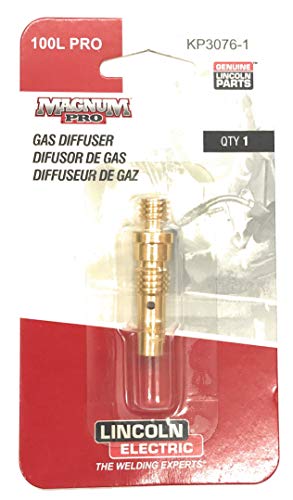
    A clogged MIG diffuser usually shows up as porosity, unstable arc starts, extra spatter, fast nozzle buildup, contact tip overheating, and repeated burnback. The diffuser sits behind the nozzle and routes shielding gas around the contact tip. When spatter blocks the diffuser ports, gas flow becomes restricted or turbulent, leaving the weld pool exposed even if the regulator still shows gas flow.

    The quick test is to remove the nozzle, inspect the diffuser holes, clean out spatter, install a clean correct-size contact tip, and run a short test bead with the same settings. If porosity or spatter drops immediately, the front-end consumables were causing the problem. Do not keep raising gas flow to compensate for a blocked diffuser; excessive flow can also create turbulence.

    Related checks include MIG burnback troubleshooting, contact tip burnback causes, MIG wire feed slipping fixes, and MIG wire selection.

    Common Symptoms

    SymptomLikely Diffuser IssueFirst Check
    Porosity appears suddenlyGas ports blocked or gas flow turbulentRemove nozzle and inspect diffuser holes
    Nozzle fills with spatter quicklyArc instability and poor gas envelopeClean nozzle, tip, and diffuser together
    Contact tip runs hotSpatter bridges around tip or diffuserReplace tip and inspect diffuser threads
    Wire burns back into tipTip overheating or gas/front-end restrictionCheck diffuser, tip bore, and stickout
    Arc starts rough or sputtersUnstable shielding and current transfer areaClean front end before changing settings

    What This Part Does

    The MIG diffuser, sometimes called a gas diffuser or contact tip adapter depending on gun design, directs shielding gas evenly into the nozzle area. On many guns it also holds the contact tip or connects the tip to the gooseneck. If the diffuser is packed with spatter, cross-threaded, overheated, loose, or wrong for the gun series, the weld can act like the gas is bad even when the cylinder, regulator, and hose are fine.

    Visual Wear Indicators

    • Spatter packed into diffuser gas holes.
    • Dark heat marks around the diffuser and contact tip seat.
    • Damaged or crossed threads where the tip screws in.
    • Loose contact tip that will not tighten squarely.
    • Nozzle spatter touching the tip or diffuser.
    • Gas holes unevenly blocked on one side, causing directional gas flow.

    Inspection Steps

    1. Turn off the machine and let the gun cool. Front-end parts can stay hot after short welds.
    2. Remove the nozzle. Look for spatter bridges between the nozzle, tip, and diffuser.
    3. Remove the contact tip. Replace it if the bore is oval, spatter-packed, or heat damaged.
    4. Inspect diffuser holes. Blocked ports are the main diffuser clogging sign.
    5. Clean only if the diffuser is still serviceable. Use a wire brush, small wire, or approved cleaning tool. Do not gouge the seating surfaces.
    6. Check tip seating. A loose or crooked tip can overheat and increase spatter.
    7. Confirm gas flow at the nozzle. Do this after cleaning, not just at the regulator.
    8. Run one test bead. Keep voltage and wire speed unchanged so the diffuser repair is the isolated variable.

    Common Causes of Diffuser Clogging

    • Excessive spatter: wrong voltage/WFS balance, dirty base metal, poor work connection, or wrong polarity.
    • Too much stickout: increases arc instability and front-end spatter exposure.
    • Dirty nozzle: spatter buildup redirects heat and gas flow back toward the diffuser.
    • Wrong consumable stack: mismatched nozzle, tip, or diffuser can disturb gas coverage.
    • Anti-spatter misuse: heavy gel or spray contamination can trap debris and carbonize around hot parts.
    • Overheated gun front end: duty-cycle abuse can cook spatter onto the diffuser and damage threads.

    Field Fix vs Proper Fix

    ProblemField FixProper Fix
    Light spatter in diffuser holesClean ports carefullyAdd diffuser/nozzle cleaning to routine maintenance
    Porosity after nozzle cloggingClean nozzle and diffuserReplace damaged consumables and verify gas coverage
    Tip will not tightenStop using that diffuserReplace diffuser/contact tip adapter
    Repeated burnbackReplace tip and clean diffuserFix wire feed drag, stickout, and front-end heat
    Spatter returns quicklyClean again and check settingsCorrect voltage/WFS, work clamp, polarity, gas, and metal prep

    Common Wrong-Part Mistakes

    • Ordering a diffuser by welder model instead of the actual MIG gun series.
    • Mixing MDX, M-series, Bernard, Tweco-style, or Lincoln consumables without verifying fitment.
    • Replacing only the contact tip when the diffuser holes are blocked.
    • Using a gasless nozzle while trying to run solid wire with shielding gas.
    • Installing a diffuser that fits the threads but does not match the nozzle/tip system.

    Compatibility Notes

    Verify the gun series before ordering diffusers. Weld Support Parts lists the Miller M-25 gas diffuser/contact tip adapter separately from Miller MDX diffuser parts, and those systems should not be treated as interchangeable. If the gun has been replaced in the field, the welder model alone is not enough to identify the diffuser.

    For verified WSP breakdowns, compare the installed gun to the Miller M-25 gun breakdown, Miller MDX-100 gun parts, and Miller MDX-250 gun parts.

    Related Failure Paths

    • Porosity blamed on bad gas when the diffuser is blocked.
    • Burnback blamed on wire speed when the tip is overheating.
    • Spatter blamed on machine settings when the nozzle and diffuser are packed.
    • Wire-feed slipping caused by a tip that overheats and grabs the wire.
    • Short consumable life caused by loose tip seating or damaged diffuser threads.

    Safety Notes

    • Let the nozzle, tip, and diffuser cool before removal.
    • Wear eye protection when brushing or chipping spatter from consumables.
    • Disconnect input power before deeper gun or feeder service.
    • Do not weld through poor gas coverage; porosity can weaken the weld.
    • Use ventilation or local exhaust to keep welding fumes away from the breathing zone.

    Sources Checked

    • Lincoln Electric MIG problems and maintenance guidance.
    • Bernard/Tregaskiss porosity and GMAW consumable troubleshooting.
    • Weld Support Parts Miller M-25, MDX-100, and MDX-250 gun breakdown pages.
    • Weld Support Parts burnback, wire-feed slipping, and MIG consumable support pages.

  • Do Welding Helmet Cover Lenses Block UV, or Is the ADF Doing That?

    A clear welding helmet cover lens is mainly a sacrificial protection plate. It protects the auto-darkening filter, fixed shade plate, and viewing area from spatter, grinding dust, scratches, smoke film, and impact wear. The welding filter or auto-darkening filter is the part that must provide the required welding shade and UV/IR protection for arc exposure.

    This matters because a clean cover lens can make the helmet look safer than it really is. A clear cover plate is not a welding shade. Do not weld with only a clear cover lens, and do not assume a scratched or missing cover lens is harmless. If the auto-darkening cartridge is damaged, missing, incorrectly installed, or not marked for welding protection, the helmet should be removed from service.

    For broader helmet selection and shade checks, see the auto-darkening welding helmet buying guide and the welding safety glasses shade and ANSI Z87.1 guide.

    Key Takeaways

    • The ADF or passive welding filter is the primary part responsible for welding shade and UV/IR protection.
    • The clear outside cover lens mainly protects the filter from spatter, dust, scratches, and impact wear.
    • Some clear cover lenses may meet ANSI Z87.1 impact requirements, but that does not make them welding shade filters.
    • Do not weld with a missing, cracked, heat-warped, or heavily scratched cover lens because it can expose the ADF to damage.
    • Do not weld with only a clear cover lens. Use the correct filter shade for the process and amperage.

    Problem / Context

    The common question is whether the clear lens on the outside of a welding helmet blocks UV, or whether the auto-darkening filter does that job. The practical answer is that the welding filter must be treated as the critical UV/IR and shade-control component. The clear cover lens is a replaceable barrier that helps preserve the filter, but it is not a substitute for the filter.

    Most helmet designs use several layers: the helmet shell, the outside clear cover lens, the ADF or fixed shade filter, and often an inside cover lens. Each part has a different job. Confusing these layers can lead to unsafe shortcuts, especially when a cover lens is cracked or the ADF looks expensive to replace.

    Root Causes of Confusion

    Clear lenses may still have safety markings: A clear replacement cover lens may be sold as ANSI Z87.1 compliant for impact protection. That does not mean it has the correct optical density for welding arc radiation.

    ADF lenses protect in light and dark states: Manufacturer manuals commonly state that the auto-darkening cartridge provides UV/IR protection in both light and dark states. The darkening function controls visible brightness and shade comfort, but the UV/IR filter function should not depend only on the lens switching dark.

    The cover lens sits closest to the arc: Because the clear plate faces sparks and spatter first, welders may assume it is the main safety lens. Its real job is to protect the more expensive filter behind it.

    Damaged cover lenses can hide filter problems: A cloudy, pitted, or heat-warped cover lens reduces visibility and can make welders raise their hood, lean into bad positions, or miss a damaged ADF. See the ArcOne S240-10 auto-darkening filter support guide for fit and visibility checks.

    Some helmets cannot be used without cover lenses: Several helmet manuals warn against using the helmet without the inside and outside cover lenses properly installed. Missing cover lenses can allow spatter, heat, and debris to damage the filter cartridge.

    Solution

    1. Confirm the helmet has a proper ADF or passive welding filter installed. A clear cover lens alone is not enough.
    2. Check the helmet and filter markings for ANSI Z87.1 and manufacturer identification.
    3. Confirm the shade range or fixed shade number matches the welding process and amperage.
    4. Inspect the outside cover lens for cracks, spatter pits, smoke film, deep scratches, or heat warping.
    5. Inspect the inside cover lens if the helmet uses one. Replace it if it is cracked, dirty, pitted, or loose.
    6. Use only replacement cover lenses specified by the helmet manufacturer when possible.
    7. Replace the cover lens before visibility drops enough to affect puddle control or sensor performance.
    8. Remove the helmet from service if the ADF cartridge is cracked, loose, delaminated, water-damaged, or not darkening correctly.
    9. Wear safety glasses or goggles under the helmet where grinding, chipping, or flying particle hazards exist.

    Specs / Verification Notes

    Helmet LayerMain JobCan It Replace the ADF?Verification Note
    Outside clear cover lensProtects the welding filter from spatter, dust, scratches, and impact wearNoSize, material, and helmet fit: Unknown (Verify)
    Auto-darkening filterProvides welding shade and UV/IR protection according to the helmet designRequired for ADF helmetsConfirm shade range and ANSI marking
    Passive filter plateProvides fixed welding shade and radiation filteringRequired for passive helmetsConfirm shade number for process and amperage
    Inside cover lensProtects the inside face of the filter from dust, handling damage, and debrisNoHelmet-specific fit: Unknown (Verify)
    Safety glasses under hoodProtects against flying particles when requiredNoConfirm ANSI Z87.1 marking

    Product Section

    Replacement cover lenses are maintenance parts, not shade filters. The example below is a 2 in x 4-1/4 in clear cover lens. Confirm helmet fit, lens size, manufacturer approval, and ANSI marking before use. Compatibility with any specific helmet is Unknown (Verify).

    Forney 56800 Cover Lens, Plastic, 2-Inch-by-4-1/4-Inch, Clear
    • package dimensions :13.208 cm L x 5.588 cm W x 0.254 cm H
    • Product type :TOOLS
    • country of origin:China
    • This are highly durable

    Last update on 2026-06-05 / Affiliate links / Images from Amazon Product Advertising API

    Comparison Table

    QuestionCorrect AnswerShop Mistake to Avoid
    Does the clear cover lens provide welding shade?No. It is not the welding filter.Do not weld through only a clear cover lens.
    Does the ADF provide UV/IR protection?Manufacturer manuals commonly state UV/IR protection is present in light and dark states.Do not keep using a cracked or unverified ADF.
    Can a cracked cover lens be ignored?No. Replace it before welding.Do not let spatter or debris reach the filter cartridge.
    Can any clear lens fit any helmet?No. Size and helmet model matter.Do not force a loose, undersized, or warped cover plate into service.
    Are safety glasses still needed?They may be required for flying particle hazards.Do not rely on the helmet alone during grinding or chipping.

    Related Failure Paths

    ADF does not darken: If the lens stays light, flashes, or responds inconsistently, use the auto-darkening welding helmet not working checklist.

    ADF flickers on TIG: A dirty cover lens or blocked sensor can contribute to flicker on low-current TIG. See why auto-darkening helmets flicker on aluminum TIG.

    Passive versus auto-darkening confusion: Passive helmets and ADF helmets both require proper filter protection, but they work differently. Compare the practical differences in auto-darkening vs passive welding helmets.

    Shade number mismatch: A clear cover lens does not determine whether shade 9, 10, 11, 12, or 13 is correct. Use the process, amperage, and manufacturer chart to select shade. The helmet lens speed, shade range, and standards guide gives broader selection context.

    Safety Notes

    Arc welding emits visible light, ultraviolet radiation, and infrared radiation. Use a welding helmet with the correct filter lens shade for the process and current. OSHA guidance also notes that workers using welding helmets may need safety glasses with side shields or goggles where flying particle hazards exist.

    Do not treat a clear cover plate as UV/IR proof for welding exposure unless the complete helmet, filter, and replacement part are being used exactly as specified by the manufacturer. Even if a clear cover lens has some UV-blocking material property, it is not a substitute for a welding filter shade.

    Stop using the helmet if the filter cartridge is cracked, loose, heat damaged, water damaged, or visibly compromised. Manufacturer warnings commonly state that UV/IR protection may be compromised when the product is damaged.

    FAQ

    Does the clear outside cover lens block UV?

    Do not rely on it as the welding UV/IR protection layer. The cover lens is mainly a protective plate. The ADF or passive welding filter is the critical radiation-filtering component.

    Does an auto-darkening helmet protect from UV before it darkens?

    Manufacturer manuals for auto-darkening helmets commonly state that the ADF protects against UV/IR in both light and dark states. The darkening function controls visible light shade, but the helmet still must be undamaged, properly assembled, and correctly rated.

    Can welding flash happen if the ADF fails to darken?

    Yes. Even when UV/IR filtering is present, a lens that fails to darken can expose the user to excessive visible light and unsafe viewing conditions. Stop welding and troubleshoot the helmet.

    Can a clear cover lens be used for grinding?

    Only if the complete helmet setup is rated and configured for grinding or impact hazards. Grinding mode does not make the helmet a welding shade, and welding mode does not replace safety glasses where flying particles are present.

    How often should cover lenses be replaced?

    Replace them when cracked, soiled, pitted, deeply scratched, heat-warped, loose, or visibility is reduced. Replacement interval depends on welding process, spatter level, grinding exposure, and shop conditions.

    Can aftermarket cover lenses be used?

    Only after verifying size, fit, material, safety marking, and helmet manufacturer guidance. OEM lenses are preferred when the helmet manual specifies exact replacement parts.

    Next Step

    Inspect the helmet in layers: outside cover lens, ADF or passive filter, inside cover lens, shell, headgear, and safety glasses. Replace damaged cover lenses, verify the correct filter shade, and remove the hood from service if the ADF or passive filter is cracked, loose, unmarked, or not working correctly.

    Sources Checked

    • OSHA Eye Protection against Radiant Energy during Welding and Cutting fact sheet: filter lens shade guidance and safety glasses or goggles for flying particle hazards.
    • Lincoln Electric auto-darkening helmet manuals: UV/IR protection in dark and light states, warnings about damaged products, and use of specified cover lenses.
    • 3M Speedglas welding PPE product guide: permanent UV/IR protection references for Speedglas ADF products.
    • Forney 56800 cover lens manufacturer listing: 2 in x 4-1/4 in clear plastic cover lens, impact and spatter protection, ANSI Z87.1 reference, and fit notes.
    • Weld Support Parts: Auto-Darkening Welding Helmet Buying Guide 2025.
    • Weld Support Parts: Welding Safety Glasses Guide 2025.
    • Weld Support Parts: Auto-Darkening Welding Helmet Not Working: Causes and Fixes.
    • Weld Support Parts: ArcOne S240-10 Auto-Darkening Welding Filter Support Guide.
    • Weld Support Parts: Auto-Darkening vs Passive Welding Helmets.
  • MIG Ground Clamp Connection Problems: Arc Sputter, Heat, Poor Starts, and Weak Current Return

    A bad MIG ground clamp connection causes arc instability, poor starts, extra spatter, weak penetration, burnback, and random sputtering even when voltage and wire speed look correct. The work clamp is not just an accessory; it completes the welding circuit. If the clamp is loose, corroded, undersized, attached over paint/rust, or connected through a weak table path, the machine cannot deliver steady current to the weld.

    Start with the simple test: move the work clamp directly to clean bare metal on the workpiece, as close to the weld as practical. If the arc immediately becomes smoother, the problem is in the work return path, not the MIG gun, wire, or machine settings. Do this before changing voltage, wire speed, drive-roll pressure, or gas flow.

    Related MIG checks include welding cable and connector sizing, MIG wire feed slipping troubleshooting, and MIG burnback at the contact tip.

    Common Symptoms

    SymptomLikely Ground Clamp CauseFirst Check
    Arc sputters or cuts in and outLoose clamp, dirty contact, weak cable lugClamp directly to clean bare metal
    Hard arc startsHigh resistance at work clamp or table connectionClean workpiece and clamp jaws
    Clamp gets hotUndersized clamp, loose cable connection, poor jaw contactInspect lug, spring pressure, and cable size
    Spatter increases suddenlyUnstable current return pathMove clamp closer to weld
    Settings seem inconsistentVoltage drop through bad work lead or connectionInspect full work cable path

    What This Part Does

    The MIG work clamp connects the workpiece to the machine’s work lead so welding current can return to the power source. A clean, tight, low-resistance path lets the arc stay consistent. A poor path forces current through rust, paint, bearings, table hinges, loose bolts, thin sheet edges, or damaged cable strands. That resistance turns into heat and unstable arc behavior.

    Inspection Steps

    1. Stop welding and let hot parts cool. A hot clamp or lug can burn gloves and damage insulation.
    2. Move the clamp to the workpiece. Do not rely on the welding table unless the table connection is clean and proven.
    3. Clean the clamp spot. Grind or brush to bare metal. Remove paint, rust, mill scale, primer, oil, and heavy oxidation.
    4. Check jaw bite. Weak spring tension or worn copper/brass contact surfaces reduce contact area.
    5. Inspect the cable-to-clamp lug. Look for loose bolts, dark heat marks, melted insulation, green corrosion, or broken strands.
    6. Check cable size and length. Long leads or undersized cable can overheat and drop voltage.
    7. Check the machine-end connector. Loose Dinse, Tweco-style, stud, or lug connections can create the same symptoms as a bad clamp.
    8. Run a test bead. Use the same settings before and after moving the clamp so the ground-path change is isolated.

    What Wears Out First

    • Clamp jaws: arcing, rust, and grinding dust reduce metal-to-metal contact.
    • Spring tension: weak springs allow vibration and poor bite on the workpiece.
    • Cable lug: heat cycling loosens bolts and oxidizes the connection.
    • Cable strands: repeated bending near the clamp breaks copper under the jacket.
    • Machine connector: loose or worn plugs create heat and voltage drop.

    Test Procedures

    Clamp relocation test: Attach the work clamp directly to bright metal on the part. If the arc stabilizes, clean the old clamp point or repair the table/work lead path.

    Heat test: After a short weld, carefully check whether the clamp, lug, or machine connector is hotter than expected. Heat at a connection usually means resistance.

    Cable flex test: With power off, flex the work lead near the clamp and connector. Crunching, soft spots, or intermittent stiffness can indicate broken copper strands or jacket damage.

    Field Fix vs Proper Fix

    ProblemField FixProper Fix
    Clamp on painted metalMove to bare metalAdd a cleaned clamp pad to the workflow
    Clamp jaws dirtyWire brush jawsReplace worn or burned clamp
    Loose lug boltTighten after coolingReplace damaged lug and verify crimp/bolt connection
    Clamp gets hotReduce duty cycle and inspectInstall properly rated clamp/cable assembly
    Table path unreliableClamp directly to partMaintain dedicated work lead connection point

    Common Wrong-Part Mistakes

    • Buying a clamp by jaw size only instead of current rating and cable size.
    • Installing a new clamp on a burned or undersized cable.
    • Reusing a loose lug that has already overheated.
    • Assuming a clean welding table guarantees a clean work return path.
    • Replacing the MIG gun or contact tip before testing the work clamp connection.

    Compatibility Notes

    Ground clamp replacement depends on machine output amperage, duty cycle, cable size, connector style, and lead length. Do not assume one clamp fits every MIG welder. If the machine uses a Dinse, Tweco-style, stud, or lug connection, verify connector size before ordering. Some Weld Support Parts accessory pages list lead sets and connector styles, but compatibility must be matched to the actual welder and cable assembly.

    For connector and cable planning, see the welding cable connector kit guide and verify any machine-specific connector before replacement.

    Related Failure Paths

    • Arc instability mistaken for wire-feed trouble.
    • Spatter increase blamed on voltage settings.
    • Contact tip burnback caused by unstable arc behavior.
    • Poor penetration caused by current loss through a bad return path.
    • Overheated work lead insulation from undersized cable or loose lugs.

    Safety Notes

    • Disconnect input power before servicing cable lugs, connectors, or internal machine terminals.
    • Do not touch hot clamps, lugs, or cable ends with bare hands.
    • Replace melted insulation, cracked clamps, or burned connectors instead of continuing to weld.
    • Never let welding current return through bearings, chains, lift tables, hinges, or vehicle electronics.
    • Use welding PPE and adequate ventilation during test welds.

    Sources Checked

    • Weld Support Parts welding cable connector kit guide.
    • Weld Support Parts MIG support pages mentioning work clamp checks.
    • Lincoln Electric MIG troubleshooting resources.
    • American Torch Tip MIG cable conductivity troubleshooting.
    • Weld Support Parts machine accessory pages showing cable/connector examples.
  • MIG Weld Spatter Reduction Troubleshooting: Settings, Gas, Stickout, Wire, and Gun Checks

    Excessive MIG spatter usually comes from an unstable arc, not from one single bad part. Start with the high-impact checks: voltage and wire-feed-speed balance, shielding gas coverage, wire stickout, base-metal cleanliness, contact tip condition, nozzle spatter buildup, and work clamp connection. If the wire is popping, throwing BBs, sticking to the tip, or leaving heavy spatter around the bead, correct the setup before replacing machine parts.

    The fastest troubleshooting path is to clean the metal to bright steel, install a clean correct-size contact tip, clean the nozzle and diffuser, confirm gas flow at the nozzle, shorten excessive stickout, and run one test bead while changing only one setting at a time. If spatter drops immediately, the machine is probably not the root cause.

    For related MIG failure paths, compare this guide with MIG contact tip burnback troubleshooting, contact tip burnback and nozzle maintenance, and MIG wire selection for ER70S-6 vs ER70S-3.

    Common Symptoms

    SymptomLikely CauseFirst Check
    Sharp popping arc with BB spatterVoltage/WFS mismatch, poor work connection, dirty steelClean clamp area and adjust one parameter at a time
    Spatter builds inside nozzle fastWrong stickout, dirty nozzle, wrong tip, unstable arcClean nozzle/diffuser and verify tip size
    Wire stubs into puddleWire feed too high for voltage or voltage too low for feedReduce WFS slightly or increase voltage slightly
    Arc hisses, bead is wide, undercut appearsVoltage too high or travel too fastLower voltage or slow travel after test bead
    Spatter plus porosityShielding gas loss, wind, dirty metal, blocked nozzleCheck gas flow at nozzle and remove drafts

    Most Common Causes of MIG Spatter

    • Voltage too low for wire speed: the wire drives into the puddle and breaks off violently.
    • Voltage too high: the arc becomes harsh, wide, and difficult to control.
    • Excessive stickout: wire resistance increases, current drops, and the arc gets inconsistent.
    • Dirty base metal: rust, oil, paint, mill scale, and coatings boil into the arc.
    • Wrong or contaminated wire: rusty wire and poorly stored wire create feed and arc instability.
    • Wrong shielding gas or flow problem: poor coverage creates oxidation, popping, porosity, and spatter.
    • Worn contact tip: oval bores and loose current transfer make the arc wander.
    • Nozzle/diffuser spatter buildup: blocked gas ports and metal bridging disturb gas coverage.
    • Poor work clamp connection: unstable current return can make settings look wrong.

    Inspection Steps

    1. Stop changing multiple variables. Record voltage, wire speed, wire diameter, gas, polarity, and material thickness.
    2. Clean the test area. Grind or brush to bright metal at the weld zone and work clamp point.
    3. Check polarity. Solid wire with shielding gas is normally DCEP; self-shielded flux-core often uses DCEN. Verify the wire manufacturer’s requirement.
    4. Inspect the contact tip. Replace it if the bore is oval, loose on the wire, spatter-packed, or overheated.
    5. Clean the nozzle and diffuser. Remove spatter that blocks gas flow or touches the contact tip.
    6. Confirm gas flow at the nozzle. Do not rely only on the regulator reading if the gun front end is blocked.
    7. Remove drafts. Fans, open doors, and outdoor air movement can pull gas away from the puddle.
    8. Shorten excessive stickout. Keep stickout consistent for the process and wire size being used.
    9. Run a test bead. Change either voltage or wire speed, not both at the same time.

    Settings Diagnosis

    If the wire feels like it is hammering into the plate, the wire feed may be too high for the voltage or the voltage may be too low for the feed rate. If the arc is harsh, wide, undercutting, or the bead looks washed out, voltage may be too high or travel speed may be too fast. Use the machine chart, wire chart, or WPS as the starting point, then tune on clean scrap.

    Do not tune around a bad contact tip, dirty nozzle, blocked diffuser, rusty wire, or leaking gas hose. A clean test bead is the only useful settings check.

    Consumables and Gun Checks

    Consumables are part of the spatter system. The contact tip controls current transfer to the wire. The diffuser spreads gas into the nozzle. The nozzle shapes the gas envelope around the arc. If any of these are worn, blocked, loose, or wrong for the gun, spatter can increase even when the machine settings are close.

    For Miller MDX front-end reference, verify the actual gun before ordering from the Miller MDX-100 MIG gun parts breakdown or Miller MDX-250 MIG gun parts breakdown. Older Miller guns may use a different tip/nozzle system, so do not order by welder model alone.

    Field Fix vs Proper Fix

    ProblemField FixProper Fix
    Nozzle packed with spatterClean nozzle and apply light anti-spatterReplace damaged nozzle and fix the arc instability causing buildup
    Wire popping into puddleSmall voltage increase or WFS reductionReset machine from chart and tune on clean scrap
    Porosity with spatterBlock drafts and confirm gas at nozzleRepair gas leaks, clean diffuser, verify gas mix
    Tip burns back repeatedlyReplace contact tipFix liner drag, stickout, WFS, and nozzle spatter buildup
    Spatter only on dirty partsGrind weld zoneAdd prep standard for rust, oil, paint, and mill scale removal

    Common Wrong-Part Mistakes

    • Buying contact tips by wire size only without confirming gun series.
    • Installing a gasless nozzle while running solid wire with shielding gas.
    • Using flux-core polarity for solid MIG wire or solid-wire polarity for self-shielded flux-core.
    • Replacing the liner when the diffuser gas ports are blocked with spatter.
    • Using anti-spatter spray or gel as a substitute for fixing incorrect settings.

    Replacement Notes

    Replace contact tips when the bore is worn, the wire sticks, burnback repeats, or arc starts become inconsistent. Replace nozzles when spatter cannot be removed cleanly, the bore is distorted, or the nozzle no longer seats correctly. Replace diffusers when gas holes are blocked, threads are damaged, or the contact tip will not tighten squarely.

    Anti-spatter products can reduce cleanup, but they do not fix wrong voltage, wire speed, polarity, gas, stickout, or contaminated steel. Use only products approved by your shop rules, paint process, and welding procedure.

    Safety Notes

    • Wear welding helmet, gloves, flame-resistant clothing, and eye protection when brushing or chipping spatter.
    • Disconnect input power before servicing feeder or gun connections.
    • Keep shielding gas cylinders secured upright.
    • Use ventilation or local exhaust to keep welding fumes out of the breathing zone.
    • Do not weld coated, oily, galvanized, or unknown materials without identifying fume hazards first.

    Sources Checked

    • Miller MIG weld defect troubleshooting guidance.
    • Lincoln Electric MIG shielding gas and welding safety resources.
    • Weld Support Parts MDX-100 and MDX-250 gun breakdown pages.
    • Weld Support Parts blog articles on burnback, contact tips, and MIG wire selection.
  • Millermatic 212 Erratic Wire Feed Causes: Drive Rolls, Liner, Tip, and Gun Checks

    If a Millermatic 212 feeds wire erratically, surges, slips, birdnests, burns back into the tip, or starts a bead clean and then stutters, start with the wire path before blaming the control board. The most common causes are incorrect drive-roll pressure, wrong or worn drive rolls, spool brake drag, a dirty or kinked gun liner, wrong contact tip size, a loose gun connection, or a poor work/gun cable connection. Miller’s troubleshooting table for the Millermatic 212 lists these exact feed-path issues before deeper electrical repairs.

    The fast test is simple: remove the contact tip, straighten the gun lead, and jog wire through the gun. If wire feeds smoothly with the tip removed, replace the tip. If feed improves only when the gun cable is straight, inspect or replace the liner. If the drive rolls click, shave wire, or leave heavy marks, correct the drive-roll groove, pressure, alignment, and spool brake setting.

    For related feed-path diagnosis, compare this with MIG wire feed slipping troubleshooting, MIG wire birdnesting causes, and MIG burnback at the contact tip.

    Common Symptoms

    SymptomMost likely causeFirst check
    Wire motor runs but wire does not moveRoll pressure too low, spool brake too tight, gun restrictionLoosen spool brake and reset roll pressure
    Wire surges while weldingTip drag, liner drag, slipping rollsRemove tip and test feed
    Birdnest at feederToo much roll pressure, wrong tip/liner, dirty or kinked linerBack off pressure and inspect liner
    Arc pops after a few secondsWire slipping, wrong voltage/WFS relationship, bad work connectionCheck feed consistency before changing settings
    Wire burns into tipFeed slowed down at tip or linerReplace contact tip first

    Inspection Steps

    1. Disconnect input power before opening the feeder. Keep gloves and eye protection on when clipping or pulling wire.
    2. Confirm wire diameter. Match spool wire size to contact tip, liner, and drive-roll groove.
    3. Inspect the contact tip. Replace it if the bore is oval, spatter-packed, overheated, or tight on the wire.
    4. Test with the tip removed. If feed becomes smooth, the restriction is at the tip, diffuser, or nozzle area.
    5. Straighten the gun lead. If the symptom changes when the cable bends, suspect liner drag or a kinked cable.
    6. Check drive-roll pressure. Use enough pressure to feed without slipping, not enough to flatten or shave the wire.
    7. Check spool brake tension. A brake set too tight makes the motor fight the spool and causes surging.
    8. Check gun seating. The gun end must be seated correctly in the drive housing without contacting the drive rolls.
    9. Inspect wire condition. Rusty, oily, or dirty wire contaminates the liner and causes repeat feeding complaints.

    Drive Roll and Wire Guide Notes

    Do not use drive-roll pressure as the main fix for every feed problem. If the liner or tip is restricting the wire, more pressure only crushes the wire and pushes debris into the liner. Miller identifies V-grooved rolls for hard wire, U-grooved rolls for soft or soft-shelled cored wires, U-cogged rolls for extremely soft-shelled wires, and V-knurled rolls for hard-shelled cored wires. For Millermatic machine support pages and verified model references, use Millermatic service parts.

    If the machine is equipped with an M-25 style gun, verify the gun and consumable family before ordering tips, liners, or gun parts. Weld Support Parts lists Millermatic 210, 212, 250X, 251, and 252 under M-25 gun selection guidance, but always confirm the actual gun on the machine because some units may have been changed in the field. See the Miller MIG gun selection chart and the Miller M-25 gun breakdown.

    What Wears Out First

    • Contact tip: heat, spatter, burnback, and wire erosion enlarge or block the bore.
    • Liner: wire dust, rust, tight bends, and kinked cable routing increase drag.
    • Drive rolls: wrong tension, wrong groove, or abrasive flux-cored wire can wear the groove.
    • Gun cable: internal liner damage or loose connections can show up only when the lead is moved.
    • Spool brake: excessive drag creates feed hesitation and motor load.

    Field Fix vs Proper Fix

    ProblemTemporary field fixProper repair
    Wire sticks at tipClip wire and replace tipConfirm correct tip size and inspect diffuser/nozzle
    Feed improves with lead straightRun with straighter gun routingReplace liner and inspect cable for kinks
    Drive rolls slipAdjust pressure slightlyFix restriction, clean rolls, verify groove and wire size
    BirdnestingCut out tangled wire and reloadCorrect pressure, tip/liner size, and gun seating
    Arc stutters mid-beadCheck work clamp and tighten gun connectionVerify feed path, cable connections, and welding parameters

    Common Wrong-Part Mistakes

    • Ordering contact tips by machine model instead of actual gun model.
    • Using a tip for .035 wire on .030 wire and chasing the arc with voltage changes.
    • Installing a liner that does not match wire diameter or gun length.
    • Using smooth V-groove rolls on wire that requires a different roll type.
    • Assuming every Millermatic 212 still has its original gun.

    Related Failure Paths

    Erratic feed often turns into burnback, birdnesting, porosity, and unstable bead shape. If the wire feed is clean but weld quality still changes, verify wire selection, shielding gas, base-metal condition, and polarity. For wire variables that affect feed and arc behavior, see the MIG welding wire selection guide.

    Safety Notes

    • Disconnect input power before servicing drive rolls, liners, gun parts, or internal connections.
    • Do not pull wire with bare hands; clipped MIG wire ends are sharp.
    • Use welding PPE and eye protection when jogging wire or clearing birdnested wire.
    • If feed problems remain after consumables, tension, and gun checks, stop and have the machine inspected by a qualified service technician.

    Sources Checked

    • Miller Millermatic 212 owner’s manual OM-232 384.
    • Weld Support Parts Millermatic service parts page.
    • Weld Support Parts Miller MIG gun selection chart.
    • Weld Support Parts Miller M-25 gun breakdown.
    • Weld Support Parts blog articles on wire feed slipping, birdnesting, burnback, and MIG wire selection.

Listen with Audible