Tag: welding cable

  • Welding Cable Connector Compatibility Guide (DINSE, Tweco, Camlock & Stud Types)

    Welding cable connectors are one of the most commonly mismatched components in welding setups. Connector size, amperage rating, cable gauge, polarity configuration, and machine-side receptacle type all affect compatibility. Using the wrong connector can cause overheating, intermittent arc starts, voltage drop, damaged receptacles, or unsafe cable heating.

    This guide breaks down common welding cable connector types, fitment verification steps, compatibility concerns, inspection procedures, and common wrong-part mistakes before ordering replacement connectors or cable assemblies.

    Key Takeaways

    • DINSE-style connectors are common on modern TIG, Stick, and multiprocess welders.
    • Connector size must match both cable gauge and machine receptacle size.
    • Tweco, Camlock, Stud, and DINSE connectors are not universally interchangeable.
    • Overheated connectors usually indicate loose crimps, undersized cable, or worn contact surfaces.
    • Always verify connector gender, amperage class, and cable size before ordering.
    • Machine manufacturers may use proprietary connector configurations.
    • Loose or oxidized connections increase resistance and arc instability.

    What Welding Cable Connectors Do

    Welding cable connectors provide a removable high-current electrical connection between the welding machine and the work lead, electrode holder, TIG torch, spool gun, or extension lead.

    A properly fitted connector minimizes resistance while maintaining mechanical retention under vibration, heat, and repeated cable movement.

    Poor connector fitment commonly causes:

    • Hot cable ends
    • Arc instability
    • Hard starts
    • Voltage loss
    • Burned receptacles
    • Intermittent output
    • Melted insulation near the connector

    Common Welding Cable Connector Types

    Connector TypeCommon ApplicationsTypical Amp RangeCommon Cable SizesCompatibility Notes
    DINSE 10-25Light TIG, inverter Stick weldersUp to ~200A#6 to #2 AWGSmall-body DINSE connector; verify receptacle diameter
    DINSE 35-50Multiprocess, MIG, TIG, Stick200A–400A#2 to 2/0 AWGCommon on mid-size industrial welders
    DINSE 50-70Heavy industrial welding400A+1/0 to 4/0 AWGLarger connector body and pin diameter
    Tweco-styleOlder MIG systemsVariesVariesOften machine-specific
    CamlockEngine drives, field weldingHigh amperage1/0 to 4/0 AWGQuick-connect field cable systems
    Stud/LugPermanent machine installsVariesVariesRequires proper torque and insulation protection

    Compatibility varies by manufacturer. Connector naming is not always standardized across imported welders and aftermarket cable kits.

    Compatibility Notes

    Before ordering a replacement cable connector, verify:

    • Machine model
    • Connector family (DINSE, Camlock, Tweco, Stud)
    • Connector size class
    • Male vs female connector orientation
    • Cable gauge
    • Maximum amperage
    • Torch or electrode holder compatibility
    • Polarity setup
    • Panel receptacle diameter
    • Set-screw vs crimp termination style

    Unknown (Verify) if your machine uses proprietary connector dimensions or adapter systems.

    Common Symptoms of Connector Problems

    SymptomLikely CauseInspection CheckRecommended Fix
    Connector gets hotLoose connection or undersized cableInspect crimps and contact surfacesReplace connector or upgrade cable size
    Arc cuts out intermittentlyWorn connector fitCheck connector retention and rotationReplace worn mating pair
    Burn marks near receptacleHigh resistance connectionInspect oxidation and spring tensionClean or replace connector
    Machine output unstableIncorrect connector sizingVerify DINSE size classInstall proper connector size
    Cable insulation meltingExcessive resistance heatCheck lug termination and amperage loadReplace damaged cable assembly

    What Usually Wears Out First

    • Connector spring tension surfaces
    • Copper contact areas
    • Set-screw retention points
    • Cable crimp joints
    • Insulation near the connector neck
    • Twist-lock retention tabs

    Heat cycling and repeated twisting accelerate wear on DINSE-style connectors.

    Visual Wear Indicators

    • Discolored copper
    • Melted insulation
    • Loose fit in machine receptacle
    • Black carbon tracking
    • Pitting on contact surfaces
    • Cable jacket cracking near strain relief
    • Connector wobble during insertion

    Test & Inspection Steps

    1. Disconnect machine input power.
    2. Inspect connector body for heat damage or cracking.
    3. Verify cable gauge matches connector rating.
    4. Check for loose set screws or failed crimps.
    5. Inspect receptacle spring tension.
    6. Look for oxidation or contamination on mating surfaces.
    7. Perform low-load test weld and monitor connector heat buildup.
    8. Replace both mating connectors if excessive wear exists.

    Field Fix vs Proper Fix

    IssueTemporary Field FixProper Repair
    Loose connector fitClean contacts and tighten hardwareReplace worn connector pair
    Overheating lugReduce amperage temporarilyInstall properly crimped connector
    Oxidized contact surfacesLight cleaningReplace damaged connector surfaces
    Damaged cable jacketTemporary insulation wrapReplace cable section

    Common Wrong-Part Mistakes

    • Ordering DINSE 10-25 when machine uses 35-50
    • Matching connector body shape but not pin diameter
    • Using undersized connectors on high-amperage leads
    • Assuming imported welders use standard DINSE sizing
    • Installing aluminum lugs in high-cycle copper systems
    • Using set-screw connectors on fine-strand cable without proper retention
    • Ignoring cable gauge compatibility

    Replacement Notes

    When replacing welding cable connectors:

    • Replace overheated connectors immediately
    • Inspect both mating halves
    • Verify cable flexibility and strand condition
    • Use proper crimp tooling where required
    • Maintain clean copper contact surfaces
    • Match amperage class to machine duty cycle

    Related Failure Paths

    • Arc instability from voltage drop
    • Burned machine receptacles
    • Electrode holder overheating
    • Work clamp resistance issues
    • TIG torch hard-start problems
    • Premature cable insulation failure

    Safety Notes

    • Never handle energized connectors.
    • Replace connectors showing thermal damage.
    • Improper cable repairs can create fire hazards.
    • Loose connections increase resistance heat rapidly under load.
    • Always disconnect machine power before inspection.
    • Use properly rated PPE when testing live welding circuits.

    Internal Links

    FAQ

    Are all DINSE connectors interchangeable?
    No. DINSE connectors vary by size class and pin diameter. Verify connector series before ordering.

    Can I use a larger connector on smaller cable?
    Possibly, but cable retention and current transfer may suffer if the connector is not sized correctly.

    Why does my connector get hot during welding?
    Usually due to resistance caused by loose crimps, oxidation, undersized cable, or worn contact surfaces.

    Should both connector halves be replaced together?
    Recommended when wear or overheating exists on both mating surfaces.

    Do imported inverter welders always use standard DINSE sizes?
    Unknown (Verify). Some imported machines use non-standard receptacle dimensions.

    Next Step

    Before ordering replacement welding cable connectors, verify machine receptacle size, cable gauge, amperage class, and connector family. Connector mismatch is one of the most common causes of overheating and intermittent welding performance problems.

    Sources Checked

    • Manufacturer welding cable documentation
    • DINSE connector sizing references
    • Welding machine service manuals
    • Weld Support Parts technical articles
    • AWS welding cable handling guidance
    • OSHA electrical safety guidance
  • Why a Stick Welding Electrode Holder Gets Hot or Loses Grip

    A stick welding electrode holder that gets hot, slips rods, or makes the arc unstable is more than an annoyance. It can point to loose cable connections, worn jaws, undersized leads, damaged insulation, poor work return, or a holder being used beyond its rating. This guide focuses on 300-amp stick welding electrode holders such as the Tweco WeldSkill WS732 and similar medium-duty SMAW stingers.

    If the rod is sticking before the holder heats up, start with WSP’s guide on why stick welding electrodes keep sticking. If the return path is suspect, compare the symptoms with the ground clamp replacement guide before replacing the stinger.

    Key Takeaways

    • A hot electrode holder is commonly caused by loose cable connections, worn jaws, over-amperage use, duty-cycle abuse, undersized welding cable, or poor work return.
    • The Tweco WeldSkill WS732 is listed as a 300-amp electrode holder with 7/32-inch electrode capacity, 10-inch length, brass alloy body, and up to 2/0 cable compatibility.
    • Do not keep welding with cracked insulation, exposed current-carrying parts, loose jaws, or a holder that becomes too hot to control safely.
    • OSHA requires manual electrode holders to be designed for arc welding and capable of safely handling the required current.
    • Before replacing the holder, inspect the full welding circuit: electrode holder, cable lug, welding lead, work clamp, machine terminals, and electrode size.

    Problem / Context

    The electrode holder is the hand-held connection between the welding lead and the stick electrode. When it works correctly, the jaws clamp the rod tightly, the handle stays manageable, and the arc responds consistently. When it starts failing, the operator may notice heat at the handle, intermittent arc starts, rod movement in the jaws, melted insulation near the cable connection, or a holder that feels weak after only a few rods.

    This failure often gets blamed on the holder alone, but the full circuit matters. A loose work clamp, wrong cable size, corroded lug, or poorly seated cable inside the stinger can all create resistance. Resistance turns into heat, and heat makes the holder less reliable over time.

    Root Causes

    1. Loose cable connection inside the holder

    A loose cable connection is one of the most common reasons an electrode holder overheats. The cable may look attached from the outside, but poor contact inside the handle can create resistance. That resistance can heat the holder, weaken the insulation, and make the arc feel inconsistent.

    2. Worn or dirty jaws

    If the jaws are worn, contaminated, or no longer spring tightly, the rod may move during welding. Poor jaw contact can make the arc flicker and can heat the contact area. This is especially noticeable when running larger electrodes or when the rod is clamped at an awkward angle.

    3. Holder rating does not match the welding current

    A 300-amp holder should not be treated as unlimited. Actual safe use depends on amperage, electrode size, cable size, duty cycle, connection quality, and working conditions. Running near the top of the rating for long periods can make a medium-duty holder heat faster than expected.

    4. Welding cable is undersized or damaged

    Undersized cable increases voltage drop and heat. Damaged cable, stiff insulation, exposed strands, or repaired sections near the holder can make the problem worse. For cable sizing and lead-length planning, see WSP’s welding cable guide for lead length and sizes.

    5. Poor work return connection

    A weak work clamp or dirty return path can make the whole welding circuit unstable. The arc may start poorly, rods may stick, and the operator may increase amperage to compensate. That extra current can add heat to the holder and cable system without fixing the real problem.

    6. Electrode size is too large for the setup

    Large electrodes require more current and place more load on the holder. The WS732 is listed with a 7/32-inch electrode capacity, but that does not mean every machine, cable, work clamp, and duty cycle combination is appropriate for extended use at the upper end. Verify the electrode manufacturer’s amperage chart and the welding machine duty cycle.

    Solution

    • Disconnect power before inspecting the holder, cable, or work clamp.
    • Remove the electrode and inspect the jaws for looseness, carbon tracking, melted spots, and poor spring tension.
    • Open the cable connection area if the holder design allows service, then verify that the cable is seated correctly and tightened to the manufacturer’s instructions.
    • Check welding lead size against amperage, duty cycle, and lead length. Do not assume a short cable and a long cable can carry the same current without added voltage drop.
    • Clean the work clamp location to bare metal and confirm the clamp is rated for the current being used.
    • Match electrode diameter to the machine output and holder rating. Do not oversize the rod to compensate for poor starts.
    • Replace the holder if insulation is cracked, jaws are loose, the body is heat-damaged, or current-carrying parts can contact the operator.

    For 7018-specific current questions, WSP’s guide on using AC or DC with 7018 and 7018AC electrodes is a useful adjacent reference. Rod selection and amperage mistakes can look like a bad holder when the real cause is an unstable arc setup.

    Specs / Verification Notes

    ItemVerified / CheckpointNotes
    ASINB01M0QPTXKVerified as Tweco WeldSkill 300-amp electrode holder on Amazon regional results.
    ModelWS732Listed by Airgas and other welding suppliers as Tweco WeldSkill WS732.
    Amperage rating300 ADo not exceed the holder, cable, clamp, connector, or machine duty-cycle limits.
    Maximum electrode capacity7/32 inVerify electrode amperage requirements before use.
    Length10 inSupplier-listed dimension.
    Body materialBrass alloySupplier-listed material.
    Maximum cable size2/0Verify cable fit and connection method before installation.
    Replacement insulator availabilityAvailable for A-732 style holderArc Weld Store lists Tweco A-732-1P replacement insulators. Verify compatibility with the exact holder before ordering.
    Machine compatibilityUnknown (Verify)Confirm welding output, polarity, cable size, and duty cycle.

    Product Section

    The Tweco WeldSkill WS732 is a 300-amp stick welding electrode holder suited for SMAW setups where the machine output, cable size, and work clamp are matched to the holder rating. It is most relevant when the existing holder has worn jaws, damaged insulation, loose cable connection hardware, or recurring heat problems after the rest of the circuit has been checked.

    Arc Weld Store related maintenance option: TWECO A-732-1P Replacement Insulator Pack of 2 - Medium Duty, 300 A for Stick Welding, Easy to Replace

    “>Tweco A-732-1P Replacement Insulator Pack of 2. Verify compatibility with the exact holder before ordering.

    300 AMP WELD SKILL ELECTRODE HOLDER
    • 6 Position Jaw Pattern
    • Max: 300 Amp
    • Max: 2/0 Cable
    • Max Electrode Size: 7/32″
    • 10″ Overall Lenght

    Last update on 2026-06-05 / Affiliate links / Images from Amazon Product Advertising API

    Comparison Table

    SymptomLikely CauseCheck FirstCorrective Action
    Holder gets hot near cable endLoose or high-resistance cable connectionCable seating, lug condition, set screw or connector hardwareDisconnect power, inspect connection, repair or replace damaged parts.
    Rod slips in jawsWorn jaws or weak spring tensionJaw grip at several rod anglesClean jaws if serviceable or replace the holder.
    Arc flickers while weldingPoor jaw contact or weak work returnRod grip and ground clamp contactClean contact points, tighten connections, replace worn clamp or holder.
    Handle insulation is crackedHeat damage, age, impact, or overloadFull handle and jaw insulationRemove from service and replace damaged components.
    Rods keep stickingLow amperage, poor ground, damp rods, or worn holderMachine setting, electrode condition, work clamp, holder jawsCorrect setup first, then replace holder if grip remains weak.

    Related Failure Paths

    • Electrodes sticking at arc start: often caused by low amperage, poor ground, dirty base metal, damp rods, or worn holder jaws.
    • Arc blow or wandering arc: may relate to magnetic fields, cable routing, work clamp position, or DC polarity setup.
    • Work clamp overheating: usually points to poor contact, undersized clamp, corroded jaws, or current above the clamp rating.
    • 7018 porosity or restart trouble: may be caused by damp electrodes, wrong current, dirty steel, or poor arc length control.

    Safety Notes

    • Use only manual electrode holders designed for arc welding and rated for the current required by the electrode.
    • Current-carrying parts through the hand-grip area and the outer jaw surfaces must be insulated against the maximum voltage encountered to ground.
    • Use welding cables that are fully insulated, flexible, and capable of handling the maximum current required for the work and duty cycle.
    • Do not use an electrode holder with cracked insulation, exposed conductors, loose jaws, or heat damage.
    • Remove electrodes from the holder and place the holder safely when welding is paused for a substantial period.
    • Wear welding gloves, flame-resistant clothing, helmet filter shade appropriate to the process, and eye protection under the hood when required.

    FAQ

    Why does my stick welding holder get hot?

    The most common causes are loose cable connection, worn jaws, undersized welding cable, poor work return, or using the holder beyond its current and duty-cycle limits.

    Is a 300-amp electrode holder enough for 1/8-inch 7018?

    Usually the holder rating is not the limiting factor for common 1/8-inch 7018 amperages, but the full setup still matters. Verify machine output, duty cycle, cable size, work clamp rating, and electrode manufacturer amperage recommendations.

    Can worn jaws make rods stick?

    Yes. Weak jaw contact can create unstable current transfer. That can cause flickering starts, rod movement, and more sticking, especially when the work clamp or amperage setting is already marginal.

    Can the insulator be replaced instead of the whole holder?

    Sometimes. Arc Weld Store lists Tweco A-732-1P replacement insulators, but compatibility must be verified against the exact holder model and condition. If jaws, internal conductors, or cable connection areas are damaged, replacing only the insulator may not solve the problem.

    Should the electrode holder be warm during welding?

    Some warmth can occur during normal welding, but it should not become too hot to hold through welding gloves, smell burnt, soften insulation, or discolor near the cable connection. Those signs require inspection before more welding.

    Next Step

    Inspect the holder and welding circuit in order: jaws, handle insulation, cable connection, cable size, work clamp, machine terminals, electrode size, and duty cycle. If the holder is worn or heat-damaged after those checks, the verified WS732 ASIN box above is a relevant replacement path, while the Arc Weld Store insulator listing may help only when the exact holder is compatible and otherwise serviceable.

    Sources Checked

    • Amazon regional product result for ASIN B01M0QPTXK.
    • Airgas: Tweco WeldSkill WS732 300 Amp Brass Electrode Holder.
    • AWISCO: Tweco WeldSkill Electrode Holder WS732-300 AMP.
    • WeldingOutfitter: Tweco WS732 9110-1182 300A WeldSkill Electrode Holder.
    • Arc Weld Store: Tweco A-732-1P Replacement Insulator Pack of 2.
    • OSHA 1926.351 Arc Welding and Cutting.
    • eCFR 29 CFR Part 1926 Subpart J Welding and Cutting.
    • Existing WSP posts on sticking electrodes, ground clamps, welding cable sizing, 7018 AC/DC selection, and electrode holder selection.
  • Stick Electrode Sticking During Arc Start: Amperage, Arc Length, Rod Condition, Polarity, Ground, and Hot Start Checks

    Stick electrode sticking during arc start usually means the arc is not getting hot and stable fast enough to keep the rod from fusing to the work. The common causes are low amperage, poor scratch/tap technique, arc length too short, damp or damaged rods, wrong polarity, weak work clamp contact, undersized leads, low open-circuit voltage, or an electrode that is difficult to restart. 7018, small-diameter rods, cold plate, dirty base metal, and small inverter machines can make the problem more noticeable.

    Do not keep twisting a stuck rod until the flux breaks off. Break the arc, free the rod, chip the stuck metal off the end, and restart on clean steel. If the electrode sticks again, increase amperage slightly within the rod range, clamp directly to clean metal, use a confident scratch start, lift immediately to a short arc, and verify rod storage and polarity before blaming the welder.

    Related stick support checks include 7018 rod sticking causes, 7018 rod moisture contamination troubleshooting, electrode holder selection, and welding cable lead length and sizing.

    Common Symptoms

    SymptomLikely CauseFirst Check
    Rod sticks instantly on touchLow amperage, poor strike, bad groundIncrease amps slightly and clean clamp point
    Rod starts then goes outArc held too close or travel starts too slowLift to short arc immediately after strike
    7018 sticks repeatedlyDamp rod, low amps, wrong restart prepTry fresh dry rod at correct range
    Rod glows red near holderRod too small for amperage or held too longVerify electrode diameter and current
    Arc start is harsh and unstableWrong polarity, dirty metal, long leadsCheck polarity, work return, and cable size
    Only restarts stickSlag cap on electrode endSnap/clean the rod tip before restrike

    Root Cause Analysis

    During a stick start, the electrode must touch or nearly touch the work long enough to ionize the gap, then separate enough to form an arc. If the current is too low, the rod coating is damp, the work clamp path is weak, or the operator holds the rod against the plate too long, the electrode bonds to the work before the arc stabilizes. Sticking is most often a setup-and-technique problem, but weak leads, poor connectors, wrong polarity, or a welder with low start performance can contribute.

    Quick Checks

    • Amperage: Start near the middle of the rod manufacturer’s range, then adjust in small steps.
    • Arc start: Scratch like striking a match or tap cleanly, then lift immediately.
    • Arc length: Keep a short arc about the rod core diameter; do not bury the rod.
    • Rod condition: Use dry, undamaged electrodes. Damp 7018 is a common sticking trigger.
    • Work clamp: Clamp directly to clean bare metal, not paint, rust, mill scale, or a loose table.
    • Polarity: Confirm the electrode supports the selected AC, DCEN, or DCEP setting.
    • Leads: Check cable size, connector fit, lug tightness, and holder jaws.

    Inspection Steps

    1. Identify the rod. Confirm electrode classification, diameter, and manufacturer amperage range.
    2. Check the machine output. Verify AC/DC mode, polarity, amperage, hot-start setting if available, and input power.
    3. Clean the start point. Remove rust, paint, oil, mill scale, and slag before striking.
    4. Move the work clamp. Clamp close to the weld on clean metal and retest.
    5. Inspect holder jaws. A loose or burned holder can reduce current transfer at the electrode.
    6. Inspect cables and connectors. Look for undersized cable, long lead voltage drop, loose DINSE/Tweco connectors, hot lugs, or damaged insulation.
    7. Try a fresh rod. If a dry new rod starts better than shop-stored rods, storage is part of the fault.
    8. Use a controlled start. Scratch or tap, lift immediately, hold a short arc, then move into the joint.
    9. Adjust amperage last. Increase only within the rod’s range after ground, polarity, and rod condition are verified.

    7018 Start and Restart Notes

    7018 can be harder to restart than 6010, 6011, or 6013 because the flux can form an insulating cap at the rod end. For restart, snap the rod tip, file/scratch the end, or strike on a run-on area before returning to the joint. Use dry rods from proper storage. For code or critical low-hydrogen work, do not use questionable 7018 just because it will eventually start.

    Field Fix vs Proper Fix

    ProblemField FixProper Fix
    Rod sticks on first touchTurn amperage up slightlySet amperage by rod range and confirm ground/polarity
    7018 restart sticksBreak the flux cap and restrikeUse dry rods and proper restart technique
    Weak arc from bad clampMove clamp to clean metalReplace worn clamp, lug, or lead
    Long leads reduce startShorten lead routeUse correctly sized cable and tight connectors
    Damp rods stickUse fresh rodsStore low-hydrogen rods in approved oven control

    Common Wrong-Diagnosis Mistakes

    • Blaming the welder before checking amperage, ground, rod storage, and polarity.
    • Running 7018 too cold because the bead looks easier to control.
    • Holding the rod against the plate too long during tap starts.
    • Dragging the rod without lifting enough to establish the arc.
    • Trying to weld with damp, chipped, oily, or shop-floor electrodes.
    • Ignoring hot electrode holder jaws, loose cable lugs, or undersized leads.
    • Using an electrode that does not match the machine’s AC/DC output.

    Compatibility Notes

    Stick-start performance depends on the electrode, machine output, lead set, holder, and clamp. Verify rod classification, rod diameter, allowed polarity, welder AC/DC output, open-circuit voltage requirements, cable size, connector type, electrode-holder rating, and work-clamp rating before ordering parts. WSP accessory references such as Miller Thunderbolt 210 stick accessories and CST 282 stick lead sets and Tweco-style connectors show why lead and connector fitment must be verified.

    What To Verify Before Ordering

    • Welder output: AC, DC, or AC/DC.
    • Electrode classification, diameter, and polarity requirement.
    • Amperage range and whether hot start is available.
    • Electrode holder amperage rating and jaw condition.
    • Work clamp rating, jaw spring, copper contact, and lug condition.
    • Welding cable gauge, length, insulation, and connector style.
    • Whether the job requires low-hydrogen storage controls.

    Related Failure Paths

    • 7018 sticking from damp coating or low amperage.
    • Porosity from wet rods or long arc length.
    • Arc blow mistaken for starting trouble.
    • Weak arc from poor work return or undersized leads.
    • Slag inclusions from improper restarts.
    • Holder overheating from loose jaws or underrated parts.

    Safety Notes

    • Do not touch live electrode, holder jaws, or work with bare skin.
    • Turn off the machine before changing leads, connectors, holder, or clamp.
    • Wear eye, hand, and body protection when striking and restarting electrodes.
    • Keep electrode stubs, hot rods, and slag away from gloves, leads, and combustibles.
    • Replace damaged cable insulation, cracked holders, and weak work clamps before welding.

    Sources Checked

    • Weld Support Parts stick rod sticking, electrode holder, cable, and 7018 storage support pages.
    • Weld Support Parts stick lead set and connector product pages.
    • Hobart E7018 amperage and operating guidance.
    • Lincoln Electric 7018 AC product reference and stick support search results.
  • Stick Welding Arc Blow Causes and Fixes: Magnetic Arc Deflection, Ground Clamp Placement, AC/DC Settings, and Weld Sequence

    Stick welding arc blow happens when the arc is pulled, pushed, or deflected away from the joint instead of staying under the electrode. The usual symptoms are a wandering arc, undercut on one side, heavy spatter, poor fusion, slag trapped at the toe, root bead washout, or a weld puddle that keeps being blown toward the end of the joint. Arc blow is most common with DC stick welding on magnetized steel, long welds, corners, ends of plates, pipe roots, heavy tack-ups, and poor return-lead placement.

    Do not assume every rough stick arc is arc blow. First verify amperage, polarity, rod condition, arc length, work clamp contact, and base-metal cleanliness. If the arc consistently deflects in one direction even with a short arc and correct amperage, suspect magnetic arc blow. Move the work clamp, weld toward the clamp or away from it as needed, use a shorter arc, reduce amperage slightly, change weld sequence, use backstep welding, or switch to AC if the electrode and machine allow it.

    Related stick support checks include 7018 rod sticking causes, 6010 vs 7018 electrode behavior, welding electrode holder selection, and welding cable lead length and sizing.

    Common Symptoms

    SymptomLikely CauseFirst Check
    Arc pulls to one side of jointMagnetic field imbalanceMove work clamp and shorten arc
    Arc blows forward at plate endEnd-of-joint magnetic concentrationUse run-off tab or backstep sequence
    Arc blows backward into finished beadReturn path or weld-sequence issueChange clamp location and travel direction
    Heavy spatter with wandering arcArc blow, high amperage, long arcReduce amperage slightly and tighten arc length
    Root arc will not stay centeredMagnetized pipe or joint geometryCheck residual magnetism and return lead layout
    Arc only rough on startsLow amperage, damp rod, poor strike techniqueRule out setup before blaming arc blow

    Root Cause Analysis

    Arc blow is caused by magnetic forces acting on the welding arc. DC current creates a magnetic field around the electrode, workpiece, welding cable, and return path. When the magnetic field is unbalanced, the arc bends away from the intended path. Corners, plate ends, heavy tacks, residual magnetism, poor clamp placement, long current paths, and high current can all make the arc harder to control.

    Thermal conditions can also move the puddle, and bad technique can look like arc blow. Long arc length, excessive amperage, wrong electrode angle, damp 7018, contaminated base metal, or a loose work clamp may create spatter and wandering behavior without true magnetic arc blow. Fix the basic setup first, then correct the magnetic path.

    Quick Checks

    • Shorten the arc: Keep a tight, controlled arc. A long arc is easier for magnetic force to deflect.
    • Move the work clamp: Clamp closer to the weld, at the opposite end, or on a run-off tab to change current flow.
    • Reduce amperage slightly: High current increases magnetic force and spatter.
    • Change travel direction: Weld toward or away from the work connection and compare arc behavior.
    • Use backstep welding: Deposit short segments in the opposite direction of overall progress.
    • Try AC: If the electrode supports AC, switching from DC can reduce magnetic arc blow.
    • Check rod condition: Damp or damaged electrodes can mimic unstable arc symptoms.

    Inspection Steps

    1. Confirm the electrode. Verify rod classification, diameter, storage condition, polarity, and amperage range.
    2. Check work clamp contact. Clamp to clean bare metal, not paint, rust, mill scale, a loose table, or a long indirect path.
    3. Watch arc direction. True arc blow usually deflects consistently in one direction or worsens near ends and corners.
    4. Move the clamp and retest. A change in arc behavior after moving the return lead confirms the magnetic path is involved.
    5. Shorten the arc and reduce current slightly. If the arc stabilizes, high current or excessive arc length was part of the problem.
    6. Change sequence. Use shorter beads, skip welds, backstep welds, or run-off tabs near plate ends.
    7. Check for magnetized parts. Pipe, repair parts, and lifted steel can carry residual magnetism.
    8. Use AC only when allowed. Confirm the rod and machine can run AC before switching.

    Field Fix vs Proper Fix

    ProblemField FixProper Fix
    Arc blows at plate endShorten arc and reduce currentAdd run-off tab or change weld sequence
    Arc pulls away from jointMove work clampPlan return-lead path before welding
    Pipe root arc deflectsChange ground locationMeasure residual magnetism and degauss if required
    Heavy spatter from long arcTighten arc lengthReset amperage, angle, and travel speed
    7018 arc rough and unstableTry fresh dry rodsControl rod storage and confirm machine output

    Common Wrong-Diagnosis Mistakes

    • Calling every rough stick arc “arc blow” when the amperage is too low or arc length is too long.
    • Moving the electrode angle only, without moving the work clamp or changing the current path.
    • Using damp 7018 rods and blaming magnetic arc blow for sticking and spatter.
    • Welding into plate ends without run-off tabs or sequence control.
    • Ignoring residual magnetism on pipe or repaired machinery parts.
    • Switching to AC without confirming the electrode is suitable for AC.

    Compatibility Notes

    Arc blow fixes depend on the machine, electrode, and lead setup. Some electrodes run well on AC; others are intended mainly for DC polarity. Verify the rod classification, welder output mode, DINSE/Tweco connector style, cable size, cable length, electrode holder rating, and work clamp rating before changing leads or polarity. WSP accessory references such as Miller Thunderbolt 210 stick accessories and stick lead sets and Tweco-style connectors show why connector and lead compatibility must be checked before ordering.

    What To Verify Before Ordering

    • Welder output type: AC, DC, or AC/DC.
    • Electrode classification and allowed polarity.
    • Electrode diameter and amperage range.
    • Work clamp amperage rating and jaw condition.
    • Electrode holder rating and insulation condition.
    • Welding cable size, length, connector type, and lug condition.
    • Whether longer leads are needed to reposition the return path.
    • Whether the part is magnetized and requires degaussing support.

    Related Failure Paths

    • Undercut caused by arc deflection.
    • Lack of fusion in root passes.
    • Porosity from unstable arc and slag/gas disturbance.
    • Excessive spatter from high current or arc blow.
    • Rod sticking from low amperage or damp electrodes.
    • Rejected welds from incomplete fusion at plate ends or corners.

    Safety Notes

    • Do not touch live electrical parts or change leads with the machine energized.
    • Inspect electrode holder insulation, work clamp jaws, cable lugs, and connectors before welding.
    • Keep welding cables routed to avoid trip hazards, sharp edges, hot slag, and pinch points.
    • Use proper eye, face, hand, and body protection for SMAW.
    • Use ventilation and avoid welding on coated or contaminated steel without controls.
    • If severe arc blow prevents fusion control on code work, stop welding and involve supervision, inspection, or welding engineering.

    Sources Checked

    • Lincoln Electric arc blow prevention guidance.
    • Lincoln Electric stick welding quality guidance.
    • ESAB magnetic arc blow guidance.
    • Weld Support Parts stick welding cable, holder, and electrode support pages.
    • Weld Support Parts stick accessory product pages.
  • MIG Ground Clamp Connection Problems: Arc Sputter, Heat, Poor Starts, and Weak Current Return

    A bad MIG ground clamp connection causes arc instability, poor starts, extra spatter, weak penetration, burnback, and random sputtering even when voltage and wire speed look correct. The work clamp is not just an accessory; it completes the welding circuit. If the clamp is loose, corroded, undersized, attached over paint/rust, or connected through a weak table path, the machine cannot deliver steady current to the weld.

    Start with the simple test: move the work clamp directly to clean bare metal on the workpiece, as close to the weld as practical. If the arc immediately becomes smoother, the problem is in the work return path, not the MIG gun, wire, or machine settings. Do this before changing voltage, wire speed, drive-roll pressure, or gas flow.

    Related MIG checks include welding cable and connector sizing, MIG wire feed slipping troubleshooting, and MIG burnback at the contact tip.

    Common Symptoms

    SymptomLikely Ground Clamp CauseFirst Check
    Arc sputters or cuts in and outLoose clamp, dirty contact, weak cable lugClamp directly to clean bare metal
    Hard arc startsHigh resistance at work clamp or table connectionClean workpiece and clamp jaws
    Clamp gets hotUndersized clamp, loose cable connection, poor jaw contactInspect lug, spring pressure, and cable size
    Spatter increases suddenlyUnstable current return pathMove clamp closer to weld
    Settings seem inconsistentVoltage drop through bad work lead or connectionInspect full work cable path

    What This Part Does

    The MIG work clamp connects the workpiece to the machine’s work lead so welding current can return to the power source. A clean, tight, low-resistance path lets the arc stay consistent. A poor path forces current through rust, paint, bearings, table hinges, loose bolts, thin sheet edges, or damaged cable strands. That resistance turns into heat and unstable arc behavior.

    Inspection Steps

    1. Stop welding and let hot parts cool. A hot clamp or lug can burn gloves and damage insulation.
    2. Move the clamp to the workpiece. Do not rely on the welding table unless the table connection is clean and proven.
    3. Clean the clamp spot. Grind or brush to bare metal. Remove paint, rust, mill scale, primer, oil, and heavy oxidation.
    4. Check jaw bite. Weak spring tension or worn copper/brass contact surfaces reduce contact area.
    5. Inspect the cable-to-clamp lug. Look for loose bolts, dark heat marks, melted insulation, green corrosion, or broken strands.
    6. Check cable size and length. Long leads or undersized cable can overheat and drop voltage.
    7. Check the machine-end connector. Loose Dinse, Tweco-style, stud, or lug connections can create the same symptoms as a bad clamp.
    8. Run a test bead. Use the same settings before and after moving the clamp so the ground-path change is isolated.

    What Wears Out First

    • Clamp jaws: arcing, rust, and grinding dust reduce metal-to-metal contact.
    • Spring tension: weak springs allow vibration and poor bite on the workpiece.
    • Cable lug: heat cycling loosens bolts and oxidizes the connection.
    • Cable strands: repeated bending near the clamp breaks copper under the jacket.
    • Machine connector: loose or worn plugs create heat and voltage drop.

    Test Procedures

    Clamp relocation test: Attach the work clamp directly to bright metal on the part. If the arc stabilizes, clean the old clamp point or repair the table/work lead path.

    Heat test: After a short weld, carefully check whether the clamp, lug, or machine connector is hotter than expected. Heat at a connection usually means resistance.

    Cable flex test: With power off, flex the work lead near the clamp and connector. Crunching, soft spots, or intermittent stiffness can indicate broken copper strands or jacket damage.

    Field Fix vs Proper Fix

    ProblemField FixProper Fix
    Clamp on painted metalMove to bare metalAdd a cleaned clamp pad to the workflow
    Clamp jaws dirtyWire brush jawsReplace worn or burned clamp
    Loose lug boltTighten after coolingReplace damaged lug and verify crimp/bolt connection
    Clamp gets hotReduce duty cycle and inspectInstall properly rated clamp/cable assembly
    Table path unreliableClamp directly to partMaintain dedicated work lead connection point

    Common Wrong-Part Mistakes

    • Buying a clamp by jaw size only instead of current rating and cable size.
    • Installing a new clamp on a burned or undersized cable.
    • Reusing a loose lug that has already overheated.
    • Assuming a clean welding table guarantees a clean work return path.
    • Replacing the MIG gun or contact tip before testing the work clamp connection.

    Compatibility Notes

    Ground clamp replacement depends on machine output amperage, duty cycle, cable size, connector style, and lead length. Do not assume one clamp fits every MIG welder. If the machine uses a Dinse, Tweco-style, stud, or lug connection, verify connector size before ordering. Some Weld Support Parts accessory pages list lead sets and connector styles, but compatibility must be matched to the actual welder and cable assembly.

    For connector and cable planning, see the welding cable connector kit guide and verify any machine-specific connector before replacement.

    Related Failure Paths

    • Arc instability mistaken for wire-feed trouble.
    • Spatter increase blamed on voltage settings.
    • Contact tip burnback caused by unstable arc behavior.
    • Poor penetration caused by current loss through a bad return path.
    • Overheated work lead insulation from undersized cable or loose lugs.

    Safety Notes

    • Disconnect input power before servicing cable lugs, connectors, or internal machine terminals.
    • Do not touch hot clamps, lugs, or cable ends with bare hands.
    • Replace melted insulation, cracked clamps, or burned connectors instead of continuing to weld.
    • Never let welding current return through bearings, chains, lift tables, hinges, or vehicle electronics.
    • Use welding PPE and adequate ventilation during test welds.

    Sources Checked

    • Weld Support Parts welding cable connector kit guide.
    • Weld Support Parts MIG support pages mentioning work clamp checks.
    • Lincoln Electric MIG troubleshooting resources.
    • American Torch Tip MIG cable conductivity troubleshooting.
    • Weld Support Parts machine accessory pages showing cable/connector examples.
  • Welding Cable & Connector Kits (25–50ft Heavy-Duty)

    Welding Cable & Connector Kits (25–50ft Heavy-Duty)

    Undersized or damaged welding cables kill performance and create safety hazards. The right cable kit ensures full power delivery and reliable connections.

    Key Takeaways

    • Heavy-duty welding cables carry full amperage without voltage drop.
    • Proper gauge and length matter—undersized cables reduce power and create heat.
    • Dinse-style connectors are industry standard for quick, secure connections.
    • Check amperage rating and cable length for your machine and workspace.
    • Inspect cables regularly for damage; replace worn connectors immediately.

    Performance & Use

    Welding cables deliver current from your machine to the torch and ground clamp. Performance depends on proper gauge (AWG), length, and connector type. A 25–50ft kit works for most shop setups; longer runs require thicker gauge to prevent voltage drop. Dinse-style connectors (10–25mm) are standard for MIG, TIG, and stick machines (Unknown: verify connector compatibility with your specific machine).

    Durability & Build

    Look for cables with rubber or silicone jackets rated for welding heat. Copper conductors resist corrosion. Quality connectors should have secure threads or twist-lock designs. Inspect regularly for cuts, burns, or exposed wire.

    Power / Specs

    • Cable Length: 25–50 ft
    • Gauge: #2 to #6 AWG (Unknown: verify for your amperage)
    • Amperage Rating: 50–200 amps (Unknown: confirm for your machine)
    • Connector Type: Dinse-style (10–25mm) or proprietary
    • Jacket Material: Rubber or silicone
    • Temperature Rating: 60°C+ typical

    Who It’s For

    Essential for any welder upgrading cables, extending workspace, or replacing damaged connectors. Not for indoor-only, low-amperage hobby setups without proper grounding.

    Quick FAQ

    Q: What gauge cable do I need? A: Depends on amperage and distance. Longer runs need thicker gauge—check your machine manual.

    Q: Are Dinse connectors universal? A: Most are, but verify compatibility with your machine before purchase.

    Q: Can I use a regular extension cord? A: No—welding cables must be rated for high amperage and heat. Regular cords will fail.

    Q: How often should I replace cables? A: Inspect regularly; replace if you see cuts, burns, or exposed copper.

    Q: Do I need both a work cable and ground cable? A: Yes—ground cable completes the circuit. Both are essential.

    Safety Notes

    Always inspect cables before use. Never weld with damaged or undersized cables—they overheat and create fire hazards. Ensure connectors are tight and secure. Keep cables away from sharp edges and hot surfaces.

    Always follow the machine manual, SDS, and applicable code requirements. If unsure, verify with the manufacturer.

    Where to Buy

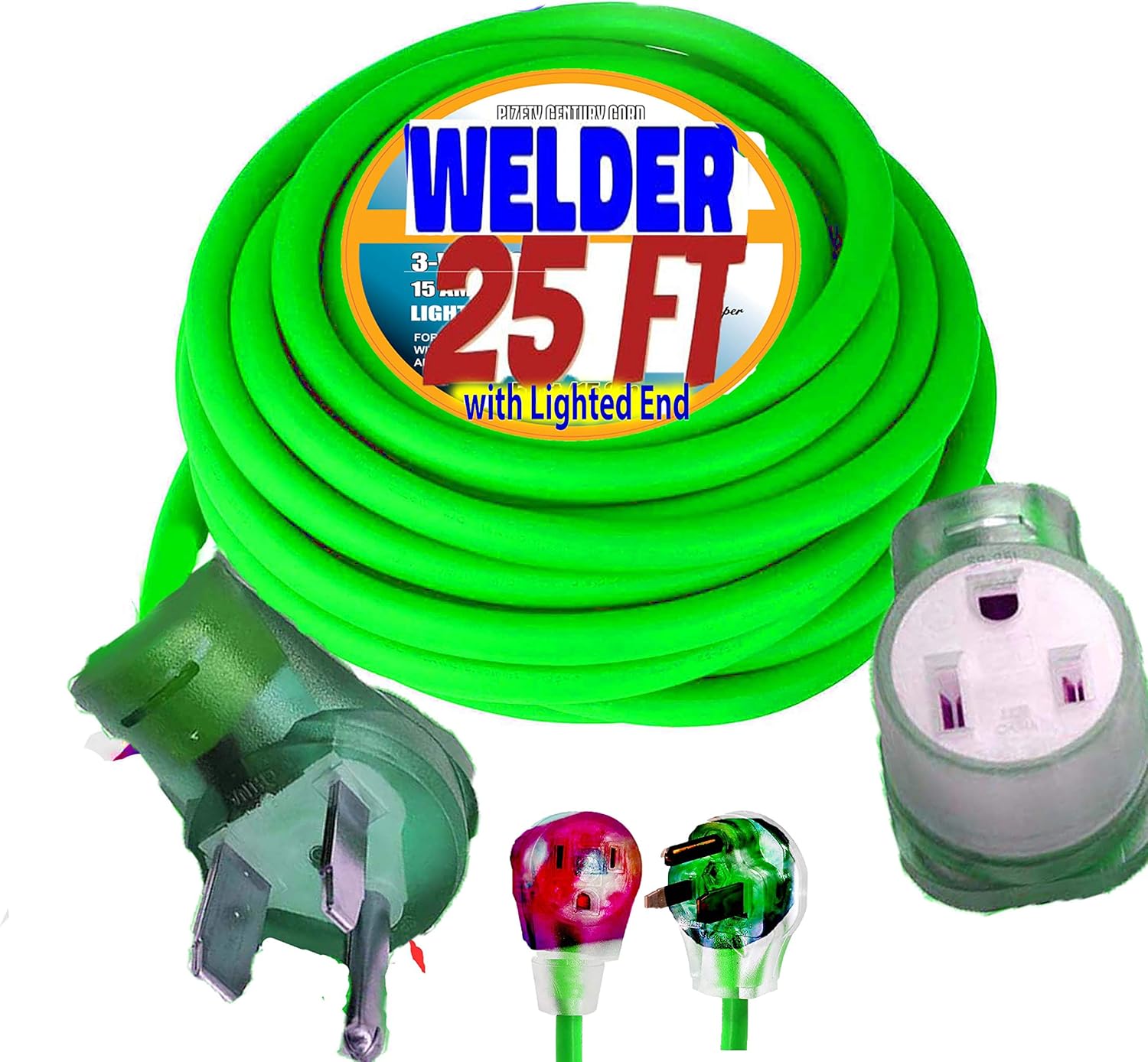
    Amazon pick: Pizety 25FT Welder Extension Cord – 50 Amp, 8 Gauge 6/3 — ASIN: B085ZYH2TF

    Amazon link:  https://www.amazon.com/dp/B085ZYH2TF?tag=weldsupport-20 

    Pizety 25FT Welder Extension Cord – 50 Amp, 8 Gauge 6/3, 10,000 Watts, NEMA 6-50 Plug, 220/250V, Heavy Duty Welding Extension Cord with Lighted End, ETL Approved
    • 🔌 50 AMP WELDER EXTENSION CORD – Rated for 50 Amps, 250 Volts, and up to 10,000 Watts of power. Ideal for heavy-duty welding machines, plasma cutters, and industrial equipment.
    • 💪 8 GAUGE 6/3 COPPER WIRE – Built with thick, flexible 100% pure copper for maximum conductivity, minimal voltage drop, and reliable performance.
    • 🌟 LIGHTED END FOR SAFETY25 ft welder extension cord 8 AWG UL Listed Heavy duty copper wire 6-50 NEMA plug and connector designed for use on all portable welders
    • 🌦️ INDOOR & OUTDOOR USE – ETL approved and constructed with a durable SJTW jacket that resists moisture, abrasion, and sunlight—perfect for garages, workshops, and job sites.
    • 8 Gauge 25 Ft Welding Cord power extension cord rated at 50A, 600V, 50 feet. Features in excellent abrasion, oil and moisture resistance and flexibility fits to extend the welding machine. It can be directly connected to your homes electrical system, 25 ft welding extension cord 50 amp 250v

    Last update on 2026-06-05 / Affiliate links / Images from Amazon Product Advertising API

  • Listen with Audible