Tag: helmet parts

  • Powerweld Horizontal Single Auto-Darkening Filter for Welding, 2 x 4″, (Shade 11): Product Breakdown

    Powerweld Horizontal Single Auto-Darkening Filter for Welding, 2 x 4″, (Shade 11): Product Breakdown

    Product not found.
    “>Powerweld Horizontal Single Auto-Darkening Filter for Welding, 2 x 4", (Shade 11)

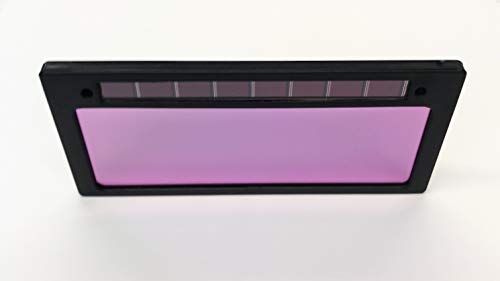
    The Powerweld Horizontal Single Auto-Darkening Filter for Welding, 2 x 4″, (Shade 11) is a helmet-support component for users who need a compact auto-darkening lens format and are already working within a 2 x 4 in. lens system. For buyers and maintenance teams, the main job is not just to read the advertised values. It is to verify fit, viewing area, cover plate requirements, and how the lens will be used in the helmet assembly.

    Key Takeaways

    • Format is 2 x 4 in. and the listed view size is 1.3 in. x 3.5 in. (34 mm x 88 mm).
    • Listed speed is 0.2 ms, light state shade is 3, and dark state shade is listed as Unknown (Verify) in the source data.
    • Thickness is listed as 1/5 in. (5.0 mm) and weight is 45 g.
    • It must be used with a protective cover plate.
    • Do not assume compatibility with any helmet shell, cartridge holder, or cover plate without measuring and checking the manufacturer’s requirements.

    What this lens is for

    This is an auto-darkening filter intended for welding helmet support use. In practical terms, that means it belongs in the front-window stack of a compatible helmet, where it can switch from a light state to a dark state during arc exposure. For the maintenance buyer, the critical issue is not only the shade number. It is whether the lens dimensions, thickness, and mounting style match the helmet and whether the front cover plate package is correct.

    Inspect before you install

    Use these checks before the lens goes into service:

    • Check the lens opening. Measure the helmet window and verify that a 2 x 4 in. filter is the correct format.
    • Inspect the cover plate requirement. The source states the filter must use a protective cover plate. Verify the cover plate size, thickness, and orientation before installation.
    • Verify the view area. The listed viewing area is 1.3 in. x 3.5 in. Confirm whether that matches the operator’s field-of-view needs and the helmet frame.
    • Check thickness. The source lists 5.0 mm thickness. Verify the cartridge pocket or front assembly has clearance.
    • Inspect the lens face and edges. Look for scratches, cracked housing, or warping before use.
    • Verify light state behavior. The source lists light state shade 3. Confirm the lens transitions correctly in a safe test setup before welding.

    Troubleshooting and support checks

    If the lens is not behaving as expected, work through the problem in order:

    • Check the helmet fit. If the lens shifts or gaps at the frame, verify the helmet opening and retaining hardware.
    • Inspect the cover plate. A missing or incorrect protective cover plate can expose the filter and reduce service life. Replace with the correct plate if required.
    • Verify orientation. Horizontal single filters are directional in practice. Confirm the lens is installed in the intended orientation and seated evenly.
    • Check the arc response in a controlled setting. If the lens is not darkening or appears inconsistent, verify that the problem is not from installation, damage, or contaminated front surfaces.
    • Inspect for contamination. Grinding dust, spatter, and smoke film on the cover plate can affect visibility and perceived response.

    For general auto-darkening helmet troubleshooting, see the support guide on welding helmet flickering and shade troubleshooting. For broader buying criteria on lens speed, shade range, and standards, see Auto-Darkening Welding Helmet Buying Guide 2025.

    Product and parts breakdown

    According to the source product data, the following details are available:

    • Product: Powerweld Horizontal Single Auto-Darkening Filter for Welding, 2 x 4″, (Shade 11)
    • Speed: 0.2 ms
    • Light state shade: 3
    • Dark state shade: Unknown (Verify)
    • View size: 1.3 in. x 3.5 in. (34 mm x 88 mm)
    • Thickness: 1/5 in. (5.0 mm)
    • Weight: 45 g
    • Installation note: Must use with a protective cover plate

    For the product page itself, use the ArcWeld source listing: Product not found.

    “>Powerweld Horizontal Single Auto-Darkening Filter for Welding, 2 x 4″, (Shade 11).

    Do not assume the dark state shade, mounting pattern, or sensor arrangement beyond what is listed. If your helmet model requires a specific cartridge profile, verify that against the actual shell and front frame measurements.

    Verify before production use

    Before putting the lens into regular service, confirm the following:

    1. Lens format matches the helmet opening.
    2. Cover plate is installed and fits without pinching the filter.
    3. Lens sits flat and does not rock in the frame.
    4. Operator can see the weld joint clearly in the light state.
    5. Auto-darkening transition is acceptable in a non-production test.
    6. Replacement schedule is defined for the cover plate and any damaged lens components.

    Safety notes

    • Use a protective cover plate as required by the product source.
    • Do not weld with a damaged filter, cracked housing, or missing front protection.
    • Verify that the lens is appropriate for the task and the helmet before arc exposure.
    • Do not rely on unverified shade assumptions when selecting a filter for a process or amperage range.
    • If the helmet setup is unclear, stop and verify the shell, lens, and cover plate stack before use.

    FAQ

    Is this lens ready to use in any 2 x 4 helmet?
    No. The format is 2 x 4 in., but fit still depends on the helmet frame, thickness clearance, retaining system, and cover plate requirements. Verify before installation.

    What is the dark shade on this filter?
    The source title references Shade 11, but the provided technical field for dark state shade is Unknown (Verify). Confirm the actual dark state shade from the product documentation or packaging before assigning it to a work cell.

    Why is the cover plate important?
    The source states the filter must use a protective cover plate. That means the cover plate is part of the working stack, not an optional accessory. It helps protect the filter surface and maintain service life.

    Can I use this as a procedure approval reference?
    No. A filler or lens page is a selection and fit starting point, not a guaranteed procedure approval. Verify against your own welding procedure, helmet requirements, and shop standards.

    Sources Checked

    • ArcWeld product page: Powerweld Horizontal Single Auto-Darkening Filter for Welding, 2 x 4″, (Shade 11)
    • Internal article: Auto-Darkening Welding Helmet Buying Guide 2025 | Lens Speed, Shade Range & Standards
    • Internal article: YESWELDER Large View Auto Darkening Welding Helmet (LYG‑M800H)
    • Internal article: ArcOne S240-10 Auto-Darkening Welding Filter: Shade 10 Lens Support Guide
    • Internal article: Welding Helmet Flickering Shade Troubleshooting: Auto-Darkening Lens, Sensors, Batteries, Sensitivity, and Delay

    Related Arc Weld Part

    Powerweld Horizontal Single Auto-Darkening Filter for Welding, 2 x 4", (Shade 11)

    Powerweld Horizontal Single Auto-Darkening Filter for Welding, 2 x 4", (Shade 11)

    '- Speed .2 ms – Light State Shade: 3 – Dark State Shade: – View Size 1.3" x 3.5" (34mm x 88mm) – Thickness: 1/5" (5.0 mm) – Weight: 45g – Must use with a protective cover plate

    View at Arc Weld Store

    Related Weld Support Guides

Read with Kindle Unlimited