Tag: flux-cored welding
-
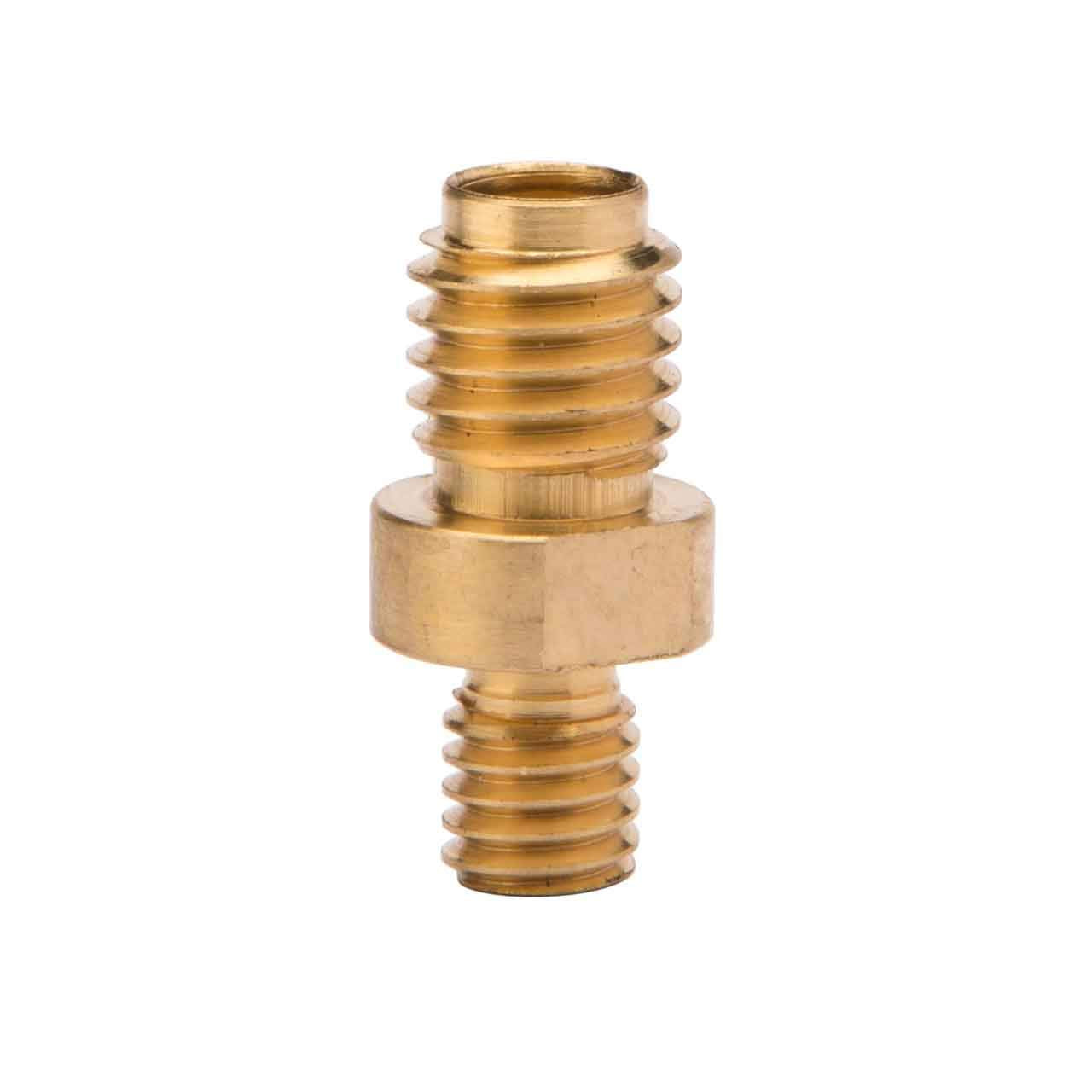
Lincoln Electric KP2908-1 Tip Holder: Product Breakdown
“>
The Lincoln Electric KP2908-1 Tip Holder is a front-end consumable part used in the consumable stack of compatible Lincoln K126 PRO Innershield guns. Its job is straightforward: hold the contact tip in position so wire transfer stays consistent at the gun front end. In self-shielded flux-cored work, that matters because the contact tip interface is part of arc stability, feed consistency, and downtime control.
Key Takeaways
- This is a replacement tip holder, not a complete gun.
- It is intended for Lincoln K126 PRO Innershield guns. Other compatibility is Unknown (Verify).
- Front-end wear can show up as inconsistent feeding, unstable arc behavior, or damaged consumable seating.
- Inspect the full consumable stack, not just the holder, when troubleshooting.
- Use the part only where it matches the gun and consumable design specified by the equipment manufacturer.
What the KP2908-1 Tip Holder Does
The tip holder threads into the front-end assembly and supports the contact tip. In practice, that means it helps keep the tip seated and aligned as wire passes through the gun. When the holder is worn, damaged, or cross-threaded, the tip can seat poorly and the wire path can become less stable.
For maintenance buyers and weld support teams, the main value is simple: it is a small replacement part that protects the function of a larger assembly. Replacing a worn holder can be faster and less disruptive than continuing to run a compromised front end.
Product and Parts Notes
Available product information identifies the Lincoln Electric KP2908-1 Tip Holder as a genuine replacement part for Lincoln K126 PRO Innershield guns. Beyond that fitment note, all technical details not stated by the source are Unknown (Verify). Do not assume thread size, material, or cross-platform compatibility unless confirmed by the equipment documentation or the supplier listing.
If you are managing stock, label this part by exact part number and gun family. That reduces mix-ups with visually similar front-end consumables.
How to Inspect the Tip Holder
Use the following checks during scheduled maintenance or when the operator reports poor performance:
- Check the outside of the holder for heat damage, spatter buildup, or mechanical deformation.
- Inspect threads for galling, cross-threading, or wear that affects how the part seats.
- Verify the contact tip installs fully and sits squarely in the front-end stack.
- Check for looseness after assembly. A part that backs out during service can create erratic performance.
- Inspect nearby consumables, including the contact tip and any related front-end components, for the same wear pattern.
If the holder is visibly damaged, replace it. Do not force a damaged threaded part back into service.
Troubleshooting Guide
Symptom: Wire feed feels inconsistent
- Check for worn threads or poor seating at the tip holder.
- Inspect the contact tip for wear, spatter buildup, or distortion.
- Verify the front-end components are assembled in the correct order for the gun model.
- Check the wire path upstream as well. Feed issues are not always caused by the tip holder.
Symptom: Arc is unstable at the gun front end
- Inspect the contact tip and holder interface for damage or looseness.
- Check for contamination, spatter, or excessive heat wear.
- Verify the gun is set up for the intended flux-cored application.
- Replace the holder if seating surfaces are compromised.
Symptom: Frequent front-end downtime
- Check whether the part is being cleaned or replaced on a scheduled interval.
- Inspect operator handling practices that may damage threads during tip changes.
- Verify inventory control so the correct replacement part is pulled every time.
Support Team Checklist
Before returning the gun to service, complete this simple check sequence:
- Confirm the gun model is compatible with the part number.
- Inspect the holder for physical damage.
- Clean spatter and debris from the front-end area.
- Install the contact tip and verify correct seating.
- Test for secure fit before production use.
Safety Notes
- Allow hot components to cool before handling.
- Wear proper hand protection when changing front-end consumables.
- Do not over-tighten threaded parts.
- Keep the gun disconnected from the power source during inspection and maintenance.
- If the setup condition is uncertain, stop and verify against the manufacturer documentation before use.
FAQ
Is the Lincoln Electric KP2908-1 Tip Holder a complete gun?
No. It is a replacement front-end consumable part, not a complete gun.
What guns does it fit?
It is identified as a genuine replacement tip holder for Lincoln K126 PRO Innershield guns. Other compatibility is Unknown (Verify).
What causes a tip holder to need replacement?
Common causes include thread wear, heat damage, spatter buildup, cross-threading, and poor tip seating. If the part no longer holds the tip securely, replace it.
Should I replace only the holder if the arc is unstable?
Not always. Inspect the whole front-end consumable stack, the wire feed path, and the gun setup before deciding. The holder may be one part of the problem, not the only part.
Sources Checked
- ArcWeld product listing: Lincoln Electric KP2908-1 Tip Holder
- Provided product summary and fitment note for Lincoln K126 PRO Innershield guns
- Weld Support Parts internal knowledge structure for MIG support content
For related welding support reading, see the Welding Electrode Holder: Stinger Guide & Stick Welding Tips and the Welding Electrode Holder: Choose the Best for Stick Welding.
Related Arc Weld Part
Lincoln Electric KP2908-1 Tip Holder
Lincoln Electric KP2908-1 Tip Holder is a genuine replacement tip holder designed for Lincoln K126® PRO Innershield® guns. It threads into the front-end consumable stack to secure the contact tip and maintain consistent wire transfer—critical for stable arc performance and reduced downtime when you’re running self-shielded flux-cored applications.
View at Arc Weld StoreRelated Weld Support Guides
Millermatic 252 Wire Feed Troubleshooting and MDX-250 Consumable Compatibility
If a Millermatic 252 has wire stutter, burnback, birdnesting, poor arc starts, heavy spatter, or drive roll slipping, troubleshoot the complete wire path before replacing electrical parts. The machine is a MIG and flux-cored power source with an integrated wire feeder. The standard package includes a 15 ft, 250 amp MDX-250 MIG gun, .030/.035 in reversible dual-groove drive rolls, extra contact tips, regulator, gas hose, work cable, and running gear. Replacement accuracy depends on confirming the gun series, consumable family, wire size, drive roll style, and whether the machine is being used for solid wire, flux-cored wire, spool gun aluminum, or push-pull aluminum.
The common wrong-part mistake is assuming all Millermatic 252 guns use the same front-end parts. Older or changed machines may still have an M-25 gun, while current Miller literature lists the MDX-250 with AccuLock MDX consumables as the standard gun. Use the Miller MIG gun selection chart and the Miller MDX-250 gun parts page before ordering tips, nozzles, diffusers, liners, or a replacement gun.
Common Symptoms
| Symptom | Likely Cause | Quick Check |
| Wire stutters while welding | Tip drag, liner restriction, wrong drive roll groove, spool drag | Remove contact tip and test feed |
| Burnback into contact tip | Low wire feed, short stickout, worn tip, wire feed interruption | Replace correct AccuLock MDX tip |
| Birdnesting at feeder | Downstream blockage, overtight drive rolls, kinked gun cable | Straighten gun lead and refeed with tip removed |
| Drive rolls slip | Too little tension or blocked wire path | Check liner and contact tip before tightening |
| Wire shaves or copper dust appears | Too much drive tension or wrong groove | Inspect wire after feeder |
| Flux-cored wire feeds rough | Smooth roll used where knurled roll is needed | Verify V-knurled roll kit by wire size |
| Aluminum feeding fails through MIG gun | Wrong gun/process setup | Verify spool gun or push-pull setup |
Compatibility Notes
- Machine: Millermatic 252.
- Stock numbers: 907321 for 208/240 V model; 907322 for 230/460/575 V model.
- Processes: MIG (GMAW) and flux-cored (FCAW).
- Amperage range: 30–300 A.
- Rated output: 200 A at 24 VDC, 60% duty cycle; 250 A at 26.5 VDC, 40% duty cycle.
- Wire feed speed: 50–700 ipm.
- Standard gun: MDX-250, 15 ft, AccuLock MDX consumables, part 1770037.
- Standard wire setup: .030/.035 in reversible dual-groove drive rolls.
- Solid/stainless wire range: .023–.045 in.
- Flux-cored wire range: .030–.045 in.
- Spool size: 12 in maximum.
- Optional aluminum guns: Spoolmatic 15A, Spoolmatic 30A, Spoolmate 200, XR-Aluma-Pro Lite, and XR-Aluma-Pro are listed by Miller for this platform.
For failure paths that overlap across MIG systems, compare this machine-specific guide with MIG wire feed troubleshooting, MIG burnback troubleshooting, and MIG gun liner wear symptoms. For broader machine context, see the Millermatic 252 MIG welder overview.
Inspection Steps
- Disconnect input power before opening the feeder or changing drive rolls.
- Confirm the installed gun: MDX-250, MDX-250 AccuLock S, M-25, spool gun, or push-pull gun.
- Record wire type and diameter before ordering any tip, liner, or drive roll.
- Remove nozzle and contact tip, then jog wire with the gun lead straight.
- If feed improves with the tip removed, replace the contact tip and inspect the diffuser/nozzle area.
- If feed is still rough, release drive rolls and hand-pull wire through the gun to check liner drag.
- Inspect drive rolls for correct groove, worn grooves, packed debris, or wire shaving.
- Check spool brake tension. The spool should stop without overrun but should not drag heavily.
- Verify polarity and shielding gas for solid wire, flux-cored wire, or aluminum setup.
- Make one correction at a time, then test on scrap before returning to production work.
Test Procedures
Tip-off feed test: Remove the contact tip and jog wire. Smooth feed with the tip removed points to a worn, undersized, spatter-packed, or overheated tip.
Liner drag test: With power off and drive rolls open, pull wire through the MDX-250 gun. Heavy pull force, rough movement, or bend-sensitive feeding indicates a dirty, kinked, wrong-size, or incorrectly trimmed liner.
Drive roll tension test: Feed wire against a soft block while keeping clear of the wire end. The rolls should feed without shaving or flattening wire. Do not compensate for a blocked liner by crushing the wire.
Flux-cored roll check: Miller lists V-knurled drive roll kits for flux-cored or difficult-to-feed wire. If self-shielded flux-core slips in smooth rolls, verify the correct knurled roll by wire diameter before increasing tension.
Visual Wear Indicators
- Contact tip bore is oval, blackened, loose, or packed with spatter.
- Nozzle has spatter bridging between nozzle, diffuser, and tip.
- Diffuser threads are damaged or the tip does not seat tightly.
- Wire has flat spots, copper flakes, or shaving dust near the feeder.
- Drive roll groove is polished smooth or packed with debris.
- Gun cable feeds only when nearly straight.
- Liner end is burred, mushroomed, short, long, or contaminated.
- Flux-cored wire is crushed from excessive drive roll pressure.
What To Verify Before Ordering
- Machine model and stock number: 907321 or 907322.
- Installed gun model and cable length.
- Consumable family: AccuLock MDX or AccuLock S.
- Contact tip size: T-M023, T-M030, T-M035, or T-M045 for standard AccuLock MDX.
- Nozzle style: N-M1200C, N-M1218C, N-M5800C, N-M5818C, or N-M58XTC.
- Diffuser: D-M250 for standard AccuLock MDX.
- Liner length: 10 ft, 12 ft, or 15 ft.
- Liner size: .023/.025, .030/.035, or .035/.045.
- Drive roll type: V-groove for solid wire, V-knurled for flux-cored wire, U-groove for aluminum.
- Spool gun or push-pull gun consumables if welding aluminum.
Common Wrong-Part Mistakes
- Buying tips by wire size only without confirming MDX-250 consumable family.
- Installing M-25 consumables on an MDX-250 gun.
- Using FasTip, M-Series, or Bernard Centerfire consumables on MDX Series guns.
- Ordering a 10 ft liner for a 15 ft gun.
- Using .030/.035 liner with .045 wire under production duty.
- Using smooth V-groove rolls for flux-cored wire that needs V-knurled rolls.
- Trying to push aluminum through the standard 15 ft MIG gun instead of verifying spool gun or push-pull configuration.
- Replacing the feeder motor before proving the gun liner and tip are clear.
Field Fix vs Proper Fix
| Failure | Field Fix | Proper Fix |
| Burnback | Cut wire and replace tip | Correct tip size, liner drag, WFS, stickout, burnback timer, and drive tension |
| Stutter | Straighten gun and remove tip | Replace restricted liner or wrong consumables |
| Birdnesting | Cut nest and rethread wire | Remove downstream blockage and reset drive roll tension |
| Flux-core slip | Increase tension slightly | Install correct V-knurled roll and verify polarity |
| Aluminum feed failure | Shorten lead and reduce bends | Use verified spool gun or push-pull setup with U-groove rolls |
Safety Notes
- Disconnect input power before feeder inspection, liner replacement, or drive roll changes.
- Keep hands clear of drive rolls during feed tests.
- Do not point the gun at yourself or another person while jogging wire.
- Wear eye protection when clipping wire or blowing out liners.
- Let contact tips, nozzles, and diffusers cool before removal.
- Use ventilation and welding PPE when test welding after repair.
Sources Checked
- Miller Millermatic 252 spec sheet, issued April 2024, Index No. DC/12.49.
- Weld Support Parts Miller MIG gun selection chart.
- Weld Support Parts Miller MDX-250 gun parts page.
- Weld Support Parts MIG troubleshooting articles listed above.
Millermatic 142 Wire Feed Troubleshooting and MDX-100 Consumable Compatibility
If a Millermatic 142 stutters, slips, burns wire back into the contact tip, birdnests at the feeder, or makes heavy spatter, start with the wire path before blaming the control board or drive motor. The Millermatic 142 is a 120 V MIG/flux-cored machine supplied with an MDX-100 MIG gun using Miller AccuLock MDX consumables. That means contact tips, nozzles, diffusers, liners, drive rolls, wire diameter, polarity, and shielding gas all need to match the actual process before ordering replacement parts.
The most common wrong-part mistake is ordering Miller consumables by wire size only. A .030 tip must also be the correct AccuLock MDX tip for the MDX-100 gun. Miller FasTip, M-Series, and Bernard Centerfire consumables are not listed as compatible with MDX Series guns in the Miller spec sheet. For the confirmed gun breakdown, use the Miller MDX-100 MIG gun parts page before replacing tips, liners, nozzles, or the diffuser.
Common Symptoms
| Symptom | Likely Cause | First Check |
| Wire stutters or surges | Tip drag, liner restriction, tight gun lead, drive roll slip | Remove contact tip and test feed |
| Wire burns into tip | Worn tip, wrong tip size, low wire feed, feed restriction | Replace correct-size AccuLock MDX tip |
| Birdnesting at feeder | Downstream blockage, too much tension, spool overrun | Cut nest, remove tip, straighten lead |
| Drive rolls spin but wire stops | Blocked tip/liner or incorrect groove | Check drive roll groove and wire diameter |
| Porosity with unstable arc | Nozzle spatter, gas issue, erratic feeding | Clean nozzle and confirm gas flow |
| Flux-core feeds poorly | Wrong drive roll, polarity error, tip drag | Verify flux-core roll and polarity setup |
Millermatic 142 Compatibility Notes
- Machine: Millermatic 142, stock no. 907838.
- Processes: MIG (GMAW) and flux-cored (FCAW).
- Input: 120 V, 20 A, single-phase, 50/60 Hz.
- Rated output: 100 A at 19 V, 60% duty cycle; 80 A at 18 V, 100% duty cycle.
- Included gun: 10 ft MDX-100 MIG gun, Miller part 1770028.
- Solid wire range: .024–.030 in.
- Stainless wire range: .024–.030 in.
- Flux-cored wire range: .030–.035 in.
- Spools: accepts 4 in or 8 in spools.
- Spool gun options: Spoolmate 100 and Spoolmate 150 are listed by Miller for this machine; verify wire alloy and diameter before ordering aluminum consumables.
For feed-path symptoms that overlap across small MIG machines, compare this guide with MIG wire feed troubleshooting, MIG wire burnback troubleshooting, and MIG weld spatter reduction troubleshooting. The symptom path is the same: prove wire movement, prove current transfer, prove gas coverage, then adjust settings.
Inspection Steps
- Turn off input power before opening the feeder or touching drive components.
- Clip the wire clean at the gun end. Do not pull a kinked wire end back through the liner.
- Remove the nozzle and contact tip.
- Lay the MDX-100 cable as straight as practical.
- Jog wire with the contact tip removed. If feed improves, the tip was worn, blocked, overheated, or wrong size.
- Install a correct AccuLock MDX tip matching the wire diameter.
- Check the diffuser and nozzle for spatter packing or loose seating.
- Verify the drive roll groove matches wire type and diameter.
- Set drive tension only tight enough to feed without flattening wire.
- Check spool brake tension. Too tight causes drag; too loose causes overrun.
- Retest with the gun straight, then with a normal bend. Bend-sensitive feeding points toward liner drag.
Test Procedures
Tip-off feed test: Remove the contact tip and jog wire. If the wire feeds smoothly with the tip removed but stutters with the tip installed, replace the contact tip and verify tip size. Do not reuse a burned-back tip.
Hand-pull test: With power off and drive rolls released, pull wire through the gun. Heavy drag means liner restriction, cable bend, contaminated wire, or a wrong liner size. If the problem resembles the MDX-100 liner issues seen on larger Miller compact machines, use the same diagnostic logic from the MDX-100 liner wear troubleshooting guide, but verify the 10 ft liner length used on the Millermatic 142.
Drive roll slip test: Feed wire into a gloved hand or soft block while keeping clear of the arc area. The rolls should slip before crushing the wire. If the wire is flattened, back off tension and inspect for a downstream blockage.
Spool brake test: Jog wire and release the trigger. The spool should stop without overrunning but should not require the motor to fight heavy drag.
Visual Wear Indicators
- Contact tip bore is oval, blackened, blue, or packed with spatter.
- Wire feeds better with the contact tip removed.
- Nozzle has spatter bridging near the tip.
- Diffuser threads are damaged or the tip will not seat firmly.
- Wire shows flat spots, copper shavings, or shaving dust near the drive rolls.
- Drive roll groove is polished smooth, packed with debris, or wrong for the wire.
- Gun cable only feeds well when perfectly straight.
- Liner end is burned, mushroomed, dirty, or cut incorrectly.
What To Verify Before Ordering
- Machine model: Millermatic 142.
- Stock number: 907838 where applicable.
- Gun model: MDX-100, 10 ft, part 1770028.
- Consumable family: Miller AccuLock MDX.
- Wire size: .023, .024, .030, .035, .045, or other actual wire being used.
- Wire type: solid steel, stainless, self-shielded flux-core, gas-shielded flux-core, or aluminum with spool gun.
- Contact tip part: T-M023, T-M030, T-M035, T-M045, or T-M047 as applicable.
- Nozzle: NS-M1200B brass flush, NS-M1200C copper flush, or NS-MFLX gasless nozzle as applicable.
- Diffuser: D-M100 for the MDX-100 gun.
- Liner: LM1A-10 for .023/.025, LMD2A-10 or LM2A-10 family for .030/.035, and LMD3A-10 or LM3A-10 family for .035/.045 depending on verified part listing.
- Drive roll: 261157 Quick Select roll or 202926 V-knurled dual-groove roll where appropriate.
Common Wrong-Part Mistakes
- Installing a .030 contact tip while running .035 wire.
- Ordering by machine name without confirming the gun is still the factory MDX-100.
- Using Miller FasTip, M-Series, or Bernard Centerfire consumables on an MDX gun.
- Buying a liner that matches wire diameter but not gun length.
- Using a smooth solid-wire groove for flux-cored wire when a knurled roll is required.
- Overtightening drive rolls to overcome a blocked liner.
- Using C25 Auto-Set assumptions while running 100% CO2 or self-shielded flux-core.
- Assuming a spool gun setup uses the same front-end consumables as the MDX-100 gun.
Field Fix vs Proper Fix
| Failure | Temporary Field Fix | Proper Fix |
| Burnback | Cut wire, replace tip, clean nozzle | Correct tip size, liner drag, WFS, stickout, and drive roll tension |
| Stuttering feed | Straighten gun lead and remove tip | Replace restricted liner or wrong consumable |
| Birdnesting | Cut nest and rethread wire | Remove downstream blockage and reset drive tension |
| Spatter buildup | Clean nozzle and diffuser | Correct gas, stickout, tip condition, base-metal cleanliness, and settings |
| Wrong drive roll | Use available groove only to finish a short repair | Install correct roll for wire type and diameter |
Related Failure Paths
- Wire burnback into the contact tip.
- Wire-feed stutter from liner drag.
- Birdnesting at the feeder.
- Porosity from nozzle spatter or poor gas coverage.
- Low penetration from inconsistent wire delivery.
- Premature tip failure from wrong wire size or loose seating.
- Drive roll wear from overtension or wrong groove profile.
Safety Notes
- Disconnect input power before opening the feeder, changing drive rolls, or servicing the gun.
- Wear eye protection when clipping wire, pulling wire, or blowing out liners.
- Do not point the gun toward yourself or another person while jogging wire.
- Let the nozzle, diffuser, and contact tip cool before removal.
- Keep hands clear of drive rolls during feed tests.
- Use ventilation and proper welding PPE during every test weld after repair.
Sources Checked
- Miller Millermatic 142 spec sheet, issued April 2024, Index No. DC/12.41.
- Weld Support Parts Miller MDX-100 gun parts page.
- Weld Support Parts MIG wire feed troubleshooting guide.
- Weld Support Parts MIG burnback troubleshooting guide.
- Weld Support Parts MIG spatter troubleshooting guide.