Tag: arc length

  • Stick Welding Undercut Troubleshooting

    Stick Welding Undercut Troubleshooting

    Undercut in stick welding appears as a groove melted into the base metal along the weld toe that is not filled properly by weld metal. It is commonly caused by excessive amperage, incorrect rod angle, excessive travel speed, poor weave control, or improper electrode manipulation. Undercut weakens weld strength, creates stress concentration points, and can cause weld rejection on structural and code work.

    Common Symptoms

    • Visible groove along the weld toe.
    • Sharp edge transitions beside the weld bead.
    • Weld bead appears narrow or rope-like.
    • Undercut worsens near restarts or weave edges.
    • Grinding reveals reduced weld toe thickness.
    • Excessive spatter and aggressive arc behavior.

    Likely Causes

    • Amperage too high: Excess heat melts the base metal faster than filler metal can refill the edges.
    • Travel speed too fast: Rapid movement prevents the puddle from filling the weld toes completely.
    • Incorrect rod angle: Excessive drag or push angle concentrates heat on one edge.
    • Excessive weave width: Wide weaving cools the puddle unevenly and leaves the edges underfilled.
    • Arc length too long: Long arcs create unstable puddles and aggressive sidewall washout.
    • Poor pause timing: Insufficient pause at weave edges prevents toe fill.

    Inspection Steps

    1. Inspect both weld toes for grooves or sharp edge transitions.
    2. Verify amperage settings match the electrode size and position.
    3. Check rod angle during welding.
    4. Review travel speed and weave width.
    5. Inspect restarts for localized undercut.
    6. Inspect work clamp connection and arc stability.
    7. Verify electrode condition and storage.

    Visual Wear Indicators

    • Sharp grooves along weld edges.
    • Thin weld toes.
    • Overly convex or narrow bead profile.
    • Irregular weave spacing.
    • Excessive sidewall washout.

    Common Wrong-Part Mistakes

    • Using oversized electrodes on thin material.
    • Running low-hydrogen rods at excessive amperage.
    • Using the wrong polarity for the electrode type.
    • Trying to cover undercut with additional cold passes instead of grinding and repairing properly.

    Field Fix vs Proper Fix

    Field fix: Lower amperage slightly, shorten arc length, slow travel speed, and pause briefly at weave edges. Proper fix: Grind out severe undercut, correct the welding procedure, improve rod manipulation technique, and match electrode size to the joint geometry and material thickness.

    Related Failure Paths

    • Slag inclusion
    • Lack of fusion
    • Toe cracking
    • Porosity
    • Cold lap

    Safety Notes

    Grinding out undercut creates sparks, debris, and airborne particles. Use proper eye protection, gloves, hearing protection, and ventilation during weld repair and cleanup operations.

    Sources Checked

    • Lincoln consumables catalogs
    • Lincoln welding equipment references
    • Uploaded welding safety and consumable references
  • Stick Electrode Sticking During Arc Start: Amperage, Arc Length, Rod Condition, Polarity, Ground, and Hot Start Checks

    Stick electrode sticking during arc start usually means the arc is not getting hot and stable fast enough to keep the rod from fusing to the work. The common causes are low amperage, poor scratch/tap technique, arc length too short, damp or damaged rods, wrong polarity, weak work clamp contact, undersized leads, low open-circuit voltage, or an electrode that is difficult to restart. 7018, small-diameter rods, cold plate, dirty base metal, and small inverter machines can make the problem more noticeable.

    Do not keep twisting a stuck rod until the flux breaks off. Break the arc, free the rod, chip the stuck metal off the end, and restart on clean steel. If the electrode sticks again, increase amperage slightly within the rod range, clamp directly to clean metal, use a confident scratch start, lift immediately to a short arc, and verify rod storage and polarity before blaming the welder.

    Related stick support checks include 7018 rod sticking causes, 7018 rod moisture contamination troubleshooting, electrode holder selection, and welding cable lead length and sizing.

    Common Symptoms

    SymptomLikely CauseFirst Check
    Rod sticks instantly on touchLow amperage, poor strike, bad groundIncrease amps slightly and clean clamp point
    Rod starts then goes outArc held too close or travel starts too slowLift to short arc immediately after strike
    7018 sticks repeatedlyDamp rod, low amps, wrong restart prepTry fresh dry rod at correct range
    Rod glows red near holderRod too small for amperage or held too longVerify electrode diameter and current
    Arc start is harsh and unstableWrong polarity, dirty metal, long leadsCheck polarity, work return, and cable size
    Only restarts stickSlag cap on electrode endSnap/clean the rod tip before restrike

    Root Cause Analysis

    During a stick start, the electrode must touch or nearly touch the work long enough to ionize the gap, then separate enough to form an arc. If the current is too low, the rod coating is damp, the work clamp path is weak, or the operator holds the rod against the plate too long, the electrode bonds to the work before the arc stabilizes. Sticking is most often a setup-and-technique problem, but weak leads, poor connectors, wrong polarity, or a welder with low start performance can contribute.

    Quick Checks

    • Amperage: Start near the middle of the rod manufacturer’s range, then adjust in small steps.
    • Arc start: Scratch like striking a match or tap cleanly, then lift immediately.
    • Arc length: Keep a short arc about the rod core diameter; do not bury the rod.
    • Rod condition: Use dry, undamaged electrodes. Damp 7018 is a common sticking trigger.
    • Work clamp: Clamp directly to clean bare metal, not paint, rust, mill scale, or a loose table.
    • Polarity: Confirm the electrode supports the selected AC, DCEN, or DCEP setting.
    • Leads: Check cable size, connector fit, lug tightness, and holder jaws.

    Inspection Steps

    1. Identify the rod. Confirm electrode classification, diameter, and manufacturer amperage range.
    2. Check the machine output. Verify AC/DC mode, polarity, amperage, hot-start setting if available, and input power.
    3. Clean the start point. Remove rust, paint, oil, mill scale, and slag before striking.
    4. Move the work clamp. Clamp close to the weld on clean metal and retest.
    5. Inspect holder jaws. A loose or burned holder can reduce current transfer at the electrode.
    6. Inspect cables and connectors. Look for undersized cable, long lead voltage drop, loose DINSE/Tweco connectors, hot lugs, or damaged insulation.
    7. Try a fresh rod. If a dry new rod starts better than shop-stored rods, storage is part of the fault.
    8. Use a controlled start. Scratch or tap, lift immediately, hold a short arc, then move into the joint.
    9. Adjust amperage last. Increase only within the rod’s range after ground, polarity, and rod condition are verified.

    7018 Start and Restart Notes

    7018 can be harder to restart than 6010, 6011, or 6013 because the flux can form an insulating cap at the rod end. For restart, snap the rod tip, file/scratch the end, or strike on a run-on area before returning to the joint. Use dry rods from proper storage. For code or critical low-hydrogen work, do not use questionable 7018 just because it will eventually start.

    Field Fix vs Proper Fix

    ProblemField FixProper Fix
    Rod sticks on first touchTurn amperage up slightlySet amperage by rod range and confirm ground/polarity
    7018 restart sticksBreak the flux cap and restrikeUse dry rods and proper restart technique
    Weak arc from bad clampMove clamp to clean metalReplace worn clamp, lug, or lead
    Long leads reduce startShorten lead routeUse correctly sized cable and tight connectors
    Damp rods stickUse fresh rodsStore low-hydrogen rods in approved oven control

    Common Wrong-Diagnosis Mistakes

    • Blaming the welder before checking amperage, ground, rod storage, and polarity.
    • Running 7018 too cold because the bead looks easier to control.
    • Holding the rod against the plate too long during tap starts.
    • Dragging the rod without lifting enough to establish the arc.
    • Trying to weld with damp, chipped, oily, or shop-floor electrodes.
    • Ignoring hot electrode holder jaws, loose cable lugs, or undersized leads.
    • Using an electrode that does not match the machine’s AC/DC output.

    Compatibility Notes

    Stick-start performance depends on the electrode, machine output, lead set, holder, and clamp. Verify rod classification, rod diameter, allowed polarity, welder AC/DC output, open-circuit voltage requirements, cable size, connector type, electrode-holder rating, and work-clamp rating before ordering parts. WSP accessory references such as Miller Thunderbolt 210 stick accessories and CST 282 stick lead sets and Tweco-style connectors show why lead and connector fitment must be verified.

    What To Verify Before Ordering

    • Welder output: AC, DC, or AC/DC.
    • Electrode classification, diameter, and polarity requirement.
    • Amperage range and whether hot start is available.
    • Electrode holder amperage rating and jaw condition.
    • Work clamp rating, jaw spring, copper contact, and lug condition.
    • Welding cable gauge, length, insulation, and connector style.
    • Whether the job requires low-hydrogen storage controls.

    Related Failure Paths

    • 7018 sticking from damp coating or low amperage.
    • Porosity from wet rods or long arc length.
    • Arc blow mistaken for starting trouble.
    • Weak arc from poor work return or undersized leads.
    • Slag inclusions from improper restarts.
    • Holder overheating from loose jaws or underrated parts.

    Safety Notes

    • Do not touch live electrode, holder jaws, or work with bare skin.
    • Turn off the machine before changing leads, connectors, holder, or clamp.
    • Wear eye, hand, and body protection when striking and restarting electrodes.
    • Keep electrode stubs, hot rods, and slag away from gloves, leads, and combustibles.
    • Replace damaged cable insulation, cracked holders, and weak work clamps before welding.

    Sources Checked

    • Weld Support Parts stick rod sticking, electrode holder, cable, and 7018 storage support pages.
    • Weld Support Parts stick lead set and connector product pages.
    • Hobart E7018 amperage and operating guidance.
    • Lincoln Electric 7018 AC product reference and stick support search results.
  • Millermatic 255 Pulse MIG Setup Problems: Wire, Gas, Arc Length, and Gun Checks

    Most Millermatic 255 pulse MIG setup problems come from a mismatch between the selected pulse program and the actual wire, gas, material, gun, or feed path. If the arc is harsh, ropey, cold, wandering, or spattery in pulse mode, first verify the screen selection: material/gas, wire diameter, and material thickness. Then check contact tip size, liner range, drive roll groove, gas blend, polarity, work clamp, and whether the installed MDX-250 gun uses AccuLock S or AccuLock MDX consumables.

    Do not troubleshoot pulse MIG like basic short-circuit MIG. Pulse programs are built around a specific wire diameter and shielding gas. If the gas does not match the listed program, the machine may still weld, but arc length and arc control may need correction. If wire delivery is inconsistent, pulse mode will exaggerate the problem because the machine is trying to control a transfer pattern that the wire feed system is not supporting.

    Common Symptoms

    SymptomLikely Setup CauseFirst Check
    Arc feels long, lazy, or wanderingArc length too high or wrong gas/programReturn arc length toward default and verify gas selection
    Arc is harsh, narrow, or diggingArc length too low or arc control too tightAdjust in small steps after verifying program
    Excess spatter in pulse modeWrong gas, wrong wire diameter, feed issue, or bad tipConfirm selected wire/gas and replace tip
    Ropey aluminum beadWrong aluminum program, poor feeding, or gun mismatchVerify aluminum wire size, gun type, and gas
    Burnback at the tipWire feed slowing before the arcInspect tip, liner, drive rolls, and spool brake
    Program changes unexpectedlyEZ-Select gun enabled or wrong saved programCheck program mode and gun settings

    What Pulse MIG Is Doing

    Pulse MIG controls current in a repeating high/low pattern so droplets transfer without running a constant high-energy spray arc. On the Millermatic 255, the operator still has to provide the correct setup inputs. The machine cannot fix a wrong gas bottle, a .035 program running .030 wire, a worn contact tip, a dirty liner, or poor work clamp contact.

    Millermatic 255 Pulse Setup Checklist

    1. Select Pulse mode, then confirm whether you are using Auto-Set or Manual pulse.
    2. Select the actual material and shielding gas being used.
    3. Select the actual wire diameter loaded in the feeder.
    4. In Auto-Set pulse, select the material thickness.
    5. In Manual pulse, set wire feed speed from the chart for the metal and thickness.
    6. Start with arc length at the default value before tuning.
    7. Only adjust arc control after wire, gas, and arc length are verified.
    8. Confirm the work clamp is on clean metal close to the weld.
    9. Confirm polarity for the process and wire type.
    10. Test on clean scrap of the same material before changing stored programs.

    Arc Length and Arc Control

    Arc length is the first pulse tuning control to check. If the arc feels too long, unstable, or wide, reduce arc length gradually. If the arc feels too tight, harsh, or digging, increase arc length gradually. Large changes can make the machine feel worse, especially when the gas or wire selection is already wrong.

    Arc control changes the width and character of the pulse arc cone. Use it after the basic program is correct. If you are using a gas that is not the gas listed for the selected pulse program, arc length and arc control may need adjustment, but they should not be used to hide a major gas mismatch.

    Compatibility Notes: MDX-250, AccuLock S, and AccuLock MDX

    For Millermatic 255 gun and consumable replacement, verify the installed gun before ordering. Weld Support Parts lists the Millermatic 255 with MDX-250 AccuLock S as the recommended replacement gun path on the Miller gun selection chart: Miller MIG Gun Selection Chart.

    Use the correct consumable family for the gun that is actually installed. The Miller MDX-250 AccuLock S page lists MDX-250 AccuLock S guns and AccuLock S tips, nozzles, diffusers, and liners. The Miller MDX-250 AccuLock MDX page lists the AccuLock MDX version. Do not mix AccuLock S and AccuLock MDX contact tips or diffusers.

    What Wears Out First

    • Contact tip: worn or oversized tips cause unstable current transfer and pulse arc wandering.
    • Liner: drag in the liner causes wire feed variation that shows up as pulsing, burnback, or ropey bead shape.
    • Drive rolls: wrong groove or pressure causes slipping, shaving, or crushed wire.
    • Nozzle and diffuser: spatter buildup changes gas coverage and can create porosity or arc instability.
    • Work clamp: poor contact makes a pulse problem look like a machine problem.

    Test Procedure

    1. Install a known-good contact tip matching the wire diameter.
    2. Clean the nozzle and confirm diffuser is tight and correct for the gun series.
    3. Lay the gun cable straight and jog wire through the gun.
    4. Check drive roll groove, pressure, and spool hub tension.
    5. Select the correct pulse program for wire, material, and gas.
    6. Return arc length near default and run a bead on clean scrap.
    7. Adjust arc length in small steps only after confirming the weld pool is stable.
    8. Use arc control only for final arc-cone tuning.
    9. If the fault remains in both standard MIG and pulse MIG, troubleshoot feed, power, ground, or service-level machine faults.

    Common Wrong-Part Mistakes

    • Ordering consumables by “Millermatic 255” instead of the actual MDX-250 gun version.
    • Mixing AccuLock S tips with AccuLock MDX diffusers.
    • Using a .045 tip for .035 wire to reduce burnback instead of fixing feed drag.
    • Using the wrong liner range for .030, .035, or .045 wire.
    • Using the wrong drive roll profile for aluminum or flux-cored wire.
    • Trying to tune pulse settings while the gas bottle does not match the selected program.

    Field Fix vs Proper Fix

    A field fix is to replace the contact tip, clean the nozzle, return arc length toward default, reselect the correct pulse program, straighten the gun lead, and clamp to clean metal.

    The proper fix is to verify the entire setup chain: machine program, shielding gas, wire diameter, wire type, drive rolls, liner, contact tip, gun series, work lead, and saved program settings. If the machine still has setup errors, overtemperature messages, trigger errors, or unstable output after verified setup, send it to a qualified Miller service center.

    Related Parts Breakdown

    Safety Notes

    Disconnect input power before servicing internal feeder parts, changing drive rolls, or inspecting internal connections. Keep fingers out of the drive rolls while jogging wire. Wear proper welding PPE and use adequate ventilation. Do not continue welding with damaged gun cable, cracked work lead, loose weld terminals, or repeated machine error messages.

  • Arc Control: Why Arc Length Matters in Stick Welding — Overview & Review

    Arc Control: Why Arc Length Matters in Stick Welding — Overview & Review

    Introduction

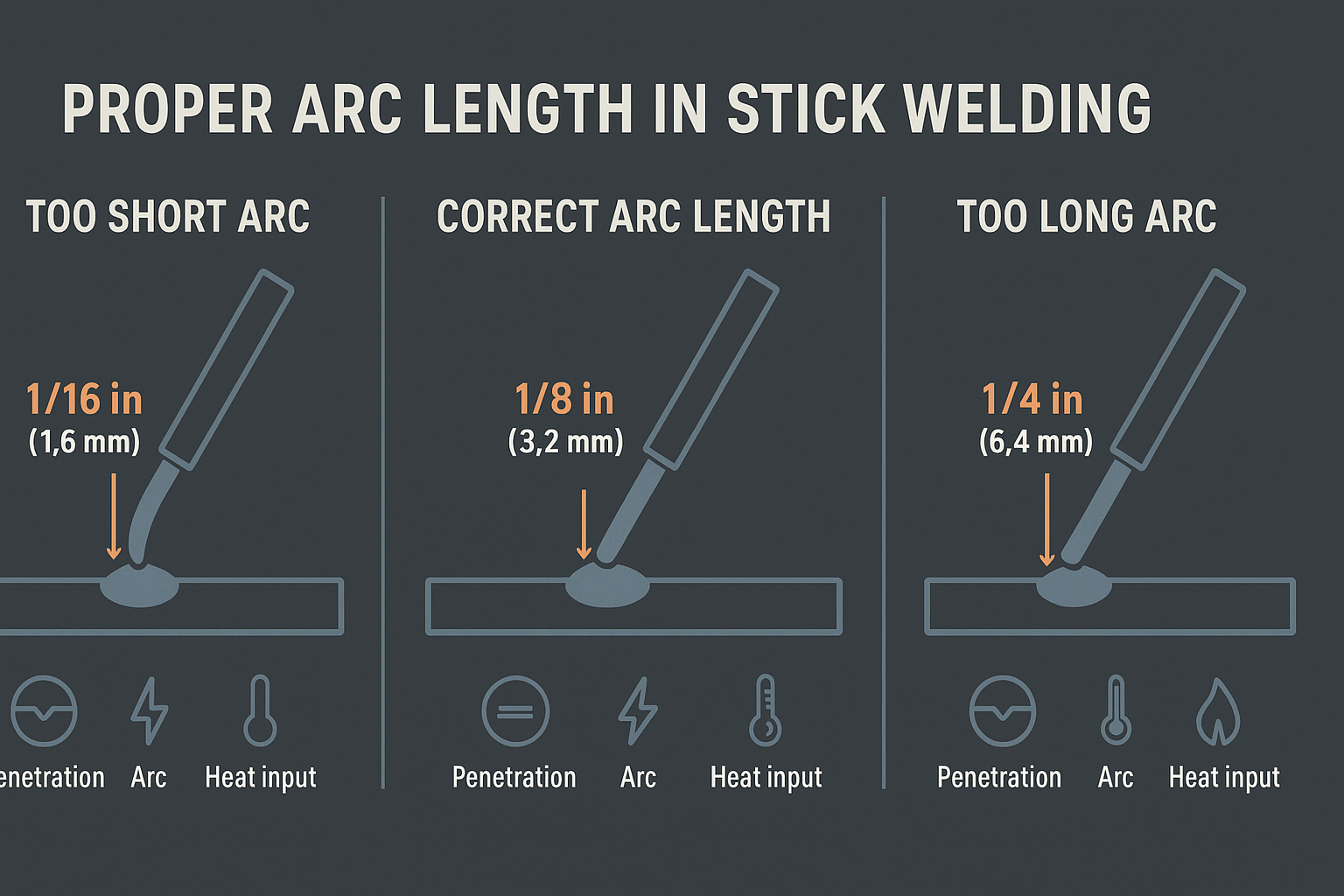
    Arc length is one of the most important variables in stick welding, and this guide—Arc Control: Why Arc Length Matters in Stick Welding—breaks down exactly why. The book explains how arc length influences penetration, bead shape, stability, and overall weld quality. For new welders trying to stop sticking and wandering arcs, and for experienced welders chasing cleaner, more consistent beads, this resource provides straightforward direction.

    Key Features

    This guide focuses entirely on understanding and maintaining proper arc length. Core topics include:

    • How arc length affects heat input and penetration
    • How arc stability changes with electrode angle and travel speed
    • The relationship between arc length, puddle control, and weld bead behavior
    • Visual diagrams that show what “too long” and “too short” arcs look like
    • Simple, actionable tips welders can use immediately

    It’s written in plain language with enough detail to be useful without overwhelming beginners.

    Pros & Cons

    Pros

    • Clear explanations of how arc length affects weld quality
    • Applicable to all experience levels
    • Helpful illustrations and diagrams
    • Strong focus on practical, real-world improvement

    Cons

    • Doesn’t include advanced technical data
    • Could go deeper for welders who already have strong arc control

    Who It’s For

    This guide fits welders who want more consistency and better quality out of their SMAW work. Ideal groups include:

    • Welding students learning fundamentals
    • DIY welders trying to reduce sticking and uneven beads
    • Working welders who want tighter control and repeatable results
    • Anyone who struggles with keeping a steady arc length

    What Makes It Unique

    Most welding books touch on arc length but don’t spend much time on it. This guide focuses specifically on that variable and explains it step-by-step. The visuals help welders understand what they should see, and the practical advice makes it easy to apply on the next weld.

    Buying Tips

    For the best learning experience:

    • Look for editions that include diagrams, photos, or companion videos
    • Choose the latest version if updates are available
    • Make sure you have basic PPE and electrodes on hand so you can practice
    • Pair the guide with a machine that has stable output—helpful when learning arc control

    Conclusion

    Arc Control: Why Arc Length Matters in Stick Welding is a solid resource for anyone wanting stronger, cleaner, and more consistent stick welds. It breaks down arc length in a way that welders can understand and apply immediately. Beginners and seasoned welders alike will find something useful here.

    This article may contain Amazon affiliate links. We may earn a small commission at no extra cost to you.

Watch with Prime Video