Tag: troubleshooting

  • Why Your TIG Welds Have Porosity (And How to Fix It in 15 Minutes)

    Why Your TIG Welds Have Porosity (And How to Fix It in 15 Minutes)

    Porosity in TIG welds—those small gas pockets trapped in the bead—kills strength and fails inspections. The good news: most porosity is caused by three fixable issues: contaminated gas, weak shielding coverage, or dirty base metal. Fix these, and your welds clean up fast.

    Key Takeaways

    • Porosity is caused by gas entrapment, not arc problems—focus on shielding and cleanliness
    • Diagnose in 5 minutes: check gas flow, inspect the torch, and clean your base metal
    • Most fixes cost under $20 and take less than 15 minutes
    • Gas lens collet bodies improve shielding coverage and reduce porosity risk
    • Test on scrap before returning to production

    Quick Diagnosis

    What you’ll see:

    • Small holes or bubbles in the weld bead (visible after cooling)
    • Bead surface looks rough or pitted
    • Porosity appears randomly or consistently across the weld

    Likely causes (ranked by frequency):

    1. Gas flow too low or regulator leaking
    2. Contaminated filler wire or tungsten
    3. Weak gas shielding (torch too far from work, wind, or bad gas lens)
    4. Dirty base metal (rust, mill scale, oil)
    5. Arc length too long or tungsten dipped in the puddle

    Safety Notes

    • Eye Protection: Use ANSI Z87.1-rated helmet with correct shade (typically #10–#12 for TIG). Porosity inspection requires close-up viewing—use a magnifying glass if needed.
    • Ventilation: TIG produces less fume than MIG or stick, but always weld in ventilated space or use a fume extractor. Tungsten inert gas (argon) is inert but displaces oxygen—ensure adequate air circulation.
    • Electrical Safety: Disconnect the welder before inspecting the torch or changing consumables.
    • Compressed Gas: Argon cylinders are pressurized. Never drop or expose to heat. Check regulator connections for leaks using soapy water (never a flame).

    Step-by-Step Troubleshooting

    Step 1: Check Gas Flow (Free)

    • Set regulator to 15–20 CFH (cubic feet per hour) for TIG.
    • Listen for a steady hiss at the torch nozzle.
    • If flow is weak or silent, check for kinks in the gas line or a leaking regulator.
    • Why: Low gas flow leaves the weld unshielded, allowing oxygen and nitrogen to enter the puddle and form gas pockets.

    Step 2: Inspect the Torch and Gas Lens (Free)

    • Remove the torch from the cable and look inside the nozzle.
    • Check for spatter buildup, cracks, or discoloration on the gas lens or collet body.
    • If the gas lens is damaged or heavily spattered, replace it (see “Recommended Fix” below).
    • Why: A damaged or dirty gas lens creates turbulence in the shielding gas stream, reducing coverage and trapping gas in the weld.

    Step 3: Clean the Base Metal (Free)

    • Use a wire brush, grinding wheel, or stainless steel brush to remove rust, mill scale, and oxidation.
    • Wipe with a clean cloth to remove dust and oils.
    • Weld within a few minutes of cleaning (oxidation returns quickly).
    • Why: Contaminants on the base metal release gases when heated, which get trapped in the molten puddle.

    Step 4: Test Arc Length and Technique (Free)

    • Keep the tungsten 1/8″ to 3/16″ above the base metal.
    • Maintain a steady, smooth arc without dipping the tungsten into the puddle.
    • Avoid moving the torch too fast or too far from the work.
    • Why: Long arc length weakens gas coverage. Dipping the tungsten introduces tungsten oxide and moisture, causing porosity.

    Step 5: Check Filler Wire and Tungsten (Low Cost)

    • Inspect the filler wire for dirt, rust, or kinks. Replace if contaminated.
    • Check the tungsten for cracks, balling, or discoloration. Replace if damaged.
    • Use the correct tungsten size for your amperage (typically 1/16″ to 3/32″ for most hobby/shop work).
    • Why: Contaminated consumables introduce gases and oxides directly into the weld.

    Fix Options (Ranked)

    1. Adjustment (Free)

    • Increase gas flow to 15–20 CFH.
    • Clean the base metal thoroughly.
    • Reduce arc length and improve torch angle.
    • Best for: First-time porosity or occasional issues.

    2. Consumable Replacement (~$10–$30)

    • Replace the filler wire spool if old or contaminated.
    • Replace the tungsten electrode if cracked or balled.
    • Best for: Consistent porosity after adjustments fail.

    3. Gas Lens Collet Body Replacement (~$15–$25)

    • Replace the gas lens and collet body to restore shielding coverage.
    • Improves gas flow pattern and reduces turbulence.
    • Best for: Persistent porosity despite clean base metal and correct gas flow.

    Recommended Fix (Product Section)

    Why a gas lens collet body works: A gas lens is a small brass component inside the torch that organizes the shielding gas flow into a smooth, laminar stream. Over time, spatter and oxidation clog the lens, creating turbulence and weak coverage. Replacing it restores full shielding and eliminates porosity caused by weak gas coverage.

    When to use it:

    • After cleaning the base metal and confirming gas flow are correct, but porosity persists.
    • When the old gas lens shows visible spatter, cracks, or discoloration.
    • As routine maintenance every 50–100 hours of welding.

    When NOT to use it:

    • If gas flow is low—fix the regulator first.
    • If the base metal is dirty—clean it before replacing the lens.
    • If the tungsten is dipped in the puddle—improve technique first.

    What to check before buying:

    • Verify your torch model (WP-17, WP-18, WP-26, WP-9, WP-20, WP-25, or SR series).
    • Confirm the collet size matches your tungsten diameter (typically 3/32″ for standard work).
    • Check that the package includes both the gas lens and collet body (some sell lens only).
    • Ensure the product is in stock and ships quickly (you’ll want to test immediately).
    • Look for 4+ star reviews from verified welders.
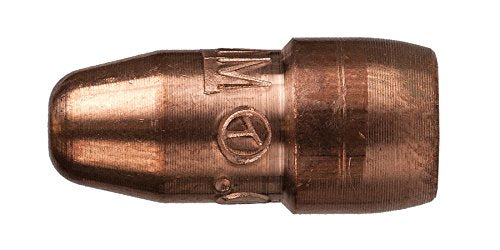
    STARTECHWELD 45V26 TIG Gas Lens 3/32” Gas Lens collet body Fit TIG WP17, WP18, WP26 (5 Pack) 45V26
    • TIG Gas Lens 45V26 Tig Torch Gas Lens 3/32”
    • Work With: TIG 17, 18, 26 Series Torches
    • 3/32″ Tungsten Electrodes Standard 10N Series Collet
    • 54N Series Gas Lens Ceramic Cups Setup
    • Pack of 5

    Last update on 2026-05-11 / Affiliate links / Images from Amazon Product Advertising API

    Comparable Options

    If you prefer a larger pack or different torch size, consider:

    • 10-Pack 45V26 Collet Bodies (B07KCXHF4G): Same specs, larger quantity for shops doing frequent replacements.
    • Assorted Gas Lens Kit (B081LKNHGS): Multiple sizes (45V26, 45V27, 45V43) if you run different torch models.

    Common Mistakes

    • Assuming porosity is an arc problem. It’s not—porosity is a gas/contamination problem. Check shielding first.
    • Running gas flow too high. Above 25 CFH, excess gas creates turbulence and actually increases porosity. Stick to 15–20 CFH.
    • Skipping base metal cleaning. Rust and mill scale are the #1 cause of porosity in production shops. Always clean before welding.
    • Replacing the gas lens without checking the regulator. If the regulator leaks or is set too low, a new lens won’t help.
    • Ignoring tungsten contamination. If the tungsten is cracked or oxidized, replace it. A bad tungsten will cause porosity no matter how clean the base metal is.

    FAQ (Snippet-Optimized)

    Q: What causes porosity in TIG welding? Porosity is caused by gas entrapment—usually from weak shielding (low gas flow, damaged gas lens, wind), contaminated base metal, or a dipped tungsten. Fix shielding and cleanliness first.

    Q: How do I know if my gas lens is bad? Look inside the torch nozzle. If you see spatter buildup, cracks, or heavy discoloration, replace it. A clean lens should look bright and smooth.

    Q: Can I fix porosity by adjusting amperage? No. Amperage doesn’t cause porosity—gas coverage and cleanliness do. Adjust gas flow, clean the base metal, and check the torch instead.

    Q: How often should I replace my gas lens? Every 50–100 hours of welding, or whenever you see visible spatter or discoloration. Shops doing high-volume work replace them weekly.

    Q: Will a new gas lens fix all my porosity? Only if the porosity is caused by weak shielding. If the base metal is dirty or gas flow is low, a new lens alone won’t fix it. Address all three: gas flow, cleanliness, and torch condition.

    Next Steps

    For more TIG troubleshooting and gear guidance, check out these related posts:

    For more welding fixes and gear options, see our full resource page: https://blog.weldsupportparts.com/links/

  • TIG Torch Slipping Tungsten? Your Collet Body Is Worn (Here’s the Fix)

    Intro

    You’re TIG welding and the tungsten keeps slipping out of the collet. You tighten the back cap, it holds for a few seconds, then slides again. The arc starts inconsistent, the puddle wanders, and your bead looks rough. The problem isn’t the tungsten—it’s a worn collet body that can’t grip anymore.

    Key Takeaways

    • Tungsten slipping is almost always caused by a worn or damaged collet body, not the tungsten itself
    • A collet body wears from repeated insertion and removal of tungsten
    • Replacement collet bodies are cheap ($5–$15) and take 30 seconds to swap
    • Gas coverage improves dramatically with a fresh collet body
    • Keep spares on hand for every torch size you use

    The Problem

    A worn collet body shows up as:

    • Tungsten slides out even when the back cap is tight
    • Inconsistent arc initiation
    • Poor gas coverage (visible oxidation on the weld)
    • Difficulty maintaining arc length
    • Collet body threads are stripped or loose

    The collet is a small tapered sleeve that grips the tungsten. Every time you insert or remove tungsten, the collet compresses and expands. Over hundreds of cycles, the taper wears out. The grip weakens. Eventually, no amount of back cap tightening will hold the tungsten in place.

    Why It Matters

    A slipping tungsten means an unstable arc. Your puddle control suffers. Weld quality drops. On precision work (aerospace, stainless, thin-wall), a wandering arc is a reject. On production runs, it’s rework and lost time. Plus, a loose tungsten can break mid-weld and contaminate your shielding gas.

    The Fix

    1. Disconnect the torch and let it cool. Safety first.
    1. Unscrew the back cap and remove the old collet body.
    1. Inspect the threads. If they’re stripped, you may need a new torch head (rare).
    1. Install the new collet body. Slide it in and hand-tighten the back cap.
    1. Insert tungsten and tighten firmly. The tungsten should not move when you pull on it.
    1. Test the arc. You should see immediate improvement in arc stability and gas coverage.

    Why This Product Solves It

    The TIG Gas Lens Collet Body #17, 18, 26 Torch 2PK (45V27-1/8″) is a direct replacement for standard TIG torches and includes a gas lens design that improves shielding gas flow. The tapered bore is precision-machined to grip tungsten consistently, and the gas lens allows larger tungsten stick-out for better visibility and control. Two-pack means you have a spare.

    Product Link:  Product not found.

    “>
    Product not found.
     

    What to Check Before You Buy

    • Torch series: This fits #17, #18, and #26 torches (most common sizes)
    • Tungsten size: This collet is sized for 1/8″ (3.2mm) tungsten
    • Gas lens compatibility: Confirm your torch head accepts a gas lens (most do)
    • Thread type: Standard collet body threads (verify if you have an older torch)

    Real-World Use

    A TIG fabricator working on stainless tubing noticed poor gas coverage and arc wander. Swapped the collet body. Tungsten stayed put, arc was stable, and the bead came out clean. One collet body lasted 18 months before needing replacement.

    Common Mistakes

    • Tightening the back cap excessively (damages the new collet body)
    • Using the wrong collet size for your tungsten diameter (loose fit)
    • Not replacing the collet body when it’s visibly worn (keeps struggling with slipping)
    • Forgetting to clean the collet body threads before installation (cross-threading)
    • Buying a single collet body instead of keeping spares (downtime when it fails)

    Safety Notes

    Always let the torch cool before handling. Collet bodies get hot during welding. Wear gloves when removing hot components. If tungsten slips during welding, stop immediately—a loose electrode can break and contaminate your argon supply.

    Always follow the manufacturer’s instructions and your shop’s safety procedures. If you’re unsure about fitment or ratings, verify before you buy or install.

    Related Reading

  • Why Your MIG Wire Stops Feeding (And How to Fix It in 5 Minutes)

    Intro

    Your MIG welder fires up fine, but halfway through the bead, the wire quits feeding. You hear the motor grinding. Nothing comes out. It’s frustrating, costly downtime, and it happens more often than it should. The fix is usually simple—but only if you know where to look.

    Key Takeaways

    • Wire feed failure is usually caused by liner wear, drive roll tension, or spool brake issues
    • A worn or dirty liner creates friction that stops the wire cold
    • Replacing the liner is the fastest fix and costs under $20
    • Check drive roll pressure and spool tension before assuming the worst
    • Keep a spare liner on hand to avoid shop downtime

    The Problem

    MIG wire feed failure shows up as:

    • Wire stops mid-weld with motor still running
    • Grinding or clicking sound from the feeder
    • Inconsistent feed speed (stuttering)
    • Wire bunching or bird nesting at the contact tip

    The culprit is almost always friction inside the liner. As you weld, the wire slides through a plastic or steel tube (the liner) thousands of times. Over time, the liner gets scored, kinked, or contaminated with spatter and oxidation. When friction builds up, the drive rolls can’t push the wire forward—it just slips and grinds.

    Why It Matters

    A dead wire feed kills productivity. You stop mid-bead, troubleshoot, waste time, and restart. On a production job, that’s money. On a tight deadline, it’s a missed commitment. Plus, repeated grinding wears out your drive rolls faster, turning a $15 liner replacement into a $60+ drive roll replacement.

    The Fix

    1. Disconnect the gun and remove the spool. Unplug the welder or kill the power.
    1. Inspect the liner. Pull the wire out and look inside the liner with a flashlight. If it’s scored, kinked, or clogged with spatter, it’s done.
    1. Measure the old liner. Note the length and diameter (usually .035″ or .045″ for MIG).
    1. Install the new liner. Feed it through the feeder, conduit, and gun. Make sure it seats flush at both ends—no gaps.
    1. Reload the wire and test. Run a test bead at low amp to confirm smooth feed.

    Why This Product Solves It

    The LM3A-15 Miller Acculock MDX Liner (15′ Liner, 035/.045) is a direct replacement for Miller Acculock systems and compatible MDX guns. It’s the exact spec you need for smooth, consistent wire feed without grinding or slipping. Miller liners are precision-engineered to tight tolerances, so you get the same feed quality as factory equipment.

    Product Link:  Product not found.

    “>
    Product not found.
     

    What to Check Before You Buy

    • Liner length: Measure your old liner or check your gun manual (15′, 25′, or custom length)
    • Wire size compatibility: This liner handles .035″ and .045″ wire
    • Gun model: Confirm it’s Miller Acculock or compatible (check your gun label)
    • Conduit fit: The liner should slide smoothly into your gun conduit without binding

    Real-World Use

    A fabricator running a Miller MDX-250 noticed wire feed stuttering on 0.035″ mild steel. Swapped the liner in under 5 minutes. Feed was smooth again. No more grinding, no more restarts. One liner lasted 6 months of regular use before needing replacement.

    Common Mistakes

    • Replacing the contact tip when the real problem is the liner
    • Forcing a liner that doesn’t match your gun model (causes kinking)
    • Not checking for spatter buildup inside the conduit before installing a new liner
    • Ignoring drive roll tension—a worn liner + loose rolls = guaranteed failure
    • Buying a generic liner instead of the OEM spec (fit and feed quality suffer)

    Safety Notes

    Always disconnect power before removing the spool or working on the feeder. If you’re unsure about liner length or compatibility, verify your gun model and check the manual. Improper liner installation can cause erratic arc and poor weld quality.

    Always follow the manufacturer’s instructions and your shop’s safety procedures. If you’re unsure about fitment or ratings, verify before you buy or install.

    Related Reading

  • Listen with Audible